
You want to choose the best microcontroller development boards for your project. Here are the top 10 microcontroller development boards for 2025. These boards are good for beginners, professionals, and people who like IoT:
Arduino Uno R4
Raspberry Pi Pico W 2
ESP32 Dev Board
STM32 Nucleo
Teensy 4.1
Adafruit Feather M4 Express
NodeMCU
Particle Photon
BBC micro:bit V2
Arduino Mega 2560
You can look at features, prices, and uses easily. Boards like Arduino and Raspberry Pi sell a lot and have big communities. Some boards, like ESP32 and NodeMCU, have Wi-Fi for IoT projects. See the table below to compare how they work for beginners and pros:
Board Name | Price Range | Features | Target Users |
|---|---|---|---|
Arduino Uno | Low | Easy programming, big community | Beginners |
Raspberry Pi Pico | Low | Versatile, multi-language | Beginners, Students |
ESP32 | Low | Wi-Fi, IoT ready | Professionals, IoT |
Feather M4 Express | Moderate | Compact, powerful | Beginners |
NodeMCU | Low | Wi-Fi, beginner-friendly | Beginners, IoT |
Particle Photon | Moderate | Cloud connectivity | Beginners, IoT |
Key Takeaways
Pick the best microcontroller board for your project. Think about how easy it is to use. Check if there is good help from others. Look at what special things the board can do.
The Arduino Uno R4 is good for beginners. It is easy to use and has many guides. Many people can help you if you need it.
For IoT projects, pick boards with Wi-Fi and Bluetooth. Boards like ESP32 and NodeMCU have these features. They help your project connect and work well.
Microcontroller Development Boards
Microcontroller development boards help you build electronics more easily. Each board has a microcontroller chip and extra parts you need. You can start making things right away. People use these boards at school, at home, or in labs. Many students use them to learn coding. Some people test ideas with them. Others build real products. You might see arduino boards in classrooms. Engineers use them to make smart devices.
Key Features
Different boards have important features you should know. Here is a table to show what is important:
Feature | Description |
|---|---|
Processor Core | The brain of the board, handles all instructions |
Memory | Stores your code and data |
ADC Modules | Lets you read signals from sensors |
Timers/Counters | Helps you keep track of time or events |
Communication Interfaces | Connects to other devices (like Wi-Fi, Bluetooth, or USB) |
Special Features | Extras like temperature sensors or motor control |
Power Management | Saves energy when your project is not busy |
Real-time Clock | Keeps track of time, even when off |
You can find these features on many boards, like arduino and others.
Use Cases
You can use microcontroller development boards for many fun projects. Here are some examples:
Use Case | Description |
|---|---|
Electric Vehicle Battery Management | Keeps batteries safe and balanced in electric cars |
Autonomous Vehicle Control | Helps cars make decisions on their own |
Smart Parking and Gate Control | Manages parking lots and gates with sensors and wireless tech |
Hotel Room Automation | Controls lights, heating, and security in hotel rooms |
These boards help you build and test ideas fast. They are small and not expensive. You can find lots of help online, so you do not get stuck.
Top 10 Microcontroller Development Boards
Arduino Uno R4
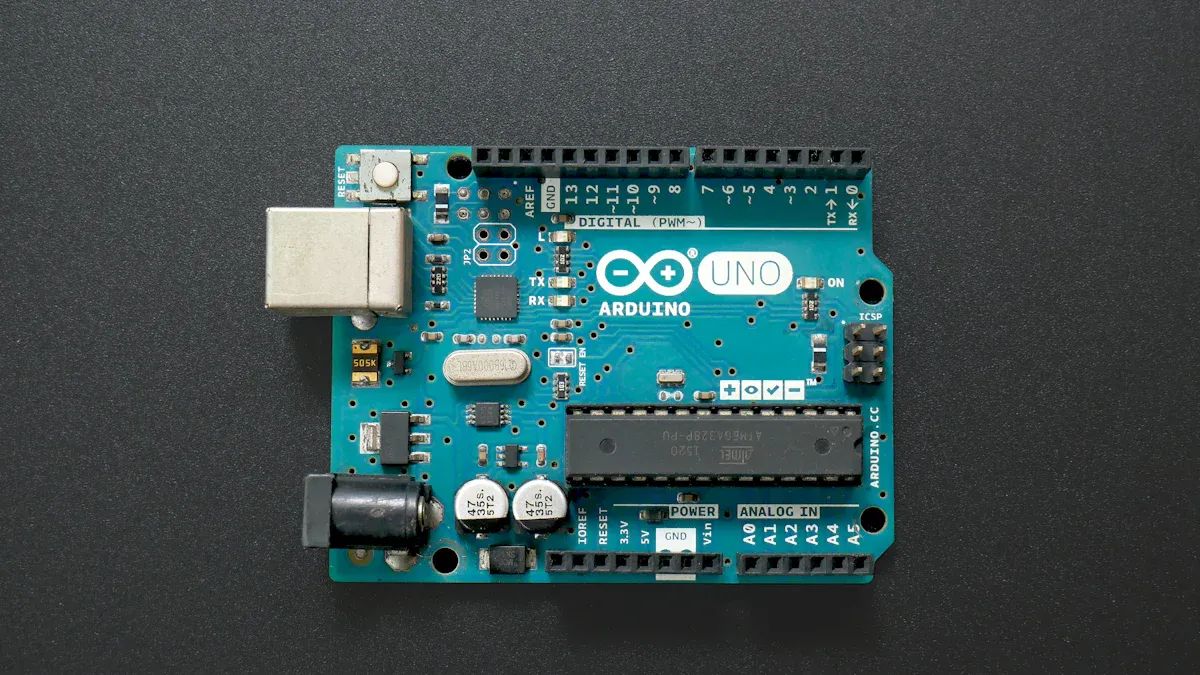
Many people know the arduino uno. The arduino uno r4 is even better. It has more memory and power for bigger projects. You get a 12-bit DAC for smooth signals. The CAN bus lets you connect many devices. It has Wi-Fi and Bluetooth built in. There is an LED matrix for cool displays. Diagnostics help you fix code problems fast.
Feature | Description |
|---|---|
12-bit DAC | Makes smooth audio or analog signals |
CAN bus | Connects to lots of devices, good for robots |
Wi-Fi® and Bluetooth® | Makes IoT and remote control easy |
Enhanced Diagnostics | Helps you find and fix code problems |
LED Matrix | Shows graphics or text on the board |
You can use the arduino uno r4 for IoT, sensing, automation, art, and science tools. It is easy for beginners but strong enough for pros. If you used older arduino uno boards, you will see new features. They may take time to learn, but you will like the extra power. Main competitors are raspberry pi pico, esp32, and teensy boards.
Tip: The arduino uno r4 is good for moving from simple to advanced projects.
Raspberry Pi Pico W 2
The raspberry pi pico w 2 is better than the first pico. It uses a dual-core Arm Cortex M33 or RISC-V Hazard3 chip. This means more speed and better security. You get 520 KB SRAM and 4MB flash storage. You can store more code and data. The board keeps your projects safe with secure boot and SHA-256 encryption. It also has a true random number generator.
Feature | Raspberry Pi Pico W 2 | Raspberry Pi Pico |
|---|---|---|
SoC | RP2350, Dual Core Arm Cortex M33 or Dual Core RISC-V Hazard3 | RP2040, Dual Core Arm Cortex M0+ |
SRAM | 520 KB | 264 KB |
Flash Storage | 4MB QSPI | 2MB QSPI |
Security | Arm TrustZone, Secure Boot | None |
You can use raspberry pi pico w 2 for encrypted messages, data safety, IoT, automation, and cloud gadgets. It is great if you want to keep data safe. You get better speed and wireless features. It is a bit harder to use than the first pico. If you want something easy, the original pico is fine.
ESP32 Dev Board
The esp32 development board is great for wireless projects. It has Wi-Fi and Bluetooth. The processor is dual-core and 32-bit. You get up to 4 MB flash memory and 520 KB SRAM. It supports deep sleep to save power. There are many interfaces like ADC, DAC, I²C, UART, and SPI.
Pros:
Many ways to connect
Good for quick testing and learning
Uses little power
Cons:
Not as flexible as raw chips
Sometimes needs extra parts
You can use the esp32 development board for IoT, smart homes, and wireless sensors. It is easy for testing ideas. If you want more control, try the raw esp32 chip. The dev board is ready to use.
STM32 Nucleo
The stm32 nucleo boards give you many choices. You can pick different ARM Cortex processors. They go from M0 to M7F and up to 550 MHz. You get up to 2 MB flash and 192 KB RAM. These boards support USB, CAN, SPI, I²C, UART, and more. Some have Ethernet, Wi-Fi, or Bluetooth. Security features like secure boot and AES encryption keep projects safe. Power management helps save energy.
Feature | Description |
|---|---|
Processors | ARM Cortex-M0, M0+, M3, M4F, M7F, or dual-core M7F/M4F, up to 550 MHz |
Memory | Up to 192 KB RAM, 2 MB flash |
Interfaces | USB, CAN, SPI, I²C, UART, SDIO, timers, ADCs, DACs, GPIOs |
Security | Secure boot, cryptographic processors, AES hardware encryption |
Power Management | Low-dropout regulator, deep sleep, wake-up options |
You can use stm32 nucleo boards for automation, electronics, medical tools, and IoT. They work with many tools. You get lots of power and features. They can be hard for beginners. If you want easy boards, try arduino or esp32. Main competitors are esp32, arduino, and PIC microcontrollers.
Teensy 4.1
The teensy 4.1 is very fast. It uses an ARM Cortex-M7 processor at 600 MHz. It boots up right away. You get more I/O pins than teensy 4.0. There is an SD card slot for extra storage. It works with the arduino IDE.
Key Features | Ideal Applications |
|---|---|
ARM Cortex-M7 processor at 600 MHz | Interactive toys |
Instant booting | Audio processing |
More I/O pins than Teensy 4.0 | Custom audio projects |
SD card slot for storage | Educational tools |
Compatible with Arduino IDE | Prototyping and development |
Pros:
Very fast
Boots up quickly
Good for audio projects
Works with arduino libraries
Cons:
No operating system
Needs extra parts for some things
You can use teensy 4.1 for toys, audio, education, and fast testing. If you want a board with an OS, try raspberry pi. Other choices are arduino mega and esp32.
Adafruit Feather M4 Express
The adafruit feather m4 express is small but strong. It uses an ATSAMD51 Cortex M4 chip at 120 MHz. You get 512 KB flash and 192 KB RAM. There is 2 MB SPI flash for files and CircuitPython code. The board has 21 GPIO pins. It has a charger for LiPo batteries. Crypto engines help with security. It is light and easy to carry.
Feature | Description |
|---|---|
Size | 2.0″ x 0.9″ x 0.28″ (51mm x 23mm x 8mm) |
Weight | 5 grams |
Processor | ATSAMD51 32-bit Cortex M4, 120 MHz |
Memory | 512 KB flash, 192 KB RAM |
Storage | 2 MB SPI FLASH for files and code |
USB Support | Native USB, bootloader, serial debugging |
GPIO Pins | 21, with analog and digital functions |
Built-in Charger | 100mA LiPo charger, status LED |
Crypto Engines | AES, RNG, Pubkey controller |
You can use adafruit feather m4 express for CAN, fast Python or arduino coding, GPIO control, and data logging. It is good for light and portable projects. You can use CircuitPython or arduino IDE. The only downside is no EEPROM, so you cannot store data forever. If you want something like it, try raspberry pi pico, esp32 dev kit, or teensy 4.1.
NodeMCU
The nodemcu board is great for Wi-Fi projects. It uses the esp8266 or esp32 chip. You get wireless power in a small board. You can program it with arduino IDE or Lua. It is cheap and easy to use. This makes it good for beginners and IoT fans.
Key Features:
Built-in Wi-Fi
USB for easy programming
Supports arduino and Lua
Many GPIO pins
Ideal Applications:
Smart home devices
Wireless sensors
IoT gadgets
Quick prototypes
Pros:
Low cost
Easy to set up
Big online community
Cons:
Not much memory for big projects
Fewer features than some boards
If you want to start with IoT, nodemcu is a good choice. You can also look at esp32 development board or particle photon for more features.
Particle Photon
The particle photon is strong in Wi-Fi and security. It uses a good Wi-Fi chip. It works with Bluetooth and has APIs for low power. You get secure boot and cryptographic keys. Updates are easy. It works in tough places and supports global cellular networks.
Feature | Description |
|---|---|
Production-ready IoT devices | Security features like OTP, secure boot, ARM TrustZone |
Connectivity | Dual-band WiFi, Bluetooth |
Power Efficiency | Low-power and sleep modes |
Security | RTOS, cryptographic keys, one-click updates |
Environment Resilience | Works from -20 to 85C |
Ecosystem Compatibility | Works with many sensors and accessories |
Global Deployment | Supports LTE CAT 1 and CAT M1 cellular |
Open APIs | Built on FreeRTOS, open-source |
Easy Scaling | Prototyping kits and production modules match |
You can use particle photon for IoT in any field, secure messages, low-power devices, and gadgets for tough places. It is good for moving from test to real product. If you want something cheaper, try esp8266, but you may find bugs. Other choices are Broadcom, Qualcomm, and Espressif chips.
BBC micro:bit V2
The bbc micro:bit v2 is fun for learning and making. It has a 25 LED matrix, accelerometer, compass, Bluetooth, two buttons, a speaker, and a microphone. You can connect it to a computer with USB or use a battery pack. The ARM Cortex-M4 CPU gives enough power for most projects.
Feature | Description |
|---|---|
25 LED matrix | Shows messages or numbers |
Accelerometer | Detects movement or tilt |
Compass | Senses direction |
Bluetooth | Connects to other devices |
User input buttons | Two for interaction |
Micro USB | For programming |
Battery pack port | For external power |
ARM Cortex-M4 CPU | Processing power |
Built-in speaker | Plays sounds |
Built-in microphone | Records sounds |
20 pin edge connector | For accessories |
You can use bbc micro:bit v2 for teaching coding, IoT, art, robots, and games. It is easy for beginners and has many features. The best parts are its friendly design, many functions, and strong community. The downsides are less power for big projects and needing extra parts for advanced ideas. You can also try arduino boards, raspberry pi pico, adafruit circuit playground, or sparkfun redboard.
Arduino Mega 2560
The arduino mega 2560 is best for big projects. You get 54 digital I/O pins and 16 analog inputs. There is lots of memory. It runs at 16 MHz and uses 5V power. You can use it for 3D printers, robots, and projects with many connections.
Feature | Description |
|---|---|
Operating voltage | 5V |
Input voltage | 7-12V (recommended), 6-20V (limits) |
Digital I/O pins | 54 (14 with PWM) |
Analog input pins | 16 |
Flash Memory | 256 KB (8KB for bootloader) |
SRAM | 8 KB |
EEPROM | 4 KB |
Clock Speed | 16 MHz |
You can use arduino mega 2560 for 3D printers, robots, and complex projects. It is easy to use and needs little power. The board is simple because of its 8-bit chip. It does not have as much power as newer boards. If you need more I/O, check out Seeeduino Mega.
Note: The arduino mega 2560 is great when you need lots of pins and simple coding.
You just learned about the top 10 microcontroller development boards for 2025. Each board has special strengths. Pick the one that fits your project. You can build robots, smart gadgets, or learn to code with these boards.
Best IoT Development Boards
If you want to make smart gadgets or connect things to the internet, you need good iot development boards. Some boards are better for IoT projects than others. Let’s see what makes a board great for your next connected idea.
IoT Features
You should know what features to check in an iot development board. The right features help your project work better and last longer. Here is a table to help you find good iot development boards:
Feature | Description |
|---|---|
Wireless Connectivity | Lets your device talk to the internet or other gadgets using Wi-Fi or Bluetooth. |
Low Power Consumption | Saves battery life, so your device can run longer without charging. |
Cloud Integration | Helps you control or check your device from anywhere using the internet. |
Enhanced Connectivity | Supports new wireless tech like Zigbee or Thread for smart homes. |
Security | Protects your data with secure boot and encryption. |
Tip: If you want your project to last longer on batteries or stay safe online, always check for these features.
Recommended Boards
There are many boards, but some iot development boards are the best for 2025. Here are the top iot development boards from the main list:
ESP32 Dev Board
NodeMCU
Particle Photon
STM32 Nucleo
Arduino Uno R4
These boards have strong wireless, use less power, and are easy to set up with the cloud. You can use them for smart homes, sensors, or robots.
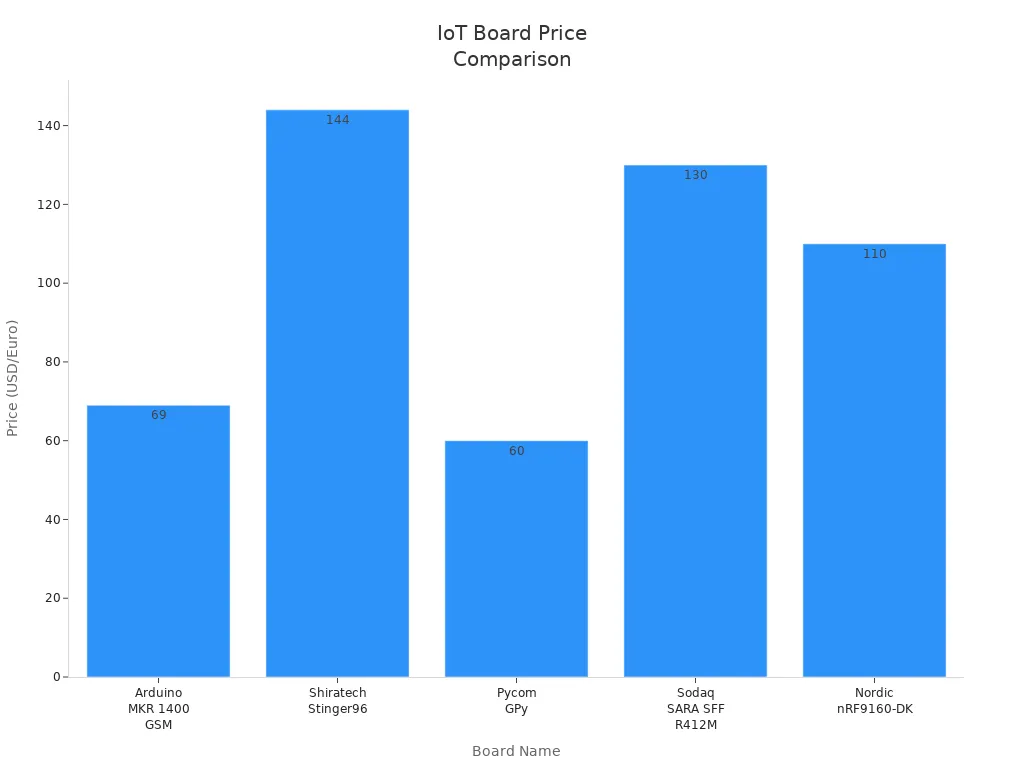
Here is a table to show how some popular IoT boards compare:
Board Name | Price | Compatibility | Coverage |
|---|---|---|---|
Arduino MKR 1400 GSM | $69 | 2G, 3G | Global |
Shiratech Stinger96 | $144 | LTE-M, NB-IoT, 3G, 2G | Global |
Pycom GPy | $60 | LTE-M, NB-IoT | Global |
Sodaq SARA SFF R412M | €120 | LTE-M, NB-IoT | North America, Europe, Asia, Africa |
Nordic nRF9160-DK | €100 | LTE-M, NB-IoT, GPS | Global |
If you want something easy, try ESP32 or NodeMCU. For harder projects, STM32 Nucleo or Particle Photon are good. These microcontroller development boards help you make smart and connected things easily.
Arduino-Compatible Boards

Compatibility Benefits
You might ask what makes a board arduino compatible. These boards work with the Arduino IDE. You can write and upload code without problems. They use microcontrollers like the official arduino boards. This gives you a similar experience. There is lots of help and libraries online. Many arduino-compatible boards are easy to use. You can start building projects right away.
Here’s a simple table to show what is important:
Criteria | Importance Level |
|---|---|
Compatibility with Arduino IDE | High |
Use of similar microcontrollers | Medium |
Ease of use | High |
You get easy setup, more choices, and lower prices. These boards come in many sizes and shapes. You can connect sensors and other parts easily.
Benefit | Description |
|---|---|
Ease of use | Setup is simple and the software feels familiar. Beginners like this a lot. |
Flexibility | You have many options and can add lots of sensors. |
Cost | You spend less money because these boards are cheaper than official ones. |
Tip: If you want to learn quickly or make something new, arduino compatible boards help a lot.
Top Picks
There are many arduino-compatible boards to pick from. Some are best for beginners and advanced users:
Arduino Uno R4: This board has a classic look and new features. It is great for learning and testing ideas.
Arduino Mega 2560: This board has lots of pins for big projects. You have more space for your ideas.
Adafruit Feather M4 Express: This board is small but powerful. It works with the Arduino IDE and CircuitPython.
These arduino-compatible boards help you start easy projects or try harder ones. You can use them for robots, sensors, or smart gadgets. Beginners like how simple they are. Advanced users like the extra power and features.
Note: If you want to try AI or remote monitoring, check out boards like Portenta H7 or Arduino Nano 33 BLE Sense Rev2. They have more sensors and can do machine learning.
Comparison Table
Specs Overview
You want to see how these boards stack up side by side? Here’s a quick look at the main specs for each one. This table helps you pick the right high quality development board for your next project.
Board | CPU/Speed | Flash Memory | RAM | Wireless | Special Features |
|---|---|---|---|---|---|
Arduino Uno R4 | 32-bit, 48 MHz | 256 KB | 32 KB | Wi-Fi, BT | CAN bus, LED matrix |
Dual-core, 133 MHz | 4 MB | 520 KB | Wi-Fi | Secure boot, encryption | |
ESP32 Dev Board | Dual-core, 240 MHz | 4 MB | 520 KB | Wi-Fi, BT | Deep sleep, many interfaces |
STM32 Nucleo | Up to 550 MHz | 2 MB | 192 KB | Wi-Fi, BT* | Secure boot, power management |
Teensy 4.1 | 600 MHz | 8 MB | 1 MB | No | SD slot, fast boot |
Adafruit Feather M4 | 120 MHz | 512 KB | 192 KB | No | LiPo charger, CircuitPython |
NodeMCU | 80 MHz | 4 MB | 80 KB | Wi-Fi | USB, easy programming |
Particle Photon | 120 MHz | 1 MB | 128 KB | Wi-Fi, BT | Cloud, secure boot |
BBC micro:bit V2 | 64 MHz | 512 KB | 128 KB | Bluetooth | LED matrix, sensors |
Arduino Mega 2560 | 16 MHz | 256 KB | 8 KB | No | 54 I/O pins, 16 analog inputs |
*Some STM32 Nucleo models include wireless.
Use Case Summary
Not sure which board fits your needs? Here’s a quick guide to help you match the board to your project:
Arduino Uno R4: Great for learning, sensors, and simple automation.
Raspberry Pi Pico W 2: Perfect for secure IoT, fast prototyping, and cloud projects.
ESP32 Dev Board: Best for wireless sensors, smart home, and connected devices.
STM32 Nucleo: Good for advanced automation, robotics, and medical tools.
Teensy 4.1: Use for audio, fast data, and custom electronics.
Adafruit Feather M4 Express: Handy for portable gadgets and Python coding.
NodeMCU: Start with Wi-Fi projects and basic IoT.
Particle Photon: Choose for cloud-connected devices and secure IoT.
BBC micro:bit V2: Fun for education, coding games, and simple robots.
Arduino Mega 2560: Pick for big projects with lots of connections.
Tip: Microcontrollers make it easy to build, test, and learn. You can find a board for almost any idea!
Choosing a Board
Picking the right microcontroller board can feel tricky, but you can make it simple by focusing on your project needs. Here’s what to look for in an iot development board or any other type.
For Beginners
If you’re just starting, you want a board that’s easy to use and has lots of help online. The best buy arduino boards, like Arduino Uno R4, are perfect for learning. You get a friendly IDE, tons of tutorials, and a big community. Look for boards with plenty of GPIO pins, simple development tools, and good availability. Try hands-on kits to see what works for your diy ideas.
Consideration | Why It Matters |
|---|---|
Availability | Easy to find and buy |
Development Tools | Simple software and guides |
GPIO Pins | Connect sensors and devices |
Future-proofing | Grows with your skills |
For IoT
You want iot development boards with strong wireless features. Boards like esp32 and nodemcu development board make iot projects easy. They support Wi-Fi and Bluetooth, use little power, and connect to the cloud. Always check for secure boot and enough memory. The types of iot development boards you choose should match your project’s needs.
Tip: For iot, pick boards that support cloud integration and have a big community.
For Robotics
Robotics needs boards with lots of I/O and fast processors. Raspberry Pi, esp32, and best buy arduino Mega 2560 work well. You can control motors, sensors, and even cameras. Look for boards with PWM, analog pins, and strong support for iot breakout boards.
For AI
AI projects need more power. Boards like NVIDIA Jetson Nano or Google Coral Dev Board have GPUs for machine learning. If you want to try simple AI, esp32 can run basic models. Make sure your board has enough RAM and storage.
For Battery-Powered
For battery projects, choose boards with low power use. esp32 and best buy arduino boards with sleep modes help batteries last longer. Pick 3.3V boards and check the processor speed. Avoid boards that use lots of power when idle.
Factor | Description |
|---|---|
Voltage Levels | Lower voltage means longer battery |
Less power, longer run time | |
Sleep Modes | Saves energy when not active |
You can always find the right board for your iot, robotics, or diy project. Just match your needs to the board’s features and check the community for help.
Choosing the right microcontroller board helps you build smarter projects and learn faster. Think about your skills, what you want to make, and where you want to go next.
Tip: Start with a board that matches your comfort level. The right choice makes building and learning much more fun!
FAQ
What is the best microcontroller board for beginners?
You should try the Arduino Uno R4. It is easy to use, has lots of guides, and you can find help online.
Can I use these boards for school projects?
Yes! You can use these boards for science fairs, coding classes, or fun DIY projects. Teachers and students love them.
Do I need to know coding before using a microcontroller board?
No, you do not. Many boards have simple tutorials. You can start learning coding as you build your first project.

‘Wonderful PCB’ is really wonderful. Found it very useful to understand about boards , being simple, concise and informative, Really enjoyed.