You need to follow strict rules when you design high speed pcb projects. High-speed pcb design has special problems that can affect how your circuit board works. Many engineers have trouble with signal integrity, noise, and making sure the board works well.
Industry surveys say you might face:
Signal integrity problems
The need for advanced production and assembly
A demand for special skills
Careful pcb layout and using the right rules help you fix these problems and make stable designs.
Key Takeaways
Control impedance to keep signals clear. Use the right trace width and materials so signals do not bounce back.
Make traces short and straight. This lowers mistakes and keeps signals strong in high-speed designs.
Use solid reference planes to help signals return. This cuts down noise and makes the board work better.
Plan where you put parts carefully. Place high-speed parts first to lower noise and stop signal loss.
Do not make mistakes like forgetting return paths or not checking what the maker can do. These mistakes can cause big problems in your design.
High Speed PCB Design Fundamentals
Controlled Impedance Guidelines
You have to control impedance in high speed pcb projects. Impedance matching keeps signals clear and stops reflections. If you do not match impedance, signals can bounce back. This can make errors happen. Your circuit might not work or act weird. You can control impedance by changing trace width, stack-up, and materials. Most high speed pcb designs use 50-ohm impedance for signal lines.
Tip: Always check which signals need controlled impedance. Signals like RF, USB, and HDMI often need it.
To get controlled impedance, do these things:
Find out which signals need controlled impedance.
Plan your PCB stack-up with the right materials and order.
Set trace width and spacing for your target impedance.
Keep traces short and do not make sharp bends.
Use a solid reference plane under high-speed traces.
Test your board with tools like TDR to check impedance.
Importance of Reference Planes
Solid reference planes are very important for high speed pcb layouts. They give signals a steady path to return. This helps keep signal integrity good. A good ground plane cuts down noise and blocks unwanted signals. Do not split ground planes under high-speed traces.
Solid reference planes:
Give a steady electrical reference.
Make current loops smaller.
Lower noise.
Make high-frequency signals better.
Study IC Datasheets
You should read IC datasheets before you start your layout. Datasheets tell you what each chip needs for high speed pcb design. They show the right voltage, signal models, and power needs. This helps you follow the right rules for each part.
Feature | Description |
|---|---|
S-parameters/Touchstone® | Study how signals act at high frequencies. |
IBIS Power-aware Model | Check what power your ICs need. |
VRM Model Support | Make sure power stays steady. |
When you follow these basics, you build a strong base for your high speed pcb. You avoid common mistakes and make your design work better.
High-Speed PCB Routing Essentials
Short, Straight Traces
You should keep traces short and straight in high-speed pcb routing. Short traces help signals travel faster and reduce the chance of errors. Straight paths lower the risk of reflections and keep your signals clean. Follow these steps to improve your layout:
Route high-speed signals over a solid ground plane.
Avoid hot spots by placing vias in a grid.
Keep trace bends at 135° instead of 90° to avoid sharp angles.
Increase spacing between traces to minimize crosstalk.
Use daisy chain routing to avoid long stub traces.
Do not place components or vias between differential pairs.
Match trace lengths to avoid skew in differential pairs.
Never route signals over split planes.
Separate analog and digital ground planes.
Keep trace width matched to the size of each component.
Tip: Keeping traces short and straight helps you maintain signal integrity in your high speed pcb.
135° Trace Bends vs. 90°
You should use 135° bends instead of 90° bends in high-speed pcb routing. Sharp 90° bends can cause reflections and signal loss. Gentle 135° bends keep the signal path smooth and lower the risk of interference. When you route high-speed signals, always choose wider angles for better performance.
Avoiding Crosstalk
You need to minimize crosstalk to keep your signals clear. Crosstalk happens when signals interfere with each other. You can follow these tips to minimize crosstalk:
Route digital signals over a continuous ground plane.
Keep at least three times the trace width between high-speed signal traces.
Use ground planes between layers to shield signals.
Avoid long parallel routing and insert ground traces between them.
Place decoupling capacitors near power pins to reduce noise.
Make sure return paths are clear to minimize noise loops.
Note: Proper spacing and ground planes help you minimize crosstalk and keep your signals reliable.
Routing High-Speed Signals Near Power Sections
You should avoid routing high-speed signals near power sections. Placing signals close to power traces can cause crosstalk and reflections. Gaps in power planes can make signal integrity worse. If high-speed signals interact with power sections, you may see bandwidth limits and poor performance. Always keep high-speed signals away from noisy power areas to protect your design.
Differential Pair and Length Matching

Symmetry in Differential Pairs
It is important to keep symmetry when making differential pair traces. When the layout is symmetrical, both signals move at the same speed. This helps stop skew and keeps signals clear. A symmetrical stackup helps you put ground and power planes in good places. These planes protect high-speed differential signals from outside noise. You also get better power sharing because paired planes make low-inductance paths. This makes your high-speed circuits work better and stay stable.
Tip: Keeping symmetry in differential pair traces helps stop crosstalk and keeps signals even.
Length-Match High-Speed Signals
You have to match the length of high-speed signals in differential pairs. If one trace is longer, signals will not reach together. This can cause mistakes and make things work worse. You should follow these rules for routing differential pairs:
Rule | Description |
|---|---|
Impedance tolerance | Set the right impedance for differential pairs based on the standard. |
Maximum uncoupled length | Keep both sides of a differential pair close to stop impedance changes. |
Length matching | Make sure signals reach the receiver at the same time, especially for fast signals. |
Maximum net length | Do not go over the maximum length for differential signals set by the standard. |
How fast signals move and skew depends on signal frequency.
The receiver can only handle a certain amount of skew.
Try to keep skew under 5% of the bit time, but never more than 20% of the clock period.
For signals faster than 1 GHz, mismatches should be less than 1 inch.
Electrical length is more important than physical length because of dielectric changes.
Consistent Trace Spacing
You should always keep the same spacing between differential pair traces. This keeps the differential impedance steady. If you change the spacing, you can get impedance mismatches. These mismatches cause reflections and make differential signals weaker. For high-speed signals like USB 2.0, you must keep a certain differential impedance, like 90 ohms. Both trace width and spacing change this value. Routing differential pairs with the same spacing helps you stop signal loss and keeps your design working well. You also need controlled return paths to keep differential signals clean.
Keep spacing the same along the whole differential pair.
Follow the rules for maximum length mismatch to stop EMI problems.
Use good routing of differential pairs to keep signal quality.
Via Management and Layer Stackup
Grid Pattern for Vias
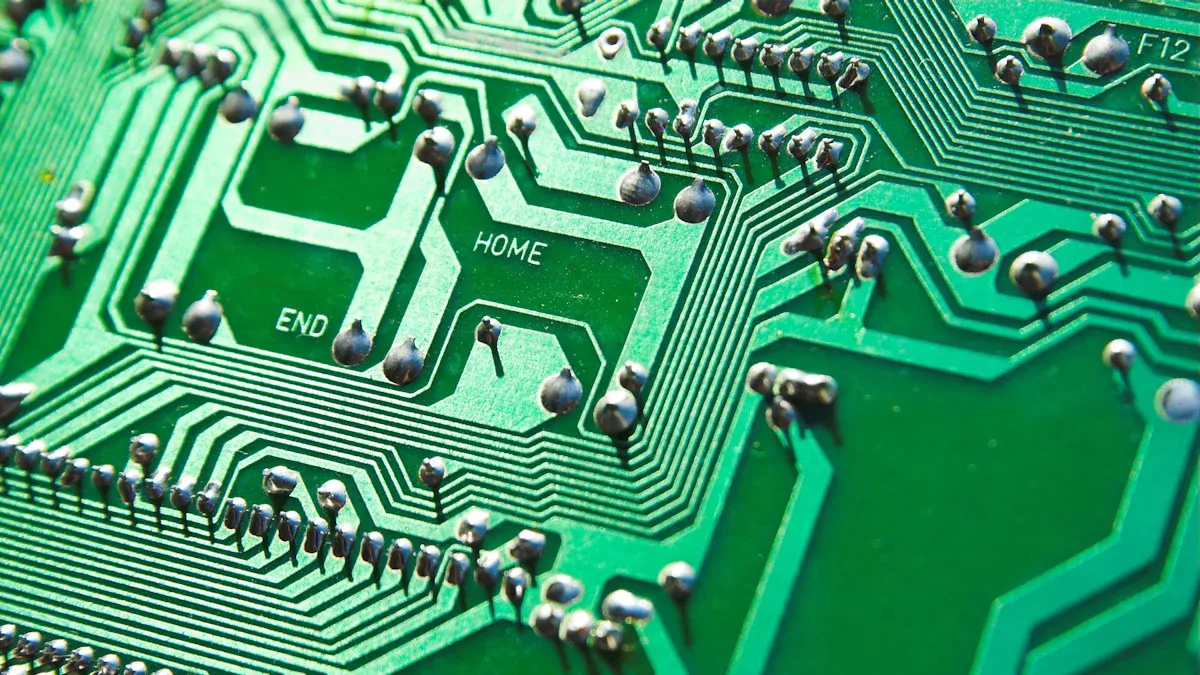
You can put vias in a grid on your PCB. This makes it easier to connect things. A grid helps you keep the board neat. It also stops parts from getting too crowded. When you use a grid, you can plan where each via goes. This helps you keep signal paths short and direct. You should check that your grid does not block important traces. Try not to make tight spots. A good grid helps signals move well. It also makes your board easier to build.
Tip: Put vias in a grid to keep your PCB tidy and make fixing problems easier later.
Minimize Via Count
Try to use as few vias as you can in high-speed PCB designs. Each via adds inductance and can change impedance. These changes can hurt your signal quality. If you use fewer vias, you lower the risk of reflections and signal problems. Fewer vias help signals move smoothly across the board. This keeps your signals strong and your design works better.
Note: Using fewer vias helps signals travel better and lowers the chance of mistakes in high-speed circuits.
Layer Stackup Planning
You need to plan your layer stackup carefully for high-speed PCBs. The stackup changes how signals move and how much noise your board gets. Think about the size of your board, how many wires you need, and how many connections you have. You also need to think about power and how you arrange the layers.
Factor | Description |
|---|---|
Integrity | Makes sure signals get where they should without problems. |
Noise | Shows how much interference can mess up data. |
Board size and net count | Tells you how big the board is and how many wires you need. |
Routing density | Changes how many signal layers you need if space is tight. |
Number of interfaces | Affects how you route signals to keep impedance the same. |
Low speed and RF signals | Means you may need more layers for these signals. |
Power integrity | Uses power and ground planes to keep power steady. |
Layer arrangement | Helps keep signals strong and stops problems when making the board. |
Design rules | Stops problems when building and helps the board work well at high speed. |
Here are some tips for better stackup planning:
Keep layer thickness and material the same on both sides to stop bending.
Use at least two layers each for power and ground for low impedance.
Keep the space between layers the same to keep impedance steady.
Do not route high-speed signals over split planes to stop EMI.
Try to use fewer vias for high-speed signals.
Remember: Good stackup planning helps you stop signal problems and keeps your PCB working right.
Power Integrity and Decoupling
Solid Power and Ground Planes
You should always use a solid ground plane in high speed PCB designs. This layer helps differential signals find a good path back. It keeps signals strong and clear. A solid ground plane also protects traces from outside noise. It makes power integrity better by stopping voltage drops and noise spikes.
A solid ground plane gives you many good things:
Signal integrity gets better. The ground plane gives signals a steady way back, so your data stays clean.
Electromagnetic interference goes down. The ground plane acts like a shield and blocks bad signals.
Thermal management improves. The ground plane spreads heat out, so your board lasts longer.
Impedance is lower. The power delivery network works better with a solid ground plane, so your board handles fast current changes.
You should keep a solid ground plane under high-speed and differential traces. This gives signals a good return path and keeps your design working well.
Decoupling Capacitor Placement
You need to put decoupling capacitors in the right place to keep power integrity high. These small parts help stop voltage dips and noise. Follow these steps for the best results:
Put vias from the capacitor as close as you can to the IC power and ground pins. This gives signals a good return path.
Connect the capacitor to the IC pin that is farther from the power or ground plane.
Use pairs of vias with opposite polarity to make impedance lower.
Mount capacitors on the same side of the board as the IC and keep them very close to the pins.
Do not put traces between the capacitor pads and vias.
Use big capacitors for low-frequency noise and small ones for high-frequency noise.
Always keep small capacitors close to the IC.
Never use vias between the capacitor and the IC if they are on different sides of the board.
Do not route traces on the decoupling capacitors.
Tip: Good decoupling keeps your signals clean and your board stable, even when power changes fast.
Component Placement for High-Speed PCBs
Place High-Speed Components First
You should think about where to put high-speed components before drawing traces. Good placement helps you control where signals go. This keeps your board working well. If you put these parts first, you can stop noise and signal loss. You need to follow a clear plan for your layout. Here are some steps you can use:
Make a floor plan for your PCB. Put similar parts together early in your design.
Organize groups like power, RF, digital, and analog. This stops signals from crossing each other.
Keep sensitive high-speed devices away from the board’s edge. This helps lower electromagnetic interference (EMI).
Make sure hot parts get enough air. Put them where air can move around them.
Place termination resistors close to ports that need impedance matching.
Group parts by circuit block, around big processors, and near routing paths.
Tip: Planning early saves time and helps you avoid mistakes later.
If you follow these steps, routing gets easier and signals stay strong. Your board also stays cooler and works longer.
Isolate Sensitive and Noisy Sections
You must keep sensitive and noisy sections apart on your PCB. If you mix them, you can get crosstalk and signal problems. You can use different ways to keep these areas apart:
Use EMI filters, like pi-filters, at circuit inputs and outputs. These filters block high-frequency noise.
Cover sensitive areas with ground planes or metal shields. Shields stop unwanted signals from reaching important parts.
Lower switching speeds and slew rates. This cuts down on EMI your board makes.
Keep analog and digital sections apart. Space between them helps stop noise from moving over.
Put decoupling capacitors close to IC power pins. These parts filter out high-frequency noise.
Route signals away from noise sources. Use perpendicular routing to keep traces away from high-current paths.
Note: Keeping noisy and sensitive sections apart helps your signals stay clean and your board work well.
If you use these ways, you protect high-speed signals and make your PCB design stronger.
Common Mistakes in High-Speed PCB Design
Overlooking Impedance Control
Some people think only experts need to match impedance. But it is a very important rule for high speed pcb projects. If you do not control impedance, your circuit can act in strange ways. You might see bit errors and EMI problems. When impedance does not match, signals can bounce back. This makes you lose data and your board works badly. Think about shining a flashlight at a mirror with a small hole. Most of the light bounces back, and only a little goes through. This is like what happens when trace impedance does not match the transmitter and receiver. Some of the signal bounces back and makes a standing wave. This wave can mess up your data.
Problems from poor impedance control:
Circuits act in ways you do not expect
Data can have bit errors
EMI problems and project delays
You should always check the impedance of traces, especially for differential signals. Using the right rules helps keep your signals strong.
Neglecting Return Paths
You need to watch return paths in high-speed pcb design. At high frequencies, return current takes the path with the least impedance. If it cannot find a good path, it spreads out. This can cause radiation and crosstalk. These problems can hurt your signals and make your board fail tests. A solid ground plane gives differential signals a steady return path. If there are gaps or splits in the ground, current must go around them. This makes electromagnetic emissions worse.
Evidence | Description |
|---|---|
Good grounding is important | Current goes from the power source, through parts, and back through the ground plane. |
Return current path | At high frequencies, current takes the path with the least impedance, so you need good grounding. |
Solid PCB ground | Gaps in the ground layer make more emissions and lower performance. |
You should always plan for strong return paths, especially for differential signals.
Ignoring Manufacturer Capabilities
You might make a great high speed pcb design. But if you do not think about what your manufacturer can do, your board may not work right. Design for manufacturing (DFM) means you follow the rules your fabricator gives you. You should talk to your manufacturer and assembler early in your project. Check what they can do and ask questions if you need to. This helps you avoid mistakes and keeps your high speed pcb design working well.
Tips for working with manufacturers:
Pick your fabricator and assembler early
Check what they can do
Follow DFM rules for differential signals and stackup
If you remember these common mistakes, you can avoid problems and make better high speed pcb designs.
You make your high speed pcb projects better by following these rules. If you control impedance and pick good materials, your signals stay strong. A checklist helps you not forget steps and makes building easier. You can read guides or take classes to learn more about high speed pcb design. If you focus on details and learn new things, you will build boards that work well.
FAQ
What is controlled impedance in PCB design?
Controlled impedance means you set the trace width and spacing so signals travel without distortion. You use special materials and stack-ups. This keeps your high-speed signals clear and reliable.
Why should you avoid 90° trace bends?
You should avoid 90° bends because sharp corners can cause signal reflections and loss. Use 135° bends for smoother paths.
Tip: Gentle bends help your signals stay strong.
How do you reduce crosstalk between traces?
You keep traces far apart and use ground planes.
Route signals with at least three times the trace width between them.
Place ground traces between noisy signals.
Where should you place decoupling capacitors?
You place decoupling capacitors close to IC power pins. This helps block noise and keeps voltage steady.
Note: Always keep small capacitors near the chip for best results.
What happens if you ignore manufacturer capabilities?
You may design a board that cannot be built. Always check with your manufacturer about trace width, spacing, and stack-up options.
Check | Why |
|---|---|
Trace width | Ensures signals work |
Stack-up | Keeps impedance correct |