Raspberry Pi is a strong computer that can fit in your pocket. You can hook up raspberry pi to a monitor or TV. It lets you try many fun and creative projects. Raspberry pi is cheap, so it is easy to buy. The Raspberry Pi 4 costs about 150 dollars. It still has good speed and memory for its price. You can look at this table to see how raspberry pi matches up with others:
Feature/Aspect | Raspberry Pi 4 | Other Single-Board Computers |
|---|---|---|
Price | Around 150 dollars | Varies, often higher |
Community Support | High | Varies, often lower |
Processing Power | High | Varies |
Memory Capacity | High | Varies |
Operating System Support | Multiple (Ubuntu, Debian) | Varies |
Peripheral Interfaces | Rich | Varies |
People everywhere use raspberry pi for automation, robotics, and learning. More than 71 million raspberry pi units have been sold in the world. Most are used in industry, but many fans and students use raspberry pi too. They use it for fun and to learn new things. You can see where raspberry pi is shipped in this chart:

Raspberry pi helps you get closer to technology. It makes it simple to start building and trying new ideas.
Raspberry Pi Overview

What Is Raspberry Pi
Raspberry pi is a small but strong computer. It is about as big as a credit card. You can use it like a normal computer. Just connect it to a TV or monitor. Add a keyboard and mouse to start using it. All the main parts are on one board. That is why it is called a single-board computer. People use raspberry pi in schools, homes, and factories.
Here is what you get with a raspberry pi:
Feature | Specification |
|---|---|
Size | Credit card-sized |
Processor | ARM |
RAM | 512 MB |
Ethernet Port | Yes |
USB Ports | Two |
Video Output | HDMI and RCA composite |
Audio Output | 3.5 mm jack |
GPIO Pins | 26-pin header with 0.1″ spacing |
Operating System Requirement | SD card with OS (not included) |
Key Features
Raspberry pi has many cool things in a tiny space. It uses an ARM CPU, so it works fast. The HDMI port lets you see clear video on a screen. You can plug in a keyboard or mouse with the USB ports. The SD card slot holds your files and system. GPIO pins let you control lights or motors for projects.
Runs Linux and other operating systems
Provides GPIO pins for electronic control
Has a GPU for better graphics
Uses a 5V micro USB power cable
Includes LEDs to show power and activity
Tip: Most people use Raspberry Pi OS. Ubuntu is also popular. Raspberry Pi OS is about 67% of downloads. Ubuntu is about 9%.
Why People Use It
People like raspberry pi because it is cheap and simple. It is easy to learn and use. There is a big group online to help you. Over 400,000 people share ideas and answer questions. The Raspberry Pi Foundation gives guides for beginners. You get updates and security fixes to keep it safe.
You can join a big group for help and ideas.
There are lots of videos and blogs to learn from.
Raspberry pi works with many special add-ons.
The software is easy for beginners and gets updates.
Old raspberry pi models still get support for years.
You can use raspberry pi for home projects, learning to code, or even in factories. It is a simple way to start working with technology.
Raspberry Pi Models
Pi 4
You can choose Raspberry Pi 4 if you want a strong and flexible computer. This model gives you options for memory, so you can pick 2GB, 4GB, or even 8GB of RAM. The CPU runs at 1.5 GHz, which helps you finish tasks quickly. You get four USB ports, so you can connect many devices at once. The Pi 4 uses a standard board shape, which makes it easy to fit into cases or projects. You can use it for gaming, coding, or even running a small server at home.
Tip: Raspberry Pi 4 uses much less power than a regular desktop. It only needs about 2.84 watts, while a desktop computer uses almost 40 watts. You save energy and money.
Model | CPU Clock Speed | Memory Options | USB Ports | Form Factor |
|---|---|---|---|---|
Raspberry Pi 4 | 1.5 GHz | 2GB, 4GB, 8GB | 4 | Standard board |
Pi Zero
If you want something tiny and simple, Pi Zero is a good choice. This model is very small, so you can hide it in small spaces or use it for portable projects. The CPU runs at 1.0 GHz, and you get 1GB of RAM. You only have one USB port, but that is enough for basic tasks. Pi Zero keeps the original small shape, which helps you build smart gadgets or simple robots.
Pi Zero fits in your pocket.
You can use it for small IoT projects or basic automation.
It uses very little power, so batteries last longer.
Model | CPU Clock Speed | Memory Options | USB Ports | Form Factor |
|---|---|---|---|---|
Raspberry Pi Zero 2 | 1.0 GHz | 1GB | 1 | Original Pi Zero form factor |
Pi 400
You might like Pi 400 if you want a computer built into a keyboard. This model has a CPU that runs at 1.8 GHz, which is faster than Pi 4. You get 4GB of RAM and three USB ports. The Pi 400 is easy to use because you just plug in a monitor and mouse. You do not need to build a case or connect many parts. The keyboard design makes it great for learning and typing.
Pi 400 works well for school or home.
You can set it up fast and start using it right away.
The keyboard shape keeps your desk neat.
Model | CPU Clock Speed | Memory Options | USB Ports | Form Factor |
|---|---|---|---|---|
Raspberry Pi 400 | 1.8 GHz | 4GB | 3 | Integrated into a keyboard |
Note: All three models use quad-core CPUs. You get different speeds and shapes, so you can pick the one that fits your project best.
Device Type | Average Power Consumption (W) |
|---|---|
Raspberry Pi | 2.84 |
Traditional Desktop | 39.96 |
Raspberry Pi Use Cases

Raspberry pi use cases are found in many real-life projects. You can use raspberry pi for smart homes, robotics, IoT, media centers, web servers, retro gaming, and learning to code. These raspberry pi use cases show that this small computer is very useful and strong.
Home Automation
You can make your home smart with raspberry pi. Many people use raspberry pi to control lights, water gardens, check temperature, and set up security. You can build a voice helper or a smart thermostat. Raspberry pi works with home automation software like Home Assistant, openHAB, Domoticz, and Node-RED. These let you control many devices from your phone or computer.
Did you know? The most common home automation raspberry pi projects are smart lights, garden watering, motion security, voice helpers, and smart temperature checks.
Top Home Automation Projects:
Smart Lighting Control
Automated Garden Watering System
Home Security System with Motion Detection
Voice-Activated Home Assistant
Smart Temperature and Humidity Monitor
You can begin with easy setups and add more as you learn.
Robotics
Raspberry pi lets you build and control robots. You can make robots that move, sense things, and react to changes. Many schools use raspberry pi for robotics classes. It helps students learn programming and engineering. You can add sensors like temperature, photoelectric, buttons, dials, pressure, vibration, RFID, inductive, and power sensors to your robot.
Sensor Type | Description |
|---|---|
Temperature | Measures heat using contact or contactless sensors. |
Photoelectric | Counts objects with light or lasers. |
Button/Switches | Lets you control the robot with simple inputs. |
Dial | Adjusts signals smoothly over a range. |
Pressure | Detects blockages or signals when service is needed. |
Vibration | Senses changes in movement for maintenance. |
RFID | Tracks or locates devices and equipment. |
Inductive | Detects metal, useful in automation. |
Power Consumption | Monitors energy use for better efficiency. |
Many schools and clubs use raspberry pi in robotics kits. Students who do these raspberry pi projects often get better at programming and like technology more.
IoT Projects
You can use raspberry pi to connect devices and collect data for IoT. Raspberry pi use cases in IoT include remote monitoring, animal tracking, thermal scanning, weather stations, attendance systems, cameras, and smart watering. Raspberry pi supports IoT protocols like SmartMesh, Bluetooth Low Energy, OneM2M, and Matter Standard. This makes it easy to connect sensors and devices.
Raspberry pi works with Linux, Android, and Windows 10 IoT, so you have more choices than other boards.
You can use raspberry pi for home automation, weather stations, and security robots.
Raspberry pi fits many IoT projects, from simple sensors to big systems.
Feature | Arduino UNO R3 | Raspberry Pi 4 Model B |
|---|---|---|
Connection Options | Basic USB | HDMI, USB, Ethernet |
Operating System | None | Linux, Android, Windows 10 IoT |
GPIO Pins | 14 | 40 |
Media Center
You can turn raspberry pi into a media center. Many people use raspberry pi to stream movies, play music, and show photos on their TV. The most popular media center software for raspberry pi is OSMC and LibreElec, both use Kodi. You can change your setup, add new features, and save money compared to other streaming devices.
You can use Jellyfin for streaming or RetroPie for gaming on the same device.
Raspberry pi media centers are flexible and save money.
You can make your media center fit your needs without limits from brands.
Tip: OSMC and LibreElec are simple to install and work with most TVs.
Web Server
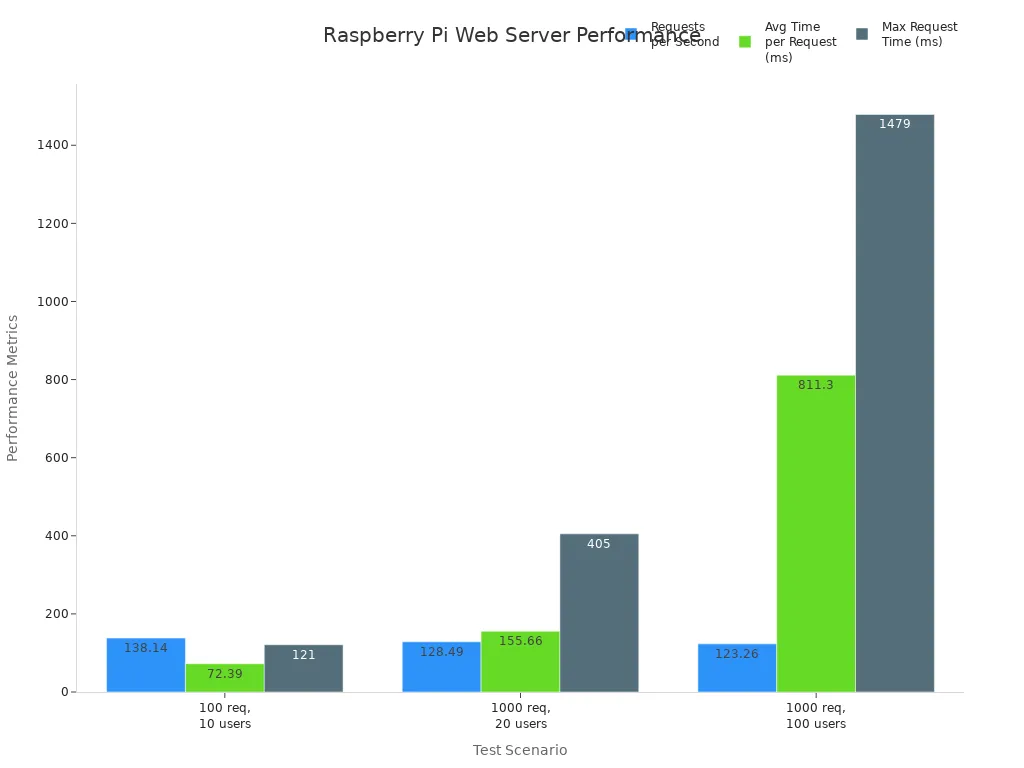
You can run your own website or blog with raspberry pi. Many people use raspberry pi as a web server for learning or small projects. NGINX is the most used web server software for raspberry pi. It runs fast and uses less memory than Apache. Raspberry pi can handle many requests at once, so it is good for small websites.
Test Scenario | Time Taken | Requests per Second | Average Time per Request | Max Request Time | CPU Usage | Memory Usage | Failed Requests |
|---|---|---|---|---|---|---|---|
100 requests, 10 users | 0.724 s | 138.14 | 72.39 ms | 121 ms | ~51% usr, 18% sys | ~28% idle | 0 |
1000 requests, 20 users | 7.783 s | 128.49 | 155.66 ms | 405 ms | ~78% usr | stable | 0 |
1000 requests, 100 users | 8.113 s | 123.26 | 811.30 ms | 1479 ms | ~76% usr, 24% sys | stable | 0 |
You can use raspberry pi to learn about web hosting, test websites, or run a small online store.
Retro Gaming
You can play old games by turning raspberry pi into a retro gaming console. Raspberry pi use cases in gaming are very popular. You can use emulator packages like RetroPie, PiPlay, or Recalbox to play thousands of games from old consoles and arcades.
Platform | Description |
|---|---|
RetroPie | Lets you turn raspberry pi into a retro-gaming machine. |
PiPlay | Pre-built OS for gaming and emulation, easy to set up. |
Recalbox | Supports many consoles and arcade systems, simple interface. |
You can add things like arcade buttons, USB gamepads, or build a mini arcade cabinet. These extras make your gaming more fun and real.
Learning to Code
Raspberry pi is great for learning to code. About 39% of users use raspberry pi for this. Python is the most used language for raspberry pi programming, but you can also try Scratch, Java, or C++. Many schools and clubs use raspberry pi to teach coding to students ages 5 to 16. You can find free resources, lesson plans, and code clubs to help you start.
The Computing Curriculum and Ada Computer Science give lessons for all levels.
Experience CS gives teachers tools to teach computer science in class.
Code Clubs make a friendly place for young people to learn coding.
Raspberry pi use cases in education help you build real skills and get ready for future jobs.
You can do lots of things with raspberry pi. You can learn to code or make smart gadgets. Raspberry pi is small and not expensive. It is simple for new users. You just plug it into a monitor and keyboard. You do not need special skills to start. Many beginners say raspberry pi projects are fun. The guides are easy to read. The community is big and helpful. The Raspberry Pi Foundation teaches people digital skills everywhere. If you have trouble, you can find many guides. There are always people online who want to help you.
Barrier Type | Description | Solutions Addressing Barriers |
|---|---|---|
Learning Curve | Hard for new users to learn hardware and software | Many guides and a helpful community |
Cost Considerations | Buying extras can cost more money | Partnerships make raspberry pi better |
Give raspberry pi a try for your next project. You could find out you love technology!
FAQ
What do you need to start using Raspberry Pi?
You need a Raspberry Pi board, a microSD card with an operating system, a power supply, a monitor or TV, and a keyboard and mouse. You can add extras like Wi-Fi dongles or sensors for more projects.
Can you use Raspberry Pi for gaming?
Yes, you can play retro games with Raspberry Pi. Install software like RetroPie or Recalbox. You can connect USB controllers and build your own arcade setup. Many classic games work well.
Tip: Try RetroPie for the easiest gaming experience.
Is Raspberry Pi good for learning to code?
You can learn coding with Raspberry Pi. It supports languages like Python, Scratch, and Java. Many schools use Raspberry Pi for coding lessons. You find free guides and projects online.
How much does a Raspberry Pi cost?
Prices vary by model. The Raspberry Pi 4 costs about $150. Pi Zero is cheaper, around $15. Accessories like cases or sensors add to the cost.
Model | Approximate Price |
|---|---|
Pi 4 | $150 |
Pi Zero | $15 |
Pi 400 | $100 |
Can you connect Raspberry Pi to the internet?
You can connect Raspberry Pi to the internet using Wi-Fi or Ethernet. This lets you browse, stream, or control devices remotely. Most models have built-in Wi-Fi.