You press play on your favorite show. The stream stutters, freezes, then turns into blocks. Frustrating, right? This problem happens because of poor video decoding. HD video decoding turns compressed high-definition data into a picture you can watch. Image processing then makes that picture clearer. These processes matter everywhere.
Video accounts for over 80% of web traffic.
Streaming will make up 91% of internet traffic by 2024. Knowing about decoding helps you pick better solutions. You need an hd video decoder that works well with encoding. Good encoding balances file size and quality. Encoding choices affect how well playback works. Proper decoding gives smooth, clear video. The right decoder makes the picture better on any screen. Processing power matters for HD streams. This blog explains these ideas clearly. You will get practical advice for choosing the right solution.
Key Takeaways
Video encoding makes video files smaller, and decoding makes them bigger for watching.
Hardware decoding uses less power and works better for heavy jobs like watching security cameras.
Software decoding can be used in many ways, but it has trouble with high-resolution video.
Pick a decoder that fits your resolution, frame rate, and delay needs.
Hardware decoders reduce energy use and costs for professional video systems.
Video Encoding and Decoding Basics
Video encoding shrinks raw footage into a smaller file for storage or sending. Video decoding does the opposite, turning compressed data back into a watchable picture. These two tasks work together. An encoder reduces data at the source, and a decoder expands it on your screen. Without both, you could not stream, record, or share moving images well.
Understanding Codecs and Their Role in Video Decoding
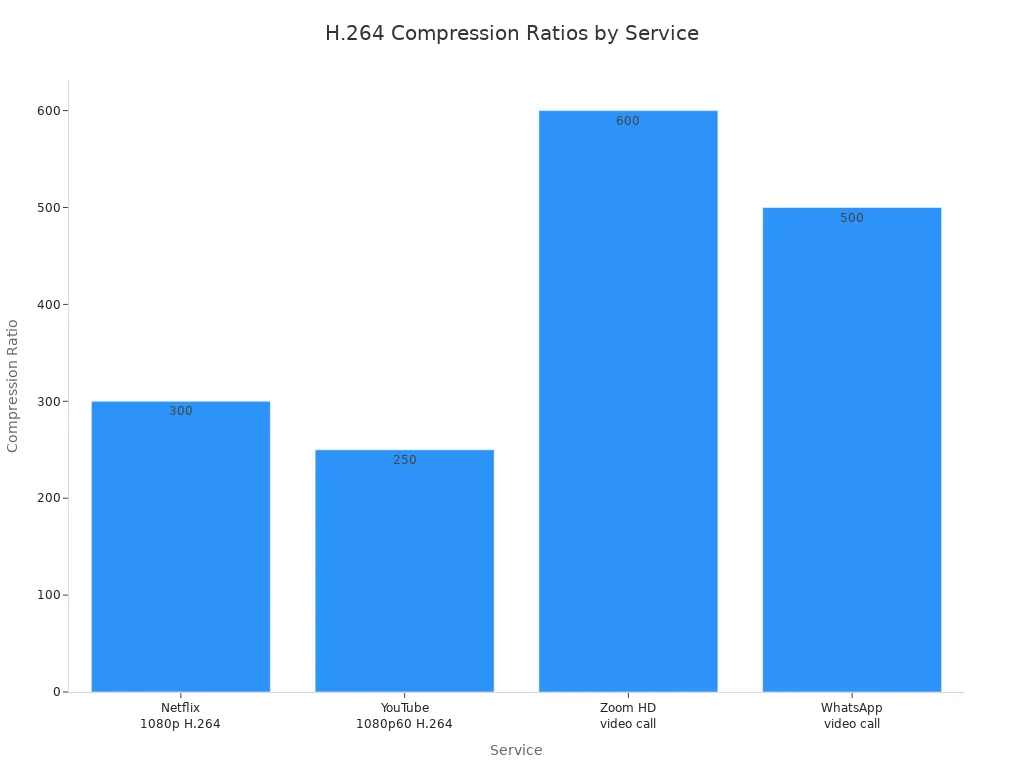
Codecs are the rules that control this compression and expansion. H.264 and HEVC (High Efficiency Video Coding) are the most common codecs today. They balance file size against picture quality. H.264 compresses video between 10:1 and 100:1 in normal use. Real-world services push much further. Netflix 1080p H.264 streams compress at about 300×, while YouTube 1080p60 H.264 reaches about 250×. Video call apps like Zoom and WhatsApp achieve even higher ratios, around 600× and 500×. These numbers show how aggressive compression can be without ruining the picture.
HEVC improves on H.264 a lot. The ITU’s introduction to HEVC said it can deliver similar quality at about half the bitrate of H.264 under proper test conditions. That means you can store or send the same video quality using roughly half the data. For hd video decoding, this efficiency matters. A decoder that supports HEVC can handle higher-resolution content without needing more bandwidth. When you pick an hd video decoder, check which codecs it supports. The right decoder makes the difference between smooth playback and constant buffering.
The Broader Scope of Video Processing
Video decoding is one part of a bigger field called video processing. Processing also includes scaling, color correction, and frame rate conversion. Scaling adjusts the resolution of an image to match your screen. Color correction makes colors look natural on different displays. Frame rate conversion smooths motion when the source footage does not match your monitor’s refresh rate. These steps happen after decoding, and they directly affect image quality.
Think of a security camera that records at 1080p but feeds a 4K monitor. The decoder must upscale the image to fill the screen. Without proper scaling, the picture looks soft or pixelated. Color correction matters too. A camera might capture footage with a slight tint. Processing fixes that tint so you see accurate colors. Frame rate conversion becomes critical for fast-moving scenes. A 30 fps source shown on a 60 Hz monitor can look choppy. Processing adds frames to create smoother motion.
The front-end hd encoded image arrives at your device as compressed data. The decoder expands it, then processing refines it. This whole pipeline decides what you see. A poor decoder ruins even the best source material. A good decoder keeps detail and delivers crisp output. For professional systems, this difference matters a lot. Surveillance operators need reliable decoding of multiple streams. Video walls require smooth conversion from encoded signals to HDMI output. In every case, the quality of the decoder and the processing chain decides the final result.
Understanding these basics helps you judge any video solution. You now know that encoding shrinks data, decoding expands it, and processing refines the picture. The codec you choose affects storage needs and bandwidth. The decoder you pick affects playback smoothness and image quality. These choices shape your entire viewing experience.
Hardware vs. Software Decoding: Pros and Cons
The Efficiency of Hardware-Accelerated Decoding
Hardware decoding uses special chips, like GPUs or ASICs, to handle video streams. These chips are made for just one job: decoding video fast and well. Because they are built for this task, they use much less power than a general-purpose CPU doing the same work. This matters for battery-powered devices like laptops and tablets. It also lowers heat and fan noise in desktop systems.
The power savings are clear when you look at the numbers. For 4K video, the difference is big.
Decoding Method | 1080p Power Consumption | 4K 2160p Power Consumption |
|---|---|---|
Hardware Decoding | 6400 mW | 8100 mW |
Software Decoding | 7688 mW | 14400 mW |
Difference at 4K: 14400 mW – 8100 mW = 6300 mW
At 1080p, hardware decoding uses 6400 mW, while software uses 7688 mW. At 4K, the gap grows a lot. Hardware decoding uses only 8100 mW, but software decoding jumps to 14400 mW. That is almost double the power. For a device running for hours, this means longer battery life and lower costs.
Research from the arXiv paper shows that HEVC software decoding uses up to four times more energy than hardware decoding, based on dynamic energy measurements.
When you pick a hardware decoder, you get a system that can handle many HD streams without overheating or draining power. This special decoding ability makes hardware decoding great for video walls, surveillance systems, and any use where you need dependable, low-power operation. The dedicated chip also gives fast response, which is very important for real-time monitoring and interactive apps. A hardware decoder works with a video encoder in many professional setups.
The Flexibility of Software-Based Decoding
Software decoding uses the CPU to process video data. The main benefit of this method is compatibility. A software decoder can handle almost any codec or format because it is not tied to a specific chip. You can update the software to support new codecs without changing hardware. This flexibility helps systems that need to play many different video sources. The software decoder can also do video encoding tasks if needed.
But software decoding has downsides. It needs more processing power, especially for high-resolution streams. As the table shows, software decoding at 4K uses 14400 mW compared to 8100 mW for hardware. This pressure can make the CPU slow down, causing dropped frames or stuttering playback. For apps that need smooth video, software decoding may not be enough. The picture quality may suffer under heavy load.
Recent improvements in CPU design help close the gap. Armv9 CPUs with SVE2 instructions speed up video decode and image processing tasks. These processors can handle some decoding work better than older CPUs. Still, they cannot match the power efficiency of a dedicated hardware decoder. For occasional use or varied codecs, software decoding offers flexibility. For non-stop, high-volume hd video decoding, hardware is still the better choice. The hardware decoder gives steady quality and low power use.
HD Video Decoding in Professional Use
Enhancing Surveillance Systems with Reliable Decoding
You need a high-definition system to watch a building. This system must decode HD video for each camera feed. Each camera sends a video stream. You need a hardware decoder to handle many streams at once. It gives low delay and clear picture. The system needs to decode many channels at the same time. Each stream gets its own decoding path. A good HD video decoder can do this job. It changes the camera’s compressed video into smooth playback. The video encoder in each camera compresses the feed. The decoder then expands it so you can watch. The decoder must handle codecs like H.264 and HEVC. This needs reliable hardware, or you see delays or blocky images. Reliable decoding means you never miss a moment. It also needs real-time video processing for smooth playback. The system can send alerts to security staff. It can also record the feeds for later review.
Powering Seamless Video Walls for Command Centers
A video wall shows many feeds on a big screen. You need a decoder to change encoded signals into HDMI output. This decoder must handle high resolutions. It supports true 4K video for sharp images. The display shows many sources at once. Each source needs its own channel. A hardware decoder can handle this load. It gives smooth video playback with low delay. Many systems use encoder/decoder chips like the MB86M21APBS-A001-ME1. These chips improve quality. They make encoding and decoding more efficient. The screen looks clear and correct. You can see every detail. The video wall is common in command centers. It helps operators see many feeds at once. The MB86M21APBS-A001-ME1 chip reduces noise and improves color accuracy. This makes the image even more detailed. The chip uses little power and keeps the system efficient. This setup works well for control rooms and security centers. The source sends the feed. This whole chain depends on reliable decoding. The encoding chip inside the IC handles compression well. The display gives HD resolution and HD quality for each source. These features make it a reliable choice for professional systems.
Key Features for Efficient Decoding
Resolution, Frame Rate, and Latency Requirements
First, figure out what resolution your app really needs. A security system watching a parking lot might do fine with 1080p streams. A medical imaging screen or a command center video wall needs true 4k video for detail. Higher resolution means more data to handle. Your decoder must manage that load without dropping frames. Check the max resolution your decoder supports before buying. Some decoders handle 1080p easily but fail with 4k content. Others process both without trouble. Match the decoder to your real needs, not the biggest number on the spec sheet.
Frame rate matters just as much as resolution. A video wall showing live traffic cameras needs smooth motion at 60 frames per second. A surveillance system recording a quiet hallway might only need 15 frames per second. Higher frame rates need more processing power. Your decoder must keep up with the source video’s frame rate. If it cannot, you see stuttering or choppy motion. This issue ruins the viewing experience and can hide important details in security footage.
Latency creates another critical limit. For interactive video apps like video conferencing, about 500 milliseconds of latency in each direction is the maximum acceptable limit. This value allows natural conversation flow without awkward pauses or overlapping speech. You see this problem in televised remote interviews when delay causes people to talk over each other. For real-time control systems, you need even lower latency. A hardware decoder delivers the low latency that software decoding often cannot match. The table below shows the latency ranges you should expect for different uses.
Latency Threshold | Application Context |
|---|---|
~200 ms | Live interactive real-time applications like video conferencing |
<300 ms | Ultra-low latency range for smooth video conferencing data transfer |
~500 ms | Upper limit per direction for natural conversation without pauses |
Your application decides which latency target you need. A video wall showing news feeds can tolerate higher latency. A remote surgery display cannot. Check your acceptable delay before choosing a decoder. This choice affects every other decision you make.
Connectivity, Scalability, and Management Interfaces
Connectivity options decide how your decoder fits into your existing setup. Most professional decoders offer HDMI output for direct connection to displays. Many also support IP network input for receiving streams over your local network. Some devices combine multiple functions into one connection. The Duet-5 encoder/decoder uses a single Gigabit Ethernet port for video, audio, control, and power. This design relies on standard CAT5e/6 network cabling. You avoid running separate power and signal cables to each device. This simplifies installation and reduces clutter in equipment racks.
Scalability matters when you plan to expand your system later. A single decoder might serve one display today. Tomorrow you might need ten decoders for a video wall. Choose a decoder that supports management software for easy setup. This software lets you adjust settings, monitor performance, and update firmware across many devices from one interface. Without management tools, you must set up each decoder one by one. This process becomes tedious and error-prone as your system grows.
Video encoding quality also affects your decoder choice. A good video encoder produces clean streams that decode easily. Poor encoding creates artifacts that no decoder can fully fix. Your decoder should support scaling and frame rate conversion. These features let one decoder handle sources with different resolutions and frame rates. You can mix 1080p and 4k content on the same display without visible quality loss. This flexibility reduces the number of decoder models you need to stock.
The image quality you see depends on the entire chain. The video encoder compresses the source. The decoder expands it. Processing refines the result. Each step affects the final picture. A hardware decoder with good processing capabilities delivers consistent high resolution output. It maintains quality across all connected displays. This reliability matters in professional environments where downtime costs money. Choose a decoder that offers the connectivity, scalability, and management features your operation requires.
You have traveled from codecs to hardware versus software trade-offs. The right choice depends on your specific use case. For personal streaming, software decoding offers flexibility. For professional surveillance, hardware decoding delivers efficiency.
Consider the cost differences. VPU solutions reduce operational and capital expenses by 80% compared to CPU-based decoding. CPUs are over 20 times less efficient than ASICs. Hardware decoders also cut power consumption by more than 20 times.
Prioritize hardware decoding for power efficiency and high-volume tasks. Choose software decoding for maximum compatibility. Evaluate your resolution, frame rate, and latency needs. You now possess the knowledge to select the right hd decoder for your video processing and encoding requirements. Your display will thank you.
FAQ
What is the difference between video encoding and decoding?
Encoding shrinks raw video into smaller files for saving or sending. Decoding does the opposite. It turns compressed data back into a picture you can watch. You need both for streaming, recording, or sharing video. The encoder works where the video is made. The decoder works on your screen.
How do I know if I need hardware or software decoding?
Pick hardware decoding when you need low power and heavy work like surveillance or video walls. Pick software decoding when you need to play many different formats. Hardware uses special chips and uses less power. Software uses your CPU and gives flexibility but has trouble with 4K streams.
What resolution and frame rate should my decoder support?
Match your decoder to what you really need. A parking lot camera system works well with 1080p at 15 frames per second. A command center video wall needs true 4K at 60 frames per second. Higher resolutions and frame rates need more processing power from your decoder.
Can one decoder handle multiple video streams?
Yes, professional decoders can handle many channels at once. Each stream gets its own decoding path. This matters for surveillance systems watching many cameras or video walls showing several sources at once. Check the decoder’s channel capacity before buying to make sure it fits your needs.