If you’re learning about Raspberry Pi, you’re not alone. These small computers are loved by tech fans, hobbyists, and teachers. But with so many models, how do you choose the best one? Knowing their features is important. For example, the Raspberry Pi 4 now costs four times more than before. The Pi Zero series costs ten times more too. This shows how much more people want them. Raspberry sold 7 million units in 2020 and sold the same in 2021, even with fewer supplies. Whether you’re wondering what Raspberry Pi is for or need one for a project, this guide will help you decide.
Key Takeaways
The Raspberry Pi 4 Model B is the strongest choice. It works fast and supports two 4K screens, great for media tasks.
The Raspberry Pi 400 is a computer inside a keyboard. It is good for beginners and saves desk space.
The Raspberry Pi Zero 2 W is small and cheap. It is perfect for DIY projects and small tasks while staying powerful.
Raspberry Pi 4B: The Most Powerful Model
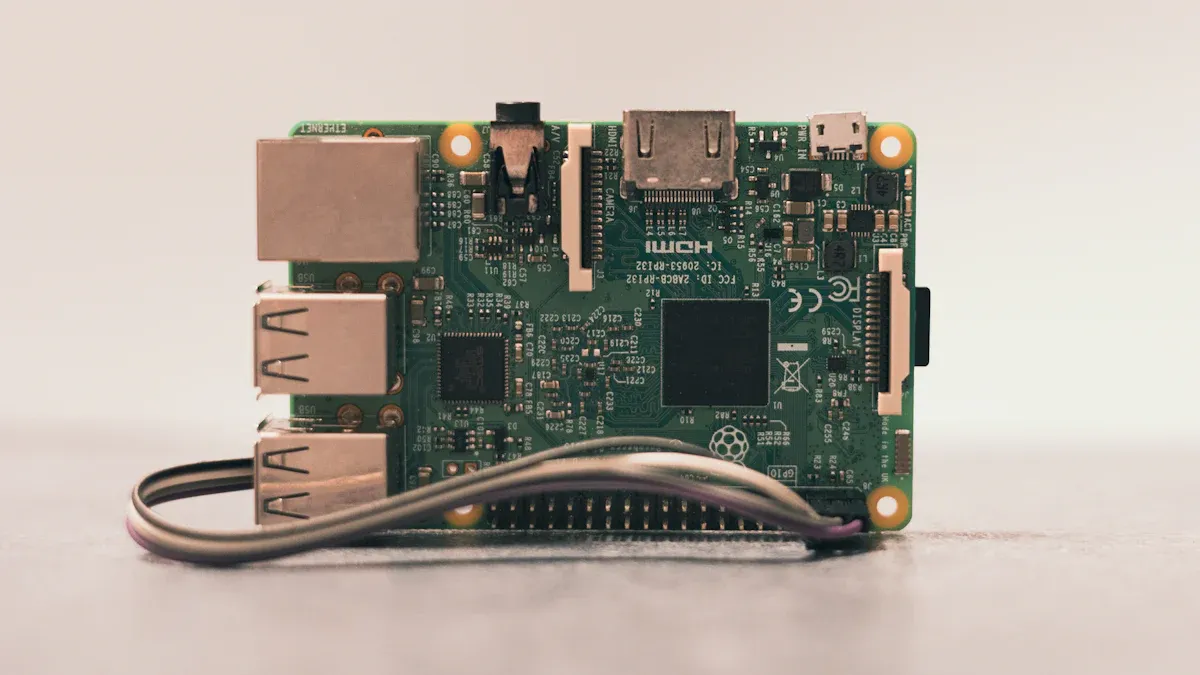
The Raspberry Pi 4 Model B is a big step forward for small computers. It’s powerful, flexible, and affordable, making it a top choice. Let’s explore why it stands out.
Key Specifications
The Raspberry Pi 4 Model B has impressive hardware. It uses a Broadcom BCM2711B0 quad-core Cortex-A72 processor running at 1.5 GHz. This makes it much faster than older models. You can pick from 1GB, 2GB, 4GB, or 8GB of RAM, depending on what you need. It also has two micro-HDMI ports that support 4K video, which is great for watching or creating videos. Here’s a simple breakdown of its specs:
Specification | Details |
|---|---|
SoC | Broadcom BCM2711B0 quad-core A72 (ARMv8-A) 64-bit @ 1.5GHz |
GPU | Broadcom VideoCore VI |
Networking | 2.4 GHz and 5 GHz 802.11b/g/n/ac wireless LAN |
RAM | 1GB, 2GB, 4GB, or 8GB LPDDR4 SDRAM |
Bluetooth | Bluetooth 5.0, Bluetooth Low Energy (BLE) |
GPIO | 40-pin GPIO header, populated |
Storage | microSD |
Ports | 2 × micro-HDMI 2.0, 3.5 mm audio-video jack, 2 × USB 2.0, 2 × USB 3.0, Gigabit Ethernet |
Dimensions | 88 mm × 58 mm × 19.5 mm, 46 g |
Unique Features
What makes the Raspberry Pi 4 Model B special? It can connect to two screens with 4K resolution, which is rare for small computers. The USB 3.0 ports and Gigabit Ethernet make data transfer faster. Its upgraded GPU gives better graphics, perfect for games or video editing. Tests like Linpack and Speedometer 2.0 show it’s faster and more responsive than before.
Tip: Love DIY projects? The 40-pin GPIO header lets you connect sensors, motors, and other gadgets for endless fun.
Raspberry Pi Use Cases
The Raspberry Pi 4 Model B can do many things. Here are some cool ideas:
Make a home media center to watch 4K movies.
Build a personal cloud server to store files safely.
Create a smart home hub to control devices like lights.
Turn it into a retro gaming console for old-school games.
Use it as a desktop replacement for browsing or writing.
Whether you’re a student, hobbyist, or professional, the Raspberry Pi 4B is a great choice. Its power and flexibility make it perfect for all kinds of projects.
Raspberry Pi 400: A Keyboard and Computer in One
The Raspberry Pi 400 is a computer built into a keyboard! This cool design is great for people who want less mess on their desk. Let’s check out its features and why it’s a great pick.
Key Specifications
The Raspberry Pi 400 has powerful parts in a small size. Here’s what it includes:
Component | Description |
|---|---|
Clock Speed | 1.8 GHz, faster than the Raspberry Pi 4 Model B’s 1.5 GHz. |
Board Layout | Long and slim, with Ethernet, USB, HDMI, and GPIO ports. |
GPIO Header | 40-pin header to connect gadgets and sensors. |
microSD Socket | Push-click slot for storage, comes with a 16GB card and OS installed. |
HDMI Connectors | Two micro HDMI ports for two 4K screens. |
Ethernet | Gigabit Ethernet for fast internet connection. |
It also has wireless LAN and Bluetooth, making it useful for many tasks.
Unique Features
What makes the Raspberry Pi 400 different? Its keyboard-computer combo saves space and looks neat. The built-in heatsink keeps it cool even when working hard. It can also connect to two 4K screens, which is great for multitasking or watching videos.
Here are some cool features:
All-in-One Design: Combines a computer and keyboard for a tidy setup.
Quiet Cooling: Built-in heatsink keeps it cool without noisy fans.
Durable Keyboard: Comfortable and strong for daily use.
4K Video Support: Great for streaming or creative projects.
Fun Fact: The Raspberry Pi 400 is the fastest Raspberry Pi yet, running at 1.8 GHz!
Raspberry Pi Use Cases
The Raspberry Pi 400 is perfect for both beginners and experts. Here’s how you can use it:
Learn coding: Its simple design is great for programming practice.
Home office setup: Use it for emails, browsing, and writing documents.
Media center: Watch 4K videos or use two screens for entertainment.
DIY projects: Connect sensors and devices using the GPIO header.
Whether you’re a student, hobbyist, or need a simple computer, the Raspberry Pi 400 is a great choice.
Raspberry Pi 3 Model B+: A Trustworthy Mid-Range Choice
The Raspberry Pi 3 Model B+ is both powerful and budget-friendly. It’s a great pick for anyone needing a flexible computer. Let’s see why this Raspberry Pi model is so popular.
Key Specifications
The Raspberry Pi 3 Model B+ has good hardware for its cost. Its 1.4 GHz quad-core ARM Cortex-A53 processor runs tasks smoothly. With 1 GB of RAM, it works well for simple apps. Here’s a quick comparison with other models:
Model | Processor | RAM |
|---|---|---|
Raspberry Pi 3 B+ | 1.4 GHz quad-core ARM Cortex-A53 | 1 GB |
Raspberry Pi 4 | 1.5 GHz (up to 1.8 GHz) Cortex-A72 | Up to 8 GB |
ODROID-C2 | Quad-core Cortex-A53 | 2 GB |
This Raspberry Pi model also includes dual-band WiFi (2.4GHz and 5GHz). Its Ethernet controller supports speeds up to 300 Mbps. These features make it great for internet-based tasks.
Unique Features
What makes the Raspberry Pi 3 Model B+ special? Its faster internet and better cooling are key upgrades. The Ethernet can reach 300 Mbps, which is much quicker than older versions. Dual-band WiFi keeps connections steady, even in busy areas.
Fun Fact: The Raspberry Pi 3 Model B+ fixed overheating problems from earlier models. Now, it can handle harder tasks without getting too hot.
Here are some standout features:
Better Internet: Faster Ethernet and dual-band WiFi.
Improved Cooling: Stays cool for longer use.
Certified Design: Meets standards for easy project use.
Raspberry Pi Use Cases
The Raspberry Pi 3 Model B+ is useful for many projects. Whether for fun or work, here are some ideas:
Network Storage: Share files easily between devices.
Home Music System: Play music in multiple rooms.
Plant Watering System: Use sensors to water plants.
Robotics: Build a robot for learning or fun.
Weather Tracker: Measure temperature and humidity.
Minecraft Server: Host games for friends.
The Raspberry Pi 3 Model B+ is a solid mid-range option. Its mix of speed, features, and price makes it a favorite for many users.
Raspberry Pi Zero 2 W: Small and Budget-Friendly
The Raspberry Pi Zero 2 W is a tiny computer that’s both cheap and powerful. It’s great for anyone who wants a low-cost option without losing good performance. Let’s see why this model is special.
Key Specifications
The Raspberry Pi Zero 2 W is small but mighty. It’s only 5cm x 6cm in size and weighs 9 grams. It uses a BCM2710A1 quad-core processor, giving it power similar to the Raspberry Pi 3 Model B. With 512MB of RAM, it can handle simple tasks easily.
Here’s a quick look at its main features:
Feature | Raspberry Pi Zero 2 W | Raspberry Pi Zero W | Raspberry Pi 3 Model B |
|---|---|---|---|
CPU | BCM2710A1 | BCM2835 | BCM2837 |
Performance (Geekbench 4) | 703 | 352 | N/A |
Boot Speed | 3x faster | N/A | N/A |
Cores | 4 | 1 | 4 |
This model also saves energy. It uses less than one-third of the power of bigger Raspberry Pi models when idle. This makes it perfect for projects that need to stay on all the time.
Unique Features
What makes the Raspberry Pi Zero 2 W stand out is its mix of size, speed, and price. It’s over twice as fast as the older Raspberry Pi Zero W, scoring 703 on Geekbench 4 compared to the Zero W’s 352. Even with this speed boost, it’s still one of the cheapest Raspberry Pi models, making it a great choice for hobbyists and teachers.
Did you know? The Zero 2 W is almost as powerful as the Raspberry Pi 3 Model B but uses only a little more energy.
Raspberry Pi Use Cases
The Raspberry Pi Zero 2 W is ideal for fun and useful projects. Here are some ideas:
Make a portable gaming system for classic games.
Build a smart home gadget like a camera or thermostat.
Create a robot project for learning or entertainment.
Set up a cheap web server for personal use.
Its small size and low price make it popular with DIY fans. Whether you’re new to projects or an expert, this Raspberry Pi model offers endless possibilities.
Raspberry Pi Pico: Great for Small Electronics Projects
The Raspberry Pi Pico is a small but strong microcontroller board. It’s great for beginners and experts working on electronics projects. This board is flexible and powerful, helping you bring your ideas to life.
Key Specifications
The Raspberry Pi Pico uses the RP2040 microcontroller chip, made by Raspberry Pi. It has a dual-core ARM Cortex-M0+ processor that runs up to 133MHz. With 264kB of SRAM and 2MB of flash storage, it has enough memory for most tasks. Here’s a simple look at its specs:
Specification | Details |
|---|---|
Microcontroller | RP2040 |
Processor | Dual-core ARM Cortex-M0+ |
Clock Speed | Up to 133MHz |
SRAM | 264kB |
Flash Storage | 2MB |
GPIO Pins | 26 multifunction pins |
Communication Interfaces | 2× SPI, 2× I2C, 2× UART |
ADC | 3× 12-bit |
PWM | 16× controllable channels |
Programmable I/O | 8× PIO state machines |
You can program the Pico easily by dragging and dropping files via USB.
Unique Features
The Raspberry Pi Pico is special because it’s both flexible and efficient. It works with voltages from 1.8V to 5.5V, making it great for battery-powered projects. Its Programmable I/O (PIO) lets you create custom hardware setups. Here are some key features:
Custom Microcontroller: The RP2040 chip gives strong performance.
Low Power Use: Works well for long-running projects.
Many GPIO Options: Includes 26 pins and 5 ADC inputs for signals.
Programmable I/O: Helps you build custom hardware interfaces.
Fun Fact: The Pico’s PIO can copy protocols like VGA or DVI, allowing creative projects.
Raspberry Pi Use Cases
The Raspberry Pi Pico is perfect for many projects. Its small size and low power use make it great for portable devices. Here are some ideas:
Microcontroller Projects: Start easily with MicroPython programming.
Battery Devices: Its efficiency helps batteries last longer.
Custom Controllers: Make keyboards or other input devices.
Real-Time Tasks: Use it for motor control or reading sensors.
Analog Projects: Use ADC inputs for things like temperature checks.
Unique Interfaces: Create special hardware setups with PIO.
The Raspberry Pi Pico is a great tool for microcontroller projects. It’s powerful, flexible, and affordable, making it a must-have for your projects.
Choosing the right Raspberry Pi depends on your needs. Here’s a quick recap of the models:
Model | Processor | RAM Options | Connectivity Features |
|---|---|---|---|
Raspberry Pi 3 A+ | 1.4 GHz quad-core | 512 MB DDR2 | 2.4 GHz dual-band, 5 GHz wireless LAN, Bluetooth 4.2 |
Raspberry Pi 4 B | 1.5 GHz quad-core | 1, 2, 4, or 8 GB | 802.11ac Wi-Fi, Bluetooth 5, Gigabit Ethernet |
Raspberry Pi 400 | Custom board with keyboard | 4 GB LPDDR4 | Integrated keyboard, HDMI for display |
Raspberry Pi Zero 2 W | 1 GHz quad-core | N/A | GPIO, MIPI CSI-2, MIPI DSI |
Raspberry Pi 5 | Upgraded CPU | N/A | 2.5 Gbps Ethernet, Wi-Fi 6, USB 3.0 |
If you need top performance, the Raspberry Pi 5 is your best bet. For affordability and compact size, the Raspberry Pi Zero 2 W is ideal. The Raspberry Pi 400 offers a neat all-in-one design, while the Raspberry Pi Pico is perfect for electronics projects.
Tip: Think about what is Raspberry Pi used for in your case. Whether it’s gaming, coding, or IoT, there’s a model for you.
Take time to evaluate your project requirements. With so many options, you’ll find the perfect Raspberry Pi to bring your ideas to life.
FAQ
What is the best Raspberry Pi for beginners?
The Raspberry Pi 400 is perfect for beginners. Its all-in-one design combines a keyboard and computer, making it easy to set up and use right away.
Can you use a Raspberry Pi as a desktop computer?
Yes, you can! Models like the Raspberry Pi 4B and Raspberry Pi 400 offer enough power for browsing, writing, and even light gaming or coding tasks.
What makes the Raspberry Pi Zero 2 W special?
Its compact size and affordability make it ideal for small projects. Despite its size, it delivers solid performance, similar to the Raspberry Pi 3 Model B.