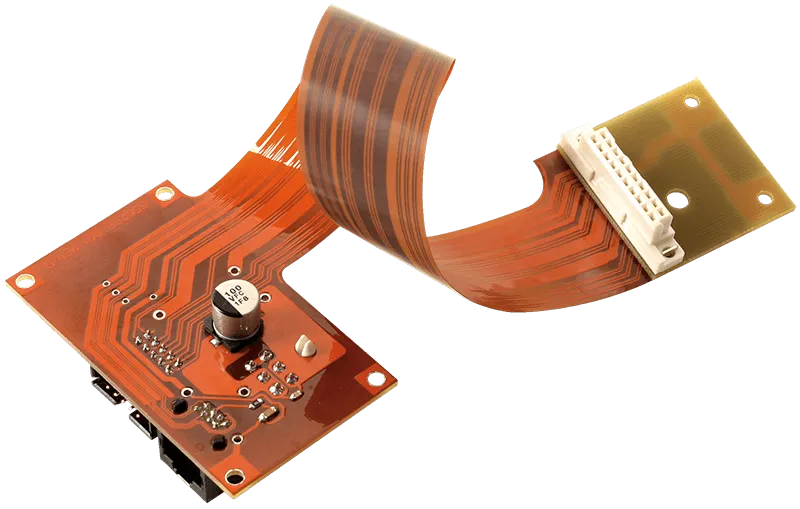
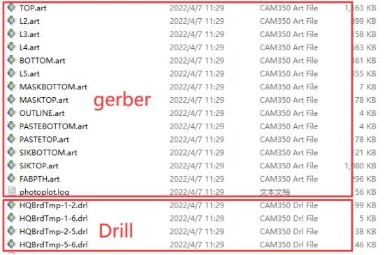
PCB cloning, or PCB clone, refers to the process of copying an existing circuit board design. This method is crucial in the production of modern electronics. By utilizing PCB clones, companies can save money on research and development, making it particularly beneficial for projects with tight budgets. Additionally, PCB cloning accelerates product creation, as engineers can replicate existing designs instead of starting from scratch. This technique also ensures that older designs remain functional by using new components to recreate them. Furthermore, PCB cloning facilitates safe testing without risking damage to the original design. Overall, PCB cloning supports the longevity of old products, reduces costs, and enables modifications for new innovations.
Key Takeaways
PCB cloning helps save money by copying existing designs.
It keeps old products working by swapping out old parts.
This speeds up making new products and lowers research costs.
PCB cloning lets you change designs for new uses or features.
Studying cloned PCBs helps students and hobbyists learn electronics.
What is PCB Cloning?
Definition of PCB Cloning
PCB cloning means copying an existing circuit board design. It’s more than just copying; it involves studying the board, recreating its diagram, and making a new layout. This method helps create new products or improve old ones. By using existing designs, you can make better products faster.
There are two main ways to clone a PCB: tracing by hand or using images. Hand tracing works for simple boards with few layers. For complex boards, clear images give better results. The cloning process usually includes these steps:
Studying the original PCB to learn its parts and layout.
Drawing the diagram to show how parts connect.
Designing the board layout based on the diagram.
Choosing parts that work well together.
Making the cloned PCB using normal manufacturing methods.
Importance of PCB Cloning
Helping Old Products
PCB cloning helps keep old products working. Many old devices use parts that are no longer made. By cloning the PCB, you can replace old parts and keep the product working. This way, old electronics last longer without needing a full redesign.
Saving Money
Cloning a PCB costs less than designing a new one. It skips long research and saves time and money. For companies, this means cheaper production and faster delivery. Using a tested design also lowers mistakes during manufacturing.
Allowing Changes
PCB cloning lets you change designs to fit new needs. You can add features, make it work better, or use it for something new. This method helps create new ideas by improving old designs instead of starting over.
How PCB Cloning Works

Reverse Engineering the PCB
Studying the Physical Board
Reverse engineering starts by closely studying the PCB. First, look at the board to find parts, connections, and markings. Use clear pictures to see small details better. Tools like cameras and microscopes make this easier. For harder boards, methods like X-rays or removing layers are used. Removing layers means taking off coatings or grinding to see inside. These steps help you find hidden parts and understand how the board is built.
Getting the Schematic and Layout
After studying the board, the next step is finding the schematic and layout. This means figuring out how the parts are connected. You can trace connections by hand using tools or use software to check images. Some software can even create schematics from pictures automatically. The goal is to make a diagram that shows how the board works.
Schematic Capture
Making the Circuit Diagram
Once you have the schematic, you create the circuit diagram. This step organizes the parts and their links into a clear picture. Special software helps you draw the circuit correctly. This ensures the new design works just like the original. The diagram is the base for the next cloning step.
PCB Layout Copying
Creating the Board Layout
The last step in reverse engineering is copying the board layout. Use the schematic to guide where parts go and how they connect. PCB design software helps you make an exact copy of the layout. Tools like 3D scans or X-rays can check if your design is correct. When done, you’ll have a cloned PCB ready to be made.
Tip: Always test your copied PCB to make sure it works like the original. Testing avoids mistakes and keeps it reliable.
Testing and Validation
Making Sure It Works Like the Original
Testing is important to check if the cloned PCB works like the original. After reverse engineering, you need to confirm it meets the same standards. This step ensures the board is reliable and avoids problems later.
Engineers use strict checks to test the cloned PCB. They run design rule checks (DRC) to see if the layout follows manufacturing rules. Simulation software helps check if signals move correctly through the circuit. Tools like multimeters and logic analyzers test how well the board works.
The cloned PCB should be tested in conditions it will face. For example, if it works in heat, test it in high temperatures. This makes sure the board can handle tough situations without breaking.
You also need to compare the cloned PCB with the original. Check things like voltage, current, and signal timing to see if they match. Fix any differences before making more boards.
Testing doesn’t just check if it works; it also ensures good quality. Finding and fixing mistakes early saves time and money. It also helps make a dependable product.
Tip: Write down all testing steps and results. Keeping records helps track progress and keeps the process organized.
By following these steps, you can make a cloned PCB that works as well as the original.
Practical Applications of PCB Cloning
Supporting Old Products
Swapping Out Old Parts
PCB cloning helps keep old products working longer. Many older devices use boards that are no longer made. By cloning, you can copy these boards and replace outdated parts. This keeps the product running without needing a full redesign. For example, if an important part of an old medical device is unavailable, cloning the board lets you recreate it. This way, the device stays useful. It saves time and is a cheaper way to handle old parts.
Cutting Costs
Skipping Expensive Redesigns
Cloning a PCB skips the need for costly redesigns. Instead of starting fresh, you copy an existing design for production. This lowers research costs and speeds up making the product. Companies save money and get products to market faster.
Advantage | Explanation |
|---|---|
Saves Money | Cloning avoids high redesign costs, cutting R&D expenses. |
Faster Production | Products reach the market quicker than with redesigns. |
Handles Old Parts | Uses existing designs to manage outdated components. |
Using current designs lets you focus on testing during production. This ensures the product is high quality and affordable.
Changing and Improving Designs
Updating Boards for New Uses
PCB cloning allows you to change designs for new needs. Instead of making a new board, you can adjust an old one. You might add features, make it work better, or use it in a new way.
Advantage | Explanation |
|---|---|
Flexible Changes | Cloning lets you adjust designs for new uses, making products more useful. |
Saves Money | Costs less than creating new designs from scratch. |
Speeds Up Design | Using old designs makes the process faster. |
This makes PCB cloning great for trying new ideas. You can improve products while keeping the original design’s reliability. By focusing on changes, you can make unique products that stand out.
Educational and Research Purposes
Learning from Existing Designs
PCB cloning is a great way to learn about electronics. By looking at existing designs, you can understand how circuits work. This helps you learn about placing parts, designing circuits, and how signals move. Whether you’re a student, hobbyist, or researcher, studying cloned PCBs improves your skills and knowledge.
Reverse engineering a PCB is one of the best ways to learn. Taking apart a board shows how each part works and connects. This hands-on method teaches more than just theory. It shows real-life uses of electrical ideas. For example, you might see how a resistor controls current or how a capacitor keeps voltage steady.
Tip: Begin with simple PCBs before trying harder ones. This builds confidence and helps you improve step by step.
PCB cloning also helps with research and new ideas. By studying designs, you can find ways to make them better. This process encourages creativity and solving problems. For example, you could change a cloned PCB to work with new technology or make it more efficient.
Schools often use PCB cloning to teach students. Teachers give students designs to study and copy. This helps students practice skills and understand theory better. It also prepares them for real-world electronics challenges.
Benefits of Learning from PCB Cloning | Explanation |
|---|---|
Hands-on Experience | Learn how circuits work by doing. |
Problem-Solving Skills | Find and fix design problems. |
Innovation | Change designs for new uses. |
By studying PCBs, you learn how they work and find ways to improve them. This builds a strong base for your future in electronics.
Tools and Equipment for PCB Cloning

Hardware Tools
Multimeter
A multimeter is a key tool for PCB cloning. It measures voltage, current, and resistance on the board. This helps find broken parts and check connections. Using it ensures the cloned PCB works properly. Digital multimeters are better because they are accurate and simple to use.
PCB Scanner
A PCB scanner takes clear pictures of the circuit board. These pictures help you study the layout and follow connections. Some scanners can separate layers, making it easier to work with complex boards. Using a scanner saves time and makes cloning more precise.
Software Tools
Schematic Capture Software
This software helps you draw the circuit diagram of the board. It shows parts and connections in an easy-to-read way. Modern tools include features like error checks and part management. These features help avoid mistakes and improve your design.
PCB Design Software
PCB design software is used to copy the board layout. It helps place parts and connect them correctly. Advanced tools have features like automation, testing, and teamwork options. These make the process faster and ensure the cloned PCB works well.
Feature | Description |
|---|---|
Design Rule Checking (DRC) | Checks for errors, improving quality and reducing mistakes. |
Component Management | Helps organize parts, making designs more accurate. |
Collaboration and Version Control | Allows teams to work together and track changes easily. |
Powerful Automation Tools | Speeds up tasks, making the design process smoother. |
Tests designs early to improve performance and avoid costly fixes. |
Additional Equipment
Soldering Tools
Soldering tools are needed to build and fix PCBs. A soldering iron attaches parts to the board securely. Tools like solder wick or pumps help remove parts when needed. These tools make sure the cloned PCB is built correctly.
Oscilloscope
An oscilloscope shows electrical signals on the board. It checks waveforms, timing, and voltage levels. This tool ensures the cloned PCB works well in real conditions. It is also helpful for fixing and improving the design.
Tip: Use good-quality tools for better results and easier cloning.
Legal and Ethical Considerations of PCB Cloning
Intellectual Property Concerns
Knowing Copyright and Patent Rules
When copying a PCB, it’s important to know the laws about intellectual property. Copyright protects original designs, while patents protect inventions. For example, Erich Styger’s meta-clock project shows how copyright issues can happen when copying designs. This case also shows the difference between copyright and patent laws, especially for design patents.
In some places, copying patented products without permission breaks the law. But there are exceptions for research or learning. Copyright laws might allow copying for education, but using it to make competing products can cause legal trouble.
Case Name | Summary |
|---|---|
Huawei vs. Cisco | Cisco said Huawei copied router software, ending in a settlement. |
Shenzhen Dunjun Technology vs. Shenzhen Terca Technology | Dunjun won after Terca copied their product and misused trade secrets. |
Ethical Considerations
Using Cloned Designs Properly
Ethical problems happen when cloned designs are used wrongly. Don’t use cloned PCBs to make fake products or hurt the original creator’s business. Misusing designs harms trust and lowers the quality of the product. Always follow ethical rules and use cloning to help learning or innovation.
When PCB Cloning is Legal
Cloning for Learning or Personal Use
Copying a PCB for personal projects or learning is often allowed. In the U.S., the Fair Use Doctrine lets people use copyrighted material for teaching or research. For example, reverse engineering might be fair use if it changes the original work and doesn’t hurt its market value.
Legal Basis for Reverse Engineering | Description |
|---|---|
Fair Use Doctrine (United States) | Allows limited use of copyrighted material for teaching or research. Reverse engineering is fair use if it transforms the work and doesn’t harm its market. |
Trade Secrets and Confidentiality Agreements | Reverse engineering is banned if the product has trade secrets or confidentiality rules. NDAs stop employees from reverse engineering. |
Patents and Intellectual Property Rights | Reverse engineering is allowed to study a patented invention but not to make competing products. |
Copying Open-Source Designs
Open-source designs are a legal and ethical way to copy PCBs. These designs are shared freely, so you can study, change, and copy them. By using open-source projects, you follow the law and join a helpful community.
Tip: Check the license of open-source designs before using them to avoid breaking rules.
PCB cloning is a helpful method for making electronics today. Copying existing designs saves time, cuts costs, and keeps quality high. It helps old products by replacing parts no longer made. It also allows changes to meet new needs. The table below shows the main benefits of PCB cloning:
Benefit | Description |
|---|---|
Supporting Old Products | Keeps older items working by copying boards no longer made. |
Saves Money | Costs less than creating a new design when the old one works. |
Saves Time | Speeds up work by using designs that already exist. |
Ensures Quality | Copies tested designs to keep the same level of quality. |
Allows Changes | Lets you improve or adjust designs for special needs. |
Even though PCB cloning has many benefits, you must follow rules. Laws like copyright and patents protect original designs and encourage new ideas. Using copied designs the wrong way can cause problems. Always make sure your cloning follows these rules.
By learning the process and respecting the law, you can use PCB cloning responsibly and effectively.
FAQ
How is PCB cloning different from reverse engineering?
PCB cloning means copying a circuit board design. Reverse engineering is about studying and understanding how it works. Cloning makes a working copy, while reverse engineering shows the design’s details and purpose.
Tip: Reverse engineering is often part of the PCB cloning process.
Is it legal to clone a PCB?
Cloning a PCB is allowed for personal, learning, or research use. But copying patented or copyrighted designs for business without permission breaks the law. Always check if the design is legally safe to copy.
Note: Open-source designs are legal and safe to clone.
Can I change a cloned PCB design?
Yes, you can change a cloned PCB to fit your needs. You can add features, make it better, or use it for something new. This makes PCB cloning useful for creating and improving designs.
What skills are needed to clone a PCB?
You need to know basic electronics, circuit design, and soldering. You should also know how to use PCB design software and tools like multimeters and oscilloscopes. These skills help you copy and test the board correctly.
Why is testing a cloned PCB important?
Testing checks if the cloned PCB works like the original. It finds mistakes, confirms performance, and ensures good quality. Skipping testing can cause problems or failures later.
Reminder: Use tools like multimeters and simulation software to test accurately.