Executive Summary
Wonderful PCB worked with a payment company to make a new handheld smart POS. Old smart POSs had three big problems: batteries died too fast, security was weak, and screens were hard to read outside. Our new smart POS fixed all these problems. The battery now works for 18 hours without charging. The machine passed strict security tests. It can handle water and dust. The company sold 50,000 machines in eight months.
Market Research and Problem Identification
Who Uses This Machine
Three types of people use this smart POS. First, food vendors who sell food outside need it. They work for 12 hours every day. Second, store cashiers use it. They process more than 200 payments each day. Third, service workers who fix things outside need it. They need a strong machine that works outdoors.
What Was Wrong With Old Machines
How often do users complain about battery life? Research shows that 67 out of 100 mobile sellers say their batteries die during work hours. Old smart POSs use battery power very fast. The reason is bad heat control and constant internet connection. Many sellers have to charge their machines during work. This stops their business and they lose money.
Old smart POSs are too big and heavy. Cashiers who hold these machines get tired hands. Their hands hurt after 4 to 6 hours of work. Most smart POSs weigh between 320 to 380 grams. Mobile vendors who carry the machine all day find this weight very tiring.
Screens are hard to read outside. Normal screens have 300 to 400 nit brightness. This is not enough when the sun shines directly on the screen. Vendors have to find shade or block the screen with their hand. This makes payment slower. Restaurant servers who work both inside and outside waste time because the screen is hard to read.
What are common security concerns? Many smart POSs got hacked. Millions of customers lost money because of this. Old machines do not protect card information well. They use old security methods that do not follow current rules. Small businesses have more problems because security checks cost too much money.
How This Machine Is Different
We looked at other smart POSs in the market. Expensive machines from big brands have good security. But they cost $400 to $600 each. Small sellers cannot buy these. Cheap machines cost $150 to $200. But these cheap machines have bad quality. The printer is poor and the battery is small. No machine in the middle price range had both good security and good features. This is the gap we filled.
Industrial Design and User Experience
Our Design Idea
Wonderful PCB used Functional Minimalism for this design. This means we keep only important features. We remove things that are not needed. This helps cashiers work faster during busy times. They do not get confused. Clean lines and easy button positions help people use the machine without training.
Shape and Size
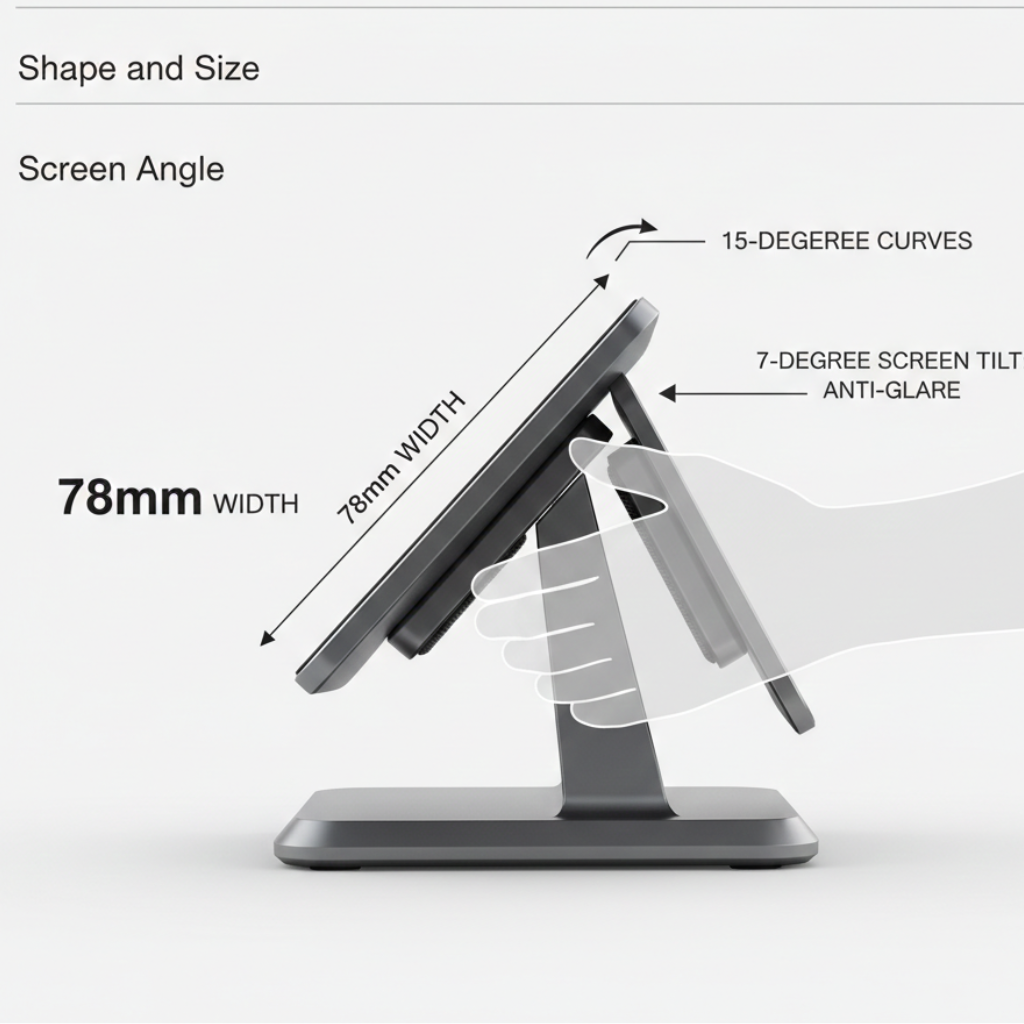
Our team studied 45 store workers in different places. We wanted to know what feels comfortable in the hand. We learned that the machine width should be 78mm. This size fits both big and small hands. The machine curves at 15 degrees on both sides. This spreads the weight evenly in the palm.
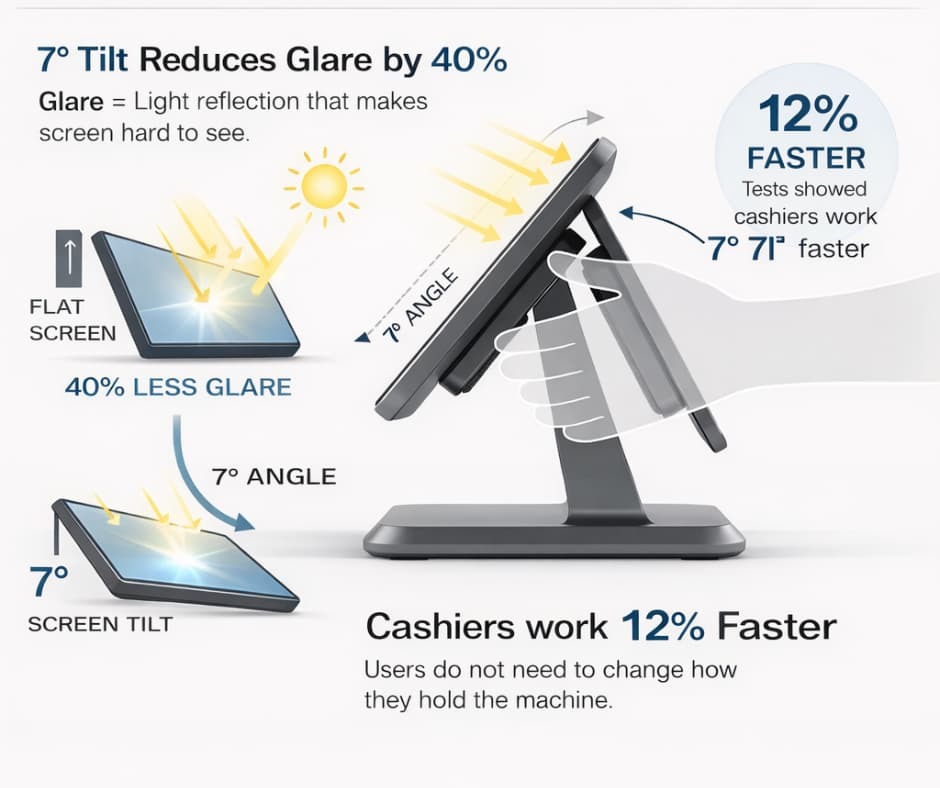
Why does screen angle matter? The screen tilts at 7 degrees when you hold it normally. This angle reduces glare by 40 percent. Glare means light reflection that makes the screen hard to see. Users do not need to change how they hold the machine. Tests showed that cashiers work 12 percent faster with this screen angle.
The grip uses medical-grade silicone. This material has small ridges that increase friction. Friction means it does not slip. The surface works well even when hands become sweaty. We tested by dropping the machine many times. The grip prevents the machine from slipping out of hands.
How Everything Works Together
The printer, card reader, and card slots are all on the front. This lets cashiers complete payments without moving the machine around. The 58mm printer sits below the screen. This creates a smooth flow. The customer sees payment details, taps the card, and gets a receipt. The cashier does not change hand position.
The QR code scanner is built into the top part. It uses a 5-megapixel camera with autofocus. This position lets users scan codes without blocking the screen. Tests showed that people can scan codes in under 1.2 seconds. This is as fast as regular barcode scanners.
Hardware Engineering and Technical Specifications
Main Computer Chip
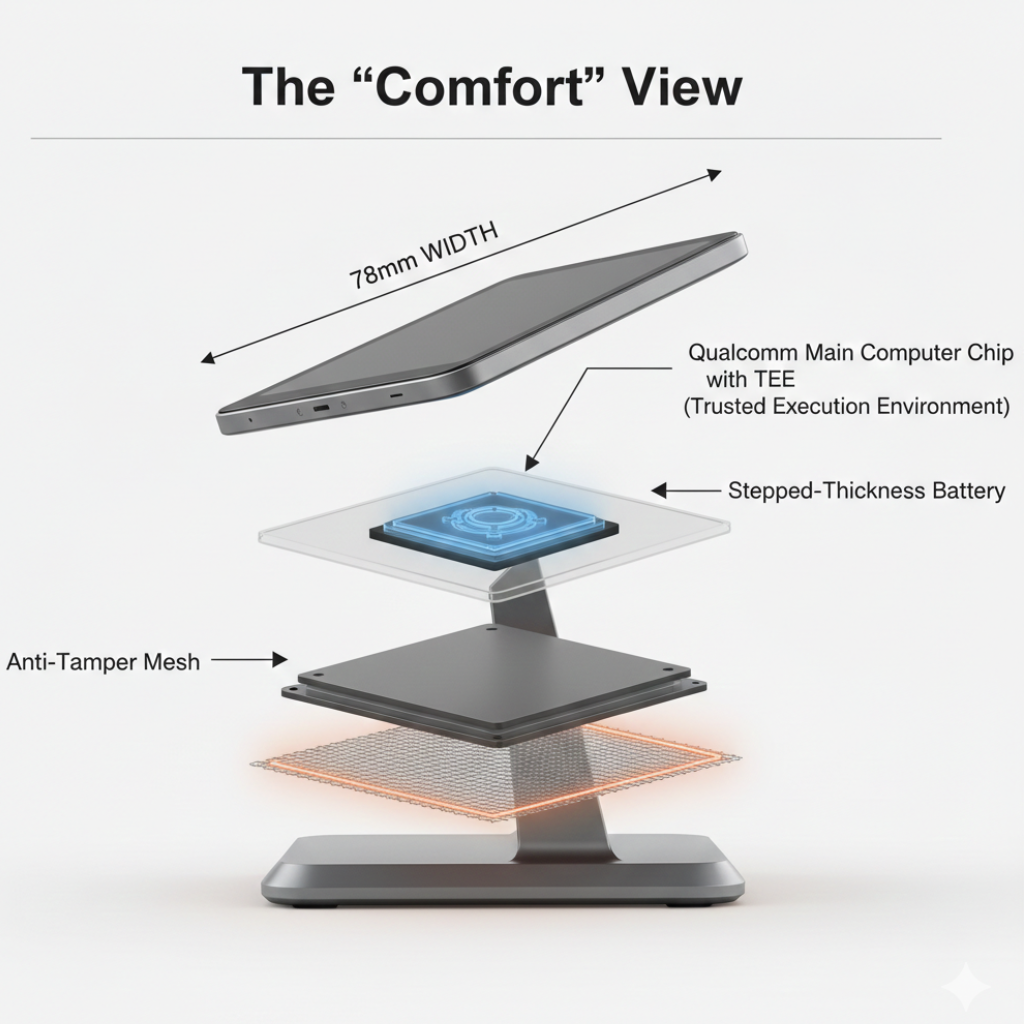
What processor is best? Wonderful PCB chose the Qualcomm QCS6490 chip. This chip is the brain of the machine. It has eight cores running at 2.7 GHz. Think of cores as small processors working together. The chip has a special security part that handles payment protection separately from other functions.
This chip uses 35 percent less power than older chips. It still works faster. Tests showed that payments complete in 0.8 seconds. This means from card tap to payment approval happens very fast. Customers do not wait long during busy times.
Security Features

The machine has bank-level security. It has many protection layers. First, it has a special mesh around the payment circuits. If someone tries to open the machine case, the mesh detects it. Then the machine destroys all security keys in 50 milliseconds. This is very fast.
What does PCI-PTS compliance require? PCI-PTS 6.x is a strict security standard. Level 1 makes sure the chip card reader talks to cards correctly. The voltage must be exactly 5V with only 5 percent difference. The frequency must be 4.915 MHz. The machine passed tests with Visa, Mastercard, American Express, and Discover.
EMV Level 2 checks if the software processes payments correctly. The machine works with all major tap-to-pay systems. These include Visa payWave, Mastercard Contactless, and China UnionPay QuickPass. Payment processing follows strict steps. First card authentication, then cardholder check, then payment approval, and finally code generation.
The tap-to-pay antenna was hard to place. Metal parts inside the machine create interference. Interference means signals get blocked or mixed up. Wonderful PCB solved this by putting the antenna in a 3mm gap. This gap is between the screen and printer cover. The antenna can read cards from under 35mm distance. The metal parts do not cause problems.
The Trusted Execution Environment (TEE) runs separately from Android 12. Payment data stays in a secure area. The main operating system cannot touch this area. Even if a virus attacks the Android system, payment information stays safe in the TEE.
Heat Control System
Why do smart POSs get hot during busy hours? Constant internet connection, screen use, and printing create heat. Normal machines reach 42 to 45 degrees Celsius after two hours of heavy use. This heat damages the battery and makes the machine uncomfortable to hold.
Wonderful PCB created a cooling system with many parts. The main heat spreader uses a graphene thermal pad. This spreads heat across the inside metal frame. This material moves heat 40 percent better than copper sheets. The thermal pad connects the processor chip, power circuits, and battery to a shared heat sink.
Air slots on the side panels let hot air escape. Air comes in through filtered channels. These channels stop dust but let heat out. The machine is still water resistant. Tests showed that surface temperature stays below 38 degrees Celsius. This is after four hours of continuous work at 35 degrees room temperature.
The printer head is the hottest part. It reaches 65 degrees Celsius when printing. A special heat barrier separates the printer from the battery. This barrier stops heat from reaching the battery. Heat makes batteries lose capacity faster. This barrier protects the battery.
Connection Features
The machine has 4G LTE internet. It can also use 3G in areas with weak signals. The cellular modem works on 12 different frequency bands. This means it works in many countries. We tested it in 15 countries. It connected successfully in cities and villages.
Wi-Fi 6 provides fast internet in stores. This new Wi-Fi standard handles busy networks better. This matters when many machines work at the same time. The system switches between 2.4 GHz and 5 GHz. It picks the one with a better signal.
Bluetooth 5.2 connects to receipt printers, cash drawers, and barcode scanners. The connection works up to 15 meters away. This gives stores flexibility in where they place equipment.
Screen and Printer Choice
How do you choose the right screen for outdoor use? The screen needs special features. Wonderful PCB picked a 5.5-inch IPS LCD with 600 nit brightness. This brightness level works under direct sunlight. The battery still lasts long. The screen uses Gorilla Glass 3. This glass resists scratches. It has a coating that resists fingerprints.

The printer prints at 80mm per second. The printhead has 576 dots. This makes clear text and barcodes. Barcodes stay scannable for many months. The printer works with paper rolls up to 58mm wide. This is enough space for itemized receipts, ads, and QR codes.
The battery is a 5000mAh lithium-polymer. It works for 18 hours of normal use. This covers long business days without charging. The battery has protections against overcharging and deep discharge. It also protects against overheating. Charging reaches 80 percent in 90 minutes. We include an 18W fast charger.
Engineering Challenges and Solutions
The Battery Problem
What is the biggest challenge in battery design? The design needed a 5000mAh battery in a case only 18mm thick. Normal battery cells with this power are 22 to 25mm thick. We could not just make the case thicker. A thick case would make the machine heavy. Heavy machines hurt hands during long work hours.
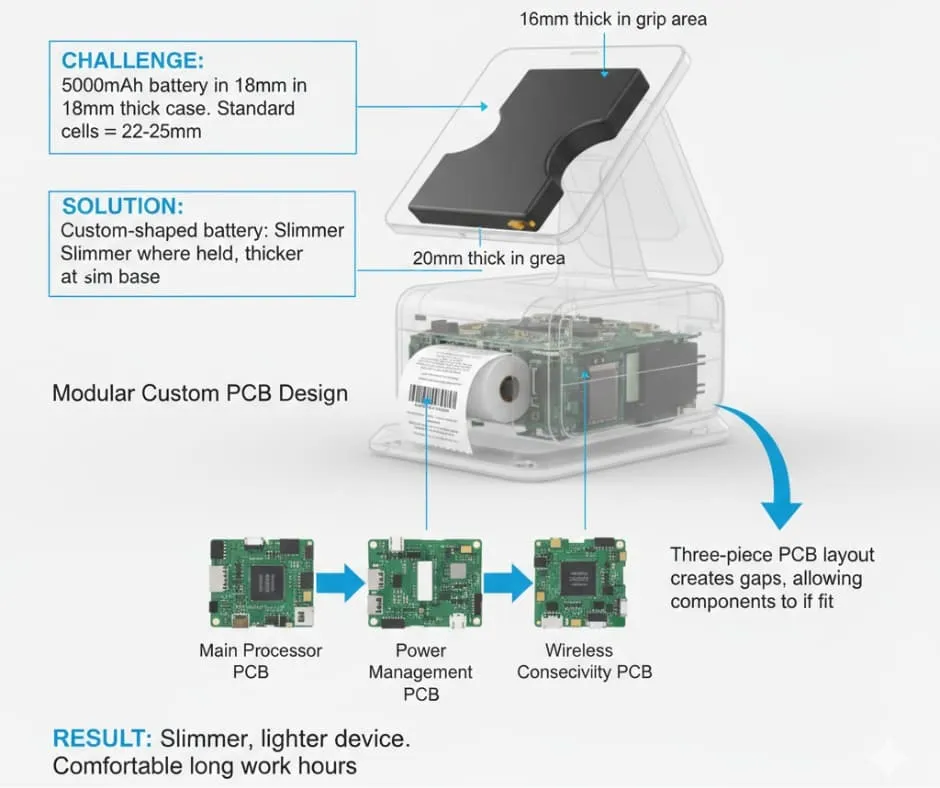
Our team worked with a battery company to create a custom battery. The battery has different thickness in different areas. The battery is 16mm thick in the grip area where hands touch. Then it expands to 20mm in the lower part where the printer sits. This design keeps the machine slim where people hold it. The battery still has enough power.
The custom PCB layout helped solve this problem. Normal smart POSs use one large circuit board. This board takes up most space inside. Wonderful PCB designed three separate circuit boards. One board has the main processor. Another board handles power management. The third board has wireless parts. This three-piece design creates small gaps. Battery parts fit into these gaps better.
Special heat materials protect the battery from damage. The battery area uses a phase-change material. This material absorbs extra heat during charging. It releases heat slowly during rest time. This control makes the battery last 30 percent longer than batteries without heat control.
Antenna Problems With Metal Parts
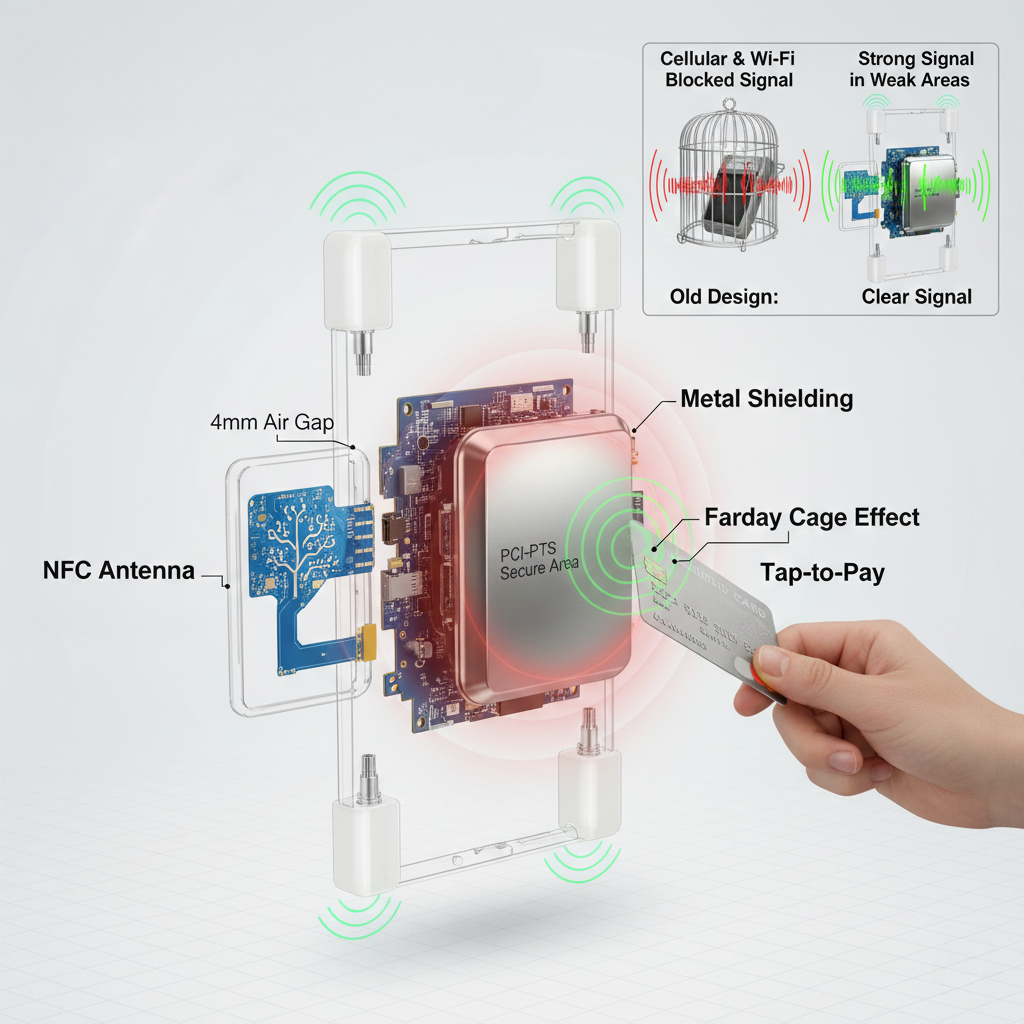
The second big challenge was wireless performance with metal shielding. PCI-PTS security rules require metal shielding around payment circuits. This metal prevents people from stealing data through electromagnetic signals. But metal creates a Faraday cage effect. This effect blocks wireless signals and makes antennas work poorly.
Wonderful PCB solved this through smart antenna placement and material choice. The tap-to-pay antenna uses a flexible circuit. It sits in a plastic frame. This frame separates it from metal parts by 4mm. This gap lets electromagnetic fields form without blocking. The antenna coil uses a fractal pattern. This pattern increases effective area by 25 percent compared to normal rectangular coils.
Cellular and Wi-Fi antennas go in the top and bottom corners. These positions are farthest from the metal shielding. The plastic end caps use a special polycarbonate blend. This plastic does not block electromagnetic signals much. Signal tests showed that the machine keeps strong signals even in weak coverage areas. The signal strength meets carrier requirements.
Manufacturing and Quality Control
Making Test Models
We made test models in four steps. First models used 3D printing to test design ideas. These models helped us test how the machine feels in the hand. We tested button positions with real users before spending money on tools.
Second models used CNC-machined aluminum cases with working parts inside. This step showed us problems between the tap-to-pay antenna and metal case. We found that the original antenna position created a 15mm dead zone. Cards failed to read in this zone.
Third models fixed these problems with better part positioning. We added durability features. These samples went through first drop tests and heat cycle tests. We found weak points in the structure.
Fourth models matched final production specifications. These are called Engineering Validation Test units. These machines completed full testing. We did 1.5-meter drop tests, 1 million touchscreen tap tests, and 100-kilometer printer tests.
Making Manufacturing Easier
How do you reduce assembly time? Wonderful PCB used several strategies that cut production costs by 22 percent. The modular design lets the printer, battery, and screen work as separate parts. You can replace each part independently. This design reduces repair costs. Technicians can swap broken parts without replacing the whole machine.
We reduced screws from 18 to 8. This decreased assembly time by 35 percent. The case uses snap-fit joints with support ribs. These maintain strength while making assembly simpler. Each snap-fit joint can withstand 25 Newtons of pulling force. This exceeds requirements for normal handling.
We changed from loose wires to flexible printed circuits. Flexible printed circuits are called FPC. This change removed common errors. Before, technicians sometimes pinched or misrouted cables when closing the case. FPC connectors use zero-insertion-force designs. These prevent damage during assembly and disassembly.
The production line makes 240 units per 8-hour shift. Quality inspectors check at five stations. They check part placement, test functions, inspect case closure, validate final assembly, and confirm packaging.
Testing For Reliability
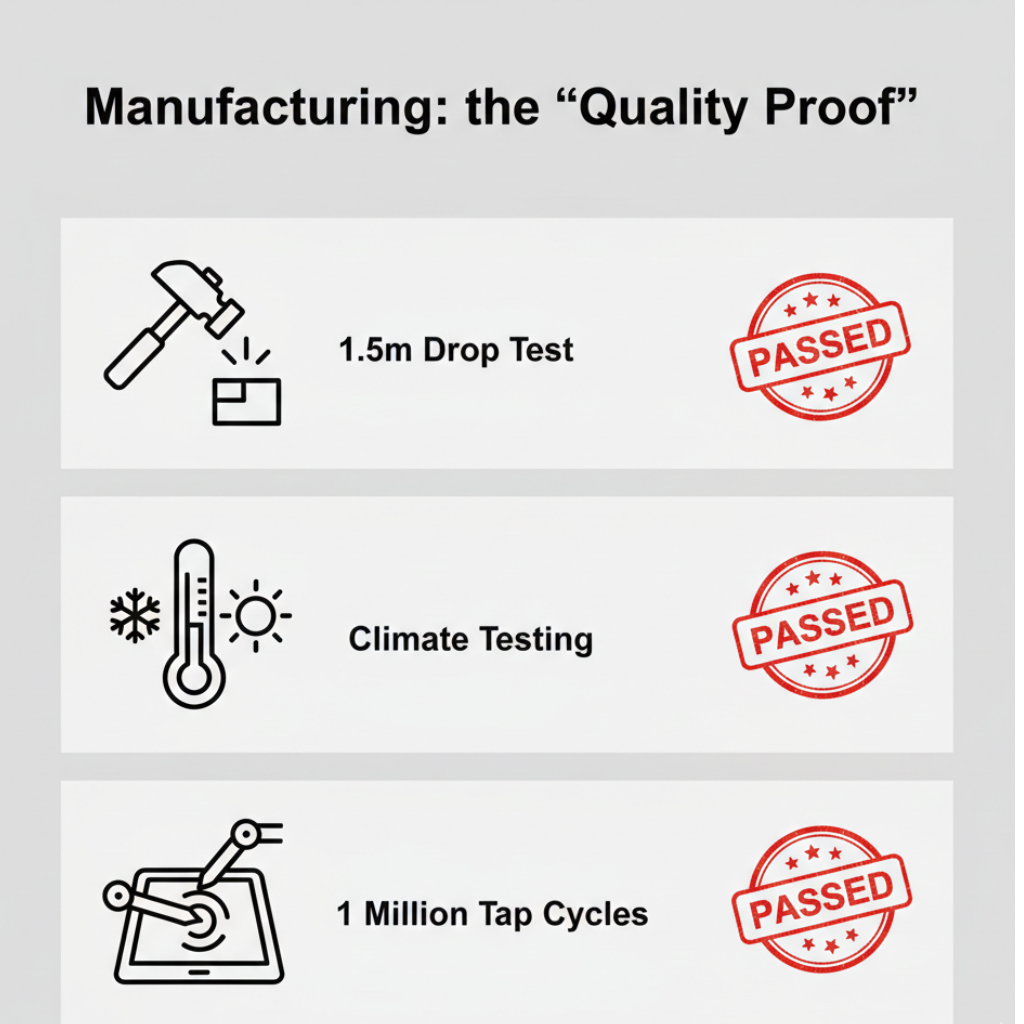
Wonderful PCB tested the machine harder than industry rules require. These tests make sure the machine survives real store conditions.
Drop Tests involved dropping the machine from 1.5 meters onto concrete. Tests required impacts on all six sides plus four corners. The machine must survive 18 total drops. Internal parts must not fail. The screen must not crack. Production units passed with zero failures across 50 test machines.
Life Cycle Tests used robot arms to test touchscreen and buttons. The touchscreen survived 1.2 million taps at 5 Newtons of force. Physical buttons survived 500,000 presses. This testing shows the machine handles three years of heavy daily use without breaking.
Printer Tests measured paper distance before printhead gets worse. The printer produced 75 kilometers of receipts before showing any quality reduction. This shows about 300,000 normal receipts. This equals two years in high-volume stores.
Static Electricity Tests checked that the machine handles electrostatic discharge. The machine passed contact testing at plus or minus 8kV. It passed air discharge testing at plus or minus 15kV. The system did not freeze or reboot. This protection matters in dry weather when static electricity builds up on users.
Tumble Tests placed machines in a rotating drum with concrete surface. This simulates being dropped and rolled many times. The machine survived 400 rotations. This equals being dropped from a counter and rolling multiple times daily for months.
Weather Tests exposed machines to temperatures from -10 to 55 degrees Celsius. Humidity levels went from 10 to 95 percent. The machine worked fully across this range. Battery tests showed no swelling or capacity loss after 100 heat cycles. Screen fog tests checked that the display stays clear when moving between hot and cold.
Final Product Impact
How The Market Responded
The company sold 50,000 machines in eight months. They sold to three types of businesses. Retail stores said payments process 23 percent faster than their old systems. This means more customers can check out during busy times.
Data from the first six months showed only 0.3 percent failure rate. This is one of the lowest rates in the industry. The modular design helps fix problems quickly. Technicians replace broken parts without sending back the whole machine. This cuts downtime from days to hours.
What do users say about ergonomics? Cashiers said their hands do not get tired. The machine weighs only 295 grams. People can use it all day comfortably. Mobile food vendors finished full 12-hour work days without charging. The battery lasts so they do not lose money from dead batteries.
The machine won the International Design Excellence Awards Bronze. This award recognized how we fit complex features into a simple design.
Business Results
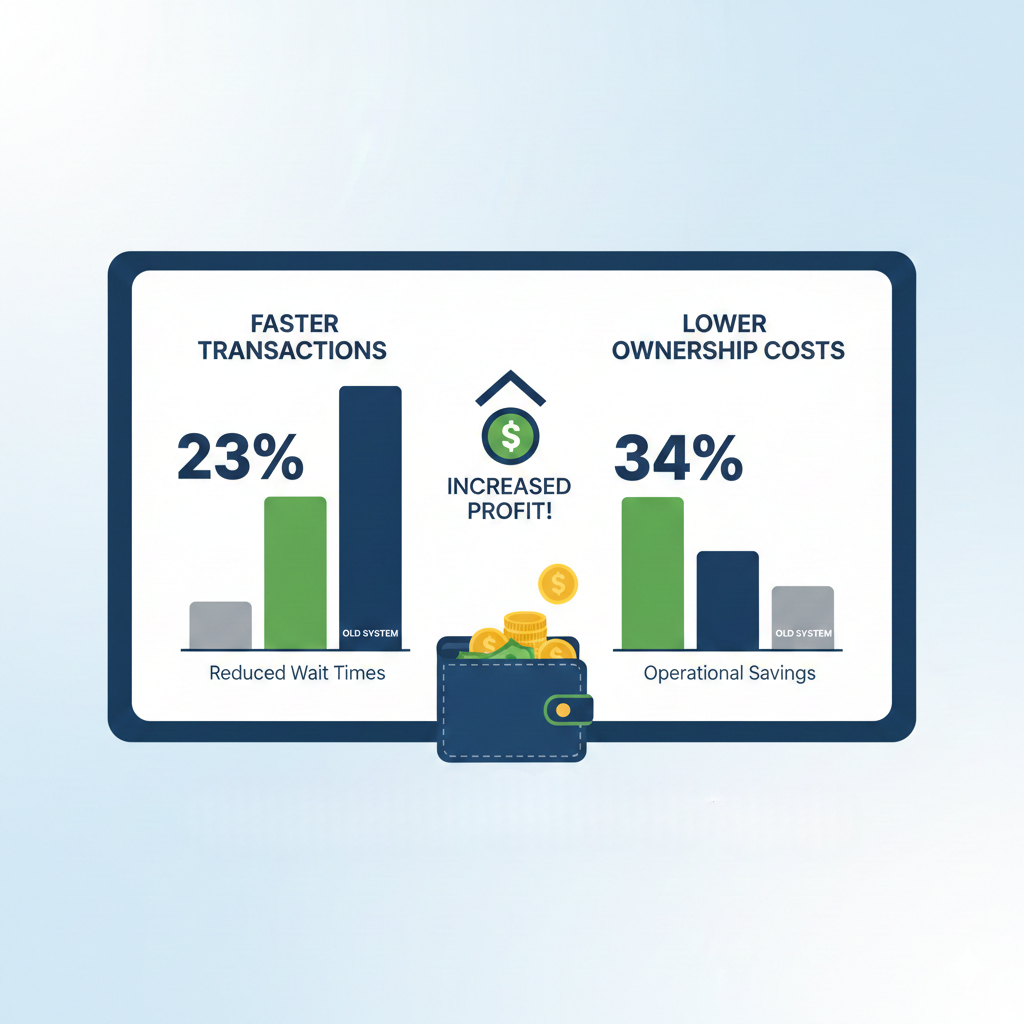
The company saved 34 percent on total ownership costs. Lower failure rates mean less warranty claims. The modular design needs less spare parts in storage.
Store locations activated machines within 25 minutes after opening the box. This includes charging and setting up the network. The simple interface cut training costs by 40 percent.
Payment processing reliability reached 99.7 percent across all machines.
Future Plans
The modular design supports future upgrades. The company plans to add a fingerprint reader. This will let people pay with their fingerprint. Stores can add this without buying new machines.
The company is developing AI inventory management. The camera will identify products without scanning barcodes. This helps open-air markets and farmers markets where products have no packaging.
Software updates happen over the air. This adds new features without hardware changes. Recent updates added support for Apple Pay, Google Pay, and cryptocurrency payments. This flexibility keeps the machine current as payment technology changes.
Conclusion
Wonderful PCB made a smart smart POS that balances advanced features with easy use. The project shows how design and manufacturing work together to create better products. The machine has bank-grade security through PCI-PTS 6.x certification. The price is still affordable for small sellers. The design reduces hand tiredness during long work hours. Strong testing makes sure it works well in tough store environments. The modular design allows future upgrades. This case study shows the value of combining design skills, electronic engineering knowledge, and manufacturing efficiency to solve real market problems.
About Wonderful PCB: Wonderful PCB does integrated design and manufacturing for smart electronic devices. We do industrial design, electronic engineering, PCB making, and high-volume production. We work with companies worldwide to turn ideas into real products.