You want the best hardware reverse engineering tools for 2026. Surveys show the top 10 tools people use. These tools are IDA Pro, Ghidra, Radare2, OllyDbg, x64dbg, Binary Ninja, Hopper, dnSpy, Frida, and Capstone. Hardware reverse engineering helps you learn how hardware works. It helps you find security problems. It also helps you make cybersecurity better. The market for these tools will be about USD 2.04 billion in 2026. You need the right toolkit for binary analysis. You also need it for hardware testing and cybersecurity research. Picking from the top 10 tools helps you match your skills. It helps you meet your project needs and budget.
Key Takeaways
Look at the top 10 hardware reverse engineering tools for 2026. These include IDA Pro, Ghidra, and Binary Ninja. This will help you pick the best tool for you.
Think about your project goals and your skill level before you choose a tool. Some tools are easier for beginners. Other tools are better for people with more experience.
Always make sure the tool works with your hardware and operating system before you buy it.
Try free tools like Ghidra and Radare2 to practice your skills. You can do this before you spend money on harder tools.
Join online forums and groups for help and to share ideas. This will make learning hardware reverse engineering easier for you.
Top 10 Reverse Engineering Tools
Quick List
You want to find the best reverse engineering tools in 2026. Here is a short list of the top 10 tools you can use for your work:
IDA Pro
Ghidra
Binary Ninja
Radare2
OllyDbg
x64dbg
Hopper Disassembler
Frida
Geomagic Design X
Saleae Logic Pro X
These tools help you look at hardware and spot security problems. They also help you see how devices work. Each tool has special features for different jobs and skill levels.
Selection Criteria
You might wonder why these tools are on the list. Experts and users check many things when picking reverse engineering tools. The most important things are features, user scores, and if the tools work with new technology. You also want tools that fit your money plan and project needs.
Tip: Always make sure the tool works with your hardware.
Here is a table that shows the main things that matter when you choose in 2026:
Factor | Description |
|---|---|
Advancements in analytical techniques | New ways like voltage probing and X-ray imaging make reverse engineering more exact. |
Regulatory developments | Changes in rules and IP laws affect how companies use and pick tools. |
Cost pressures | Tariffs on gear and parts make costs go up, so people rethink where they buy things. |
Market segmentation | Different IC types need special ways to study them, which changes what tools you buy. |
You should also check what other users and experts say about the tools. The chart below shows how users rate the top tools:
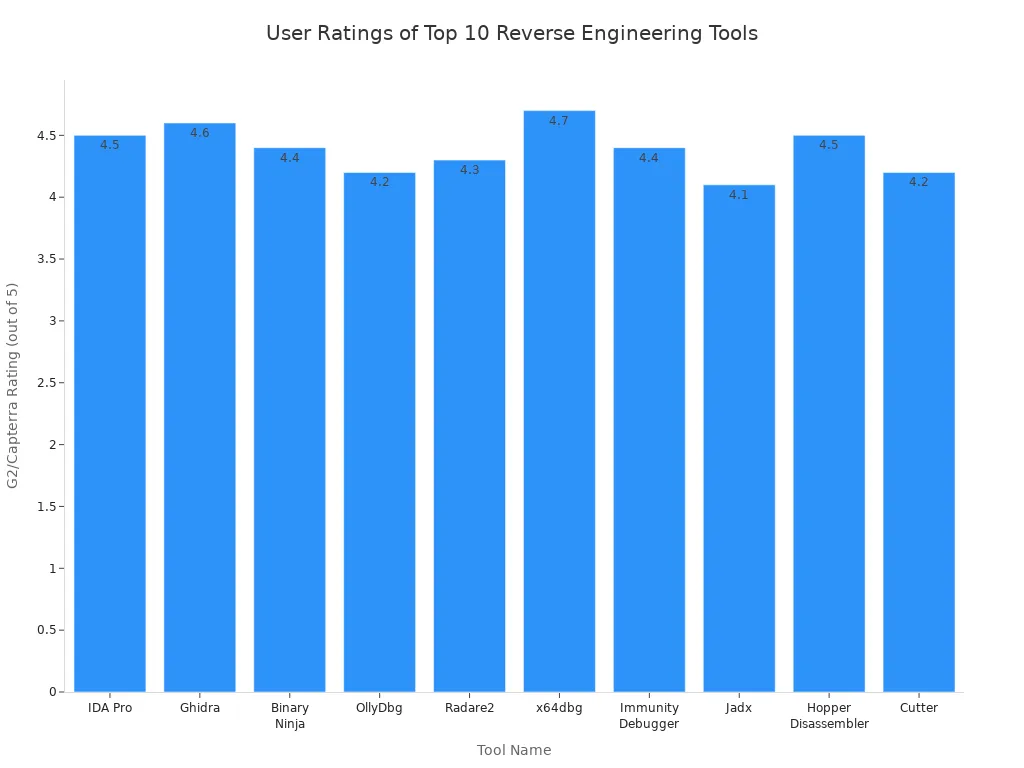
When you look at tools, think about how easy they are to use. Check if they work with many kinds of hardware and how often they get updates. These things help you pick the best tool for your work. You want tools that help you finish your work faster and easier.
Hardware Reverse Engineering Tools Overview
What Is Hardware Reverse Engineering?
Hardware reverse engineering helps you see how a device works. You take the device apart to look at its design and parts. You also check how it works and what it does. You look at things like the circuitry and firmware. You also see how the device talks to other things. Engineers use special tools to help with this job. These tools let you do static and dynamic analysis. You can look inside the device and learn about its features. Static and dynamic analysis show how the device acts when you give it different inputs. This helps you see how all the parts work together.
Reverse engineering tools help you find hidden features and problems in hardware. They make your work faster and easier.
Why Use These Tools?
People use reverse engineering tools for many reasons. These tools help you study hardware and find important features. Dynamic analysis lets you see how a device acts right now. You can use these tools to check for security problems. You can also learn how old devices work. These tools help you make sure your software works with your hardware. If you work with networks, you can use dynamic analysis to make data move faster. These tools help you keep your data safe and check for IP problems.
Here is a table that shows the main uses for hardware reverse engineering in 2026:
Application Area | Description |
|---|---|
Software Development | You can learn more about hardware. This helps you plan and fix software problems. |
Network Optimization | You can find ways to make networks faster. You do this by studying how hardware handles data. |
Data Security and IP Protection | You can find weak spots in hardware and make it safer. You can also check if other devices are safe. |
Legacy System Maintenance | You can keep old devices working. You do this by learning how they were built, even if you do not have manuals. |
Legal Analysis and IP Violations | You can use analysis to show if someone copied your ideas or used your technology without asking. |
You should pick tools that fit your project. Some tools are better for dynamic analysis. Other tools help you do static analysis. You can choose tools that match your skill level. If you want to work faster, pick tools that are easy to use.
Ghidra
Features
You can use Ghidra for many hardware reverse engineering jobs. This tool gives you a strong way to break down hard code. Ghidra is special because it has advanced reverse engineering features. These features help you work faster and make things easier. The tool works with many instruction sets. You can use it with different hardware types. You can pick user-interactive or automated modes. This means you can choose how you want to work.
Here is a table that shows the main features of Ghidra:
Feature | Description |
|---|---|
Context-sensitive help | You get help on menu items, dialogs, buttons, and tool windows. This is great for beginners. |
High-end analysis tools | You can use disassembly, assembly, decompilation, graphing, and scripting. |
Support for various instruction sets | Ghidra works with many instruction sets and executable formats. |
User-interactive and automated modes | You can switch between interactive and automated work. |
Custom plug-ins and scripts | You can create your own plug-ins and scripts using Java or Python. |
Side-by-side disassembler/decompiler | You can view disassembly and decompilation at the same time. |
Extensive analysis options | Ghidra gives you robust analysis features like commercial tools. |
Open-source improvement potential | The open-source design lets the community add new features. |
Ghidra’s disassembly tools help you see how hardware works. You can write your own scripts to save time during analysis.
Pros and Cons
Tip: Ghidra is open-source, so you do not need to pay for a license. You can also get updates from the community.
Pros:
You get many features for free.
The tool works with lots of hardware types.
You can use manual or automated analysis.
The open-source model lets you add new features.
Ghidra’s disassembly and decompilation tools are strong.
Cons:
The interface can be hard for new users.
Some scripts need programming skills.
There are fewer tutorials than with commercial tools.
If you want a tool with strong analysis and disassembly, Ghidra gives you what you need for hardware reverse engineering.
IDA Pro
Features
You can use IDA Pro for many hardware reverse engineering jobs. This tool has strong features for static and dynamic analysis. You can take apart and study many processor types. This makes IDA Pro a top pick for people who need deep hardware and firmware analysis.
Here are some main features you get with IDA Pro:
Multi-processor disassembly support lets you work with many hardware types.
The interface is interactive and scriptable, so you can automate tasks.
Graphical views help you see how code and data connect.
Debugging tools let you test and watch code as it runs.
Plug-in support lets you add new features for special needs.
Professional reverse engineers say IDA Pro is a top tool for hardware analysis. They trust its features and use it for hard projects. You can use IDA Pro for both easy and tough jobs. Many cybersecurity experts use it to find security problems in hardware.
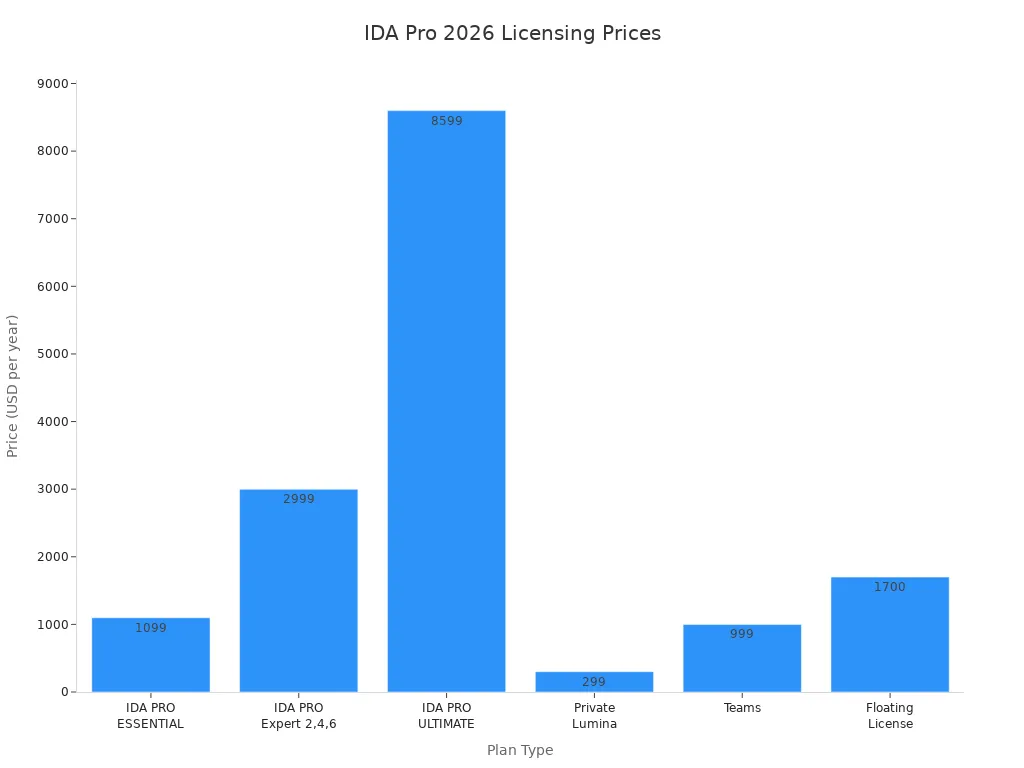
IDA Pro has different licensing plans. You can see the starting prices in this table:
Plan Type | Starting Price (per year) |
|---|---|
IDA PRO ESSENTIAL | $1,099 |
IDA PRO Expert 2,4,6 | $2,999 |
IDA PRO ULTIMATE | $8,599 |
Private Lumina | $299 |
Teams | $999 |
Floating License | $1,700 |
Pros and Cons
Note: IDA Pro has powerful features, but you should think about your needs and budget before you choose.
Pros:
You get advanced features for hardware and firmware analysis.
The tool works with many processor types and file formats.
You can do static and dynamic analysis in one place.
Many experts trust this tool.
You can add features with plug-ins and scripts.
Cons:
The price is high for some users.
The interface may seem hard if you are new.
You need time to learn all the features.
You can use IDA Pro for deep analysis and to find hidden details in hardware. If you want a tool with lots of features and strong support, IDA Pro gives you what you need.
Binary Ninja
Features
If you want to make hardware reverse engineering simple, try Binary Ninja. The tool has a clean interface. You will not feel confused when you start. It has many features that help you look inside hardware. You can use static analysis to check code without running it. There is also some dynamic analysis for deeper checks.
Here is a table that lists the main features and strengths of Binary Ninja:
Feature/Strength | Description |
|---|---|
User-friendly interface | Clean, intuitive graphical interface |
Analysis capabilities | Static and limited dynamic analysis capabilities |
Decompiler | Converts binaries to C-like code for many architectures |
Scripting APIs | Powerful Python and C++ scripting APIs |
Plugin marketplace | Extensible plugin marketplace for more features |
Community-driven content | Continuous updates and new features from the community |
Price comparison | Lower price point than IDA Pro |
Automation and integration | Highly scriptable for automation and integration |
Collaborative workflows | Supports team-based analysis |
Use cases | Great for rapid binary triage and vulnerability research |
The decompiler lets you turn hard code into C-like code. This makes it easier to read and see what the hardware does. You can add new features with plugins from the marketplace. Scripting helps you do tasks faster. The community keeps adding new things to the tool.
Pros and Cons
Tip: Binary Ninja is good for both new users and experts. You can use it for quick checks or deep research.
Pros:
The interface is easy to use and saves time.
The price is lower than many other tools.
You can add plugins and scripts for more features.
The community gives you updates and support.
Teamwork is simple with collaborative workflows.
Cons:
Dynamic analysis does not have as many options as some tools.
Some advanced features need extra plugins.
You might need to learn scripting to use all features.
You can use Binary Ninja for lots of hardware reverse engineering jobs. The tool gives you strong features and is a good deal for your money.
Radare2
Features
Radare2 helps you with many hardware reverse engineering jobs. This tool has lots of features for looking inside devices. Radare2 is open-source, so anyone can see how it works. People can also help make it better. Many hardware engineers like this tool because they trust it. They can also add new things to it.
Here is a table that shows why hardware engineers like Radare2:
Feature | Description |
|---|---|
Open-source framework | Radare2 is recognized for its open-source nature, which allows for community contributions and transparency. |
Scripting capabilities | It offers extensive scripting options that can automate tasks, making it appealing for hardware engineers. |
Automation features | The automation capabilities enhance efficiency in reverse engineering processes, which is crucial for hardware development. |
You can use scripts to do your work faster. Radare2 lets you automate many steps. This saves time and helps you focus on hard problems. The tool works on Windows, macOS, and Linux. You can use Radare2 for static and dynamic analysis. This means you can study code without running it. You can also watch how code works in real time.
Radare2 works with many file types and processors. You can use it for small or big projects. The tool uses a command-line interface, but you can add a graphic front-end. There are also many plugins that give you more features.
Pros and Cons
Note: Radare2 is free, but you need to learn some commands to use all the features.
Pros:
You get a free tool with many features.
The open-source model lets you trust and improve the tool.
Scripting and automation help you work faster.
Radare2 works on many operating systems.
You can use it for static and dynamic analysis.
Cons:
The command-line interface is hard for new users.
You may need to learn scripting for advanced features.
Some features need extra plugins or setup.
If you want a tool with strong features and ways to change your analysis, Radare2 gives you what you need for hardware reverse engineering.
OllyDbg
Features
OllyDbg helps you see how hardware works inside. The tool has many features that show what happens in a program. The interface is easy to use, so you will not get confused. You can set breakpoints and watch registers. You can also see how code runs one step at a time. These tools help you follow what the program does.
OllyDbg lets you check API calls and debug DLLs. It supports hardware breakpoints, so you can stop the program when hardware events happen. You can dump a process to look at it later. These features help you find problems and hidden things in hardware.
Here is a table that shows what OllyDbg can do for hardware reverse engineering:
Use Case | Description |
|---|---|
Tracing Registers | Lets you watch register values as the program runs. |
Finding Loops and Switches | Helps you spot loops and switches in the code. |
API Call Analysis | Shows you which API calls the program uses. |
Debugging DLLs | Lets you load and debug DLL files. |
Setting Breakpoints | Lets you put breakpoints in the code. |
Hardware Breakpoints | Stops the program when hardware events happen. |
Process Dumping | Lets you save the process for more study. |
Step-by-Step Debugging | Lets you debug the program one step at a time. |
These features make your analysis better. OllyDbg works best with 32-bit programs. There is a beta version for 64-bit programs you can try.
Pros and Cons
Tip: OllyDbg is free, so you do not need to pay to use it.
OllyDbg has good and bad sides. The tool is simple, so you can learn fast. It gives you strong tools for looking at programs. But OllyDbg does not work as well with 64-bit programs as some other tools. It does not have advanced things like graph views.
Some programs can tell if you use OllyDbg, so it may not work for all security tests. Many other debuggers cost money, but OllyDbg is free. Here is a table that compares OllyDbg to other debugging tools:
Feature/Aspect | OllyDbg | Other Debuggers |
|---|---|---|
User Interface | Easy to use and simple | Some are harder to use |
Analysis and Manipulation | Strong features | Some have more advanced tools |
Support for 64-bit applications | Not as good, beta version exists | Most have better support |
Advanced Features | Does not have graph view | Some have more features |
Vulnerability to Anti-Debugging | Can be found by programs | Some are harder to detect |
Cost | Free | Many cost money |
You can use OllyDbg for many hardware reverse engineering jobs. The tool gives you what you need for simple and hard analysis, but you should know what it cannot do before you start.
x64dbg
Features
You can use x64dbg for many hardware reverse engineering jobs. This tool works with both 32-bit and 64-bit programs. The interface is easy to use and helps you follow what a program does. You can find problems in the code quickly. x64dbg lets you use plugins and Python scripts. This means you can add new things or make your work faster. You do not have to worry about registry entries. x64dbg uses paths that are easy to move. This makes it simple to set up on different computers.
Here is a table that shows how x64dbg is different from other tools:
Feature/Advantage | x64dbg | OllyDbg | WinDbg |
|---|---|---|---|
64-bit Debugging | Yes | No | Yes |
Community Support | Active community support | Limited, unmaintained since 2010 | Strong support for system-level debugging |
Extensibility | Scripting via plugins and Python integration | Limited to OllyScript | Extensive, but more complex |
Portability | Uses relative paths, avoids registry entries | Relies on absolute paths | More resource-intensive |
User Interface | Intuitive for user-mode tasks | Similar, but less maintained | More complex for kernel-mode analysis |
Mixed Environment Support | Supports both 32-bit and 64-bit | 32-bit only | N/A |
x64dbg helps you look deep into hardware and firmware. You can see how code works and where mistakes happen.
Pros and Cons
Tip: x64dbg is free and open-source. You can try it without paying.
There are many good things about x64dbg. It has strong tools for checking and fixing code. The community is active and can help you. You can use plugins and scripts to add what you need. x64dbg works with both 32-bit and 64-bit programs.
There are also some problems you might face. Some people say the interface is hard to use at first. The help system does not always explain things well. Sometimes, the tool uses a lot of CPU and slows down your computer. The interface can freeze if you open big files. Copying tables only gives you what you see, not everything. UTF-16 support in the dump view is not very good. You cannot set memory breakpoints with special sizes because it can slow things down.
Here is a short list of common problems:
The interface can be hard to use at first.
The help system does not always explain things.
High CPU use can slow your computer.
The tool may freeze with big files.
Copying tables only gives you some data.
UTF-16 support in the dump view is weak.
You cannot set memory breakpoints with custom sizes.
You should try x64dbg if you want a tool with lots of features. The active community and plugin support make it a good pick for hardware reverse engineering.
Frida
Features
Frida lets you look at hardware in new ways. This tool has many features for dynamic instrumentation. You can put JavaScript code into apps that are running. This helps you watch function calls and change what they do. You can also catch data as it moves in real time. These features show you what is happening inside a device while it works.
Frida works on Windows, macOS, Linux, and mobile devices. You do not have to restart your app to use it. You can start checking things right away. The scripting engine lets you make your own scripts for special jobs. You can hook functions and see how data moves in the system. Frida lets you do both static and dynamic analysis, so you get a full look at how hardware acts.
Here are some things you can do with Frida:
Put JavaScript code into live apps
Watch and change function calls
Catch and study data as it happens
Make your own scripts to automate tasks
Use it on many types of devices and systems
Tip: Frida helps you test security and find hidden problems in hardware.
Pros and Cons
Frida gives you many good things for hardware reverse engineering. You get strong tools for live analysis. You can change how a device works without stopping it. Frida makes it easy to use scripts to do your work. You can use it for simple or hard projects.
But there are some risks you should know. Frida can help bad people get past security. They can put in code and change how apps work. Attackers might get secret data or turn off security. Frida can also get around SSL pinning, so attackers can see safe traffic.
Here is a table that shows the main good and bad things about Frida:
Pros | Cons |
|---|---|
Powerful dynamic instrumentation | Can be used for bad things |
Real-time data interception | May get past security controls |
Works on many platforms | Some things need scripting skills |
Easy to automate with scripts | Can put secret data at risk |
No need to restart target apps | May be found by anti-instrumentation tools |
You should be careful when you use Frida. The tool has many features for analysis, but you must keep your systems safe from misuse.
Hopper
Features
You can use Hopper if you want a tool that is easy to learn. Hopper is simple for people who are new to hardware reverse engineering. The tool works best on macOS, but you can also use it on Linux and Windows. Hopper is good for looking at Apple hardware or iOS binaries. You do not need to pay every year. You only pay once to use Hopper.
Here is a table that shows why people like Hopper for hardware reverse engineering:
Strengths | Description |
|---|---|
Accessible for beginners | Easy to use, making it suitable for newcomers. |
Cost-effective | Affordable option for reverse engineering tasks. |
Ideal for macOS/iOS | Designed for Apple hardware and iOS binaries. |
Hopper’s interface is clear and easy to use. You can use it for quick checks or small projects. The tool gives you the main features for basic analysis. You can use scripting to add more features if you want. Hopper helps you see how code works and find problems in hardware.
Pros and Cons
You should know the good and bad sides of Hopper before you pick it. Hopper is great if you want something simple. The interface is easy, so you can start right away. You do not need much time to learn the features. Hopper costs less than many other tools.
Here is a table that compares Hopper to other popular tools:
Feature/Aspect | Hopper Disassembler | Ghidra/IDA Pro |
|---|---|---|
User Interface | Simple and intuitive | More complex and feature-rich |
Accessibility | Great for beginners | Steeper learning curve |
Pricing | Affordable one-time purchase | Often subscription-based |
Features | Fewer for large workflows | Comprehensive and extensive |
Platform Support | macOS, Linux, Windows | Multiple platforms |
Ideal Use Cases | Quick, small-scale analysis | Large-scale reverse engineering |
Hopper does not have as many features as Ghidra or IDA Pro. If you need advanced analysis for big projects, you may want another tool. Hopper works best for small jobs and for people who want to learn. You can use Hopper to start hardware reverse engineering and basic analysis.
Tip: Hopper is a smart pick if you use a Mac or want to study iOS binaries.
Geomagic Design X
Features
You can use Geomagic Design X to turn 3D scan data into CAD models. This tool gives you many features that help with hardware reverse engineering. You can scan real objects and create digital models. The software works well with advanced scanning tools like the FARO Design ScanArm. You can use the ‘Transfer to SOLIDWORKS’ button to move your models into SOLIDWORKS. This keeps your design tree and makes editing easy.
Here are some features you will find helpful:
You can import 3D scan data from many devices.
The software lets you rebuild CAD models from scan data.
You can use the FARO Design ScanArm for fast and accurate scans.
The tool works with other engineering software, so you can keep your workflow smooth.
You get a user-friendly interface that helps you learn quickly.
You will see that these features make your work faster and more accurate. You can use the tool for both simple and complex projects. The software supports many file types, so you can share your work with others.
Pros and Cons
You will find that Geomagic Design X has many strengths. The tool gives you powerful features for reverse engineering. You can do detailed analysis of hardware parts. The software works well with other tools, which helps you finish projects faster.
Pros:
You can create CAD models from real objects.
The tool works with advanced scanners like the FARO Design ScanArm.
You can move your models to SOLIDWORKS with one click.
The software supports many file formats.
You get strong analysis tools for hardware projects.
Cons:
The software can cost a lot for some users.
You may need a good computer for large scans.
Some features may take time to learn if you are new.
Tip: If you want to do fast and accurate hardware analysis, Geomagic Design X gives you the features you need.
Saleae Logic Pro X

Features
Saleae Logic Pro X helps you capture and study signals from hardware. You can see how your circuits work with this tool. It connects to your computer using USB 3.0, so data moves fast. The device has eight digital and eight analog channels. This means you can watch many signals at the same time. You can use it for jobs like firmware debugging and reverse engineering. The software lets you record long sessions. How long you can record depends on your computer’s RAM and how much data you collect.
Here is a table that lists the main technical specs:
Specification | Value |
|---|---|
Digital Channels | Eight |
Max Digital Sampling | 500 MSPS |
Max Digital Bandwidth | 100 MHz |
Analog Channels | Eight |
Max Analog Sampling | 50 MSPS |
Max Analog Bandwidth | 5 MHz |
Recording Length | Limited by RAM and data density |
Connection | USB 3.0 Super Speed |
Applications | Firmware Debugging, Reverse Engineering, etc. |
You can use the software to look at, zoom in, and search your data. The tool helps you decode protocols. This makes it easier to see how devices talk to each other. These features make Saleae Logic Pro X a good pick for signal analysis and fixing hardware problems.
Pros and Cons
Saleae Logic Pro X has good and bad points. Many people like its features for fixing serial connections like SPI and I2C. The device makes it simple to capture and check signals. Some people think the tool costs too much, especially for hobbyists or Arduino users. The price is usually between $400 and $500. Some users want more advanced features, like better ways to trigger on certain SPI values. Other tools, like Logicport LA1034, have more features for about the same price.
Here is what users say about Saleae Logic Pro X:
Some people like how it helps with serial connections.
Many think the interface is easy for basic checks.
Some users feel the price is high for what you get.
A few want more advanced features, like better triggers.
Some other tools give you more features for the same price.
Tip: If you want a tool that is easy to set up and gives clear signal results, Saleae Logic Pro X is a good choice. Make sure its features fit your project before you buy it.
Comparison of Top Tools
Feature Table
You want to find the best hardware reverse engineering tools. You need to know how each tool helps with security. The table below shows what each tool can do. Use this table to compare the features that matter most for your work.
Tool | Main Features | Security Focus | Ease of Use | Scripting Support |
|---|---|---|---|---|
IDA Pro | Disassembly, Debugging, Plugins | High | Medium | Yes |
Ghidra | Decompilation, Multi-arch, Open-source | High | Medium | Yes |
Binary Ninja | Clean UI, Decompiler, Plugins | Medium | High | Yes |
Radare2 | Command-line, Automation, Plugins | High | Low | Yes |
OllyDbg | Debugging, Breakpoints, Free | Medium | High | Limited |
x64dbg | 32/64-bit, Plugins, Free | Medium | High | Yes |
Hopper | Simple UI, Scripting, One-time buy | Medium | High | Yes |
Frida | Dynamic Instrumentation, Scripting | High | Medium | Yes |
Geomagic Design X | 3D Scan to CAD, Integration | Low | Medium | No |
Saleae Logic Pro X | Signal Capture, Protocol Decoding | Low | High | No |
Note: Pick tools with strong security features if you want to keep your devices safe.
Price and Platform
You should know the cost and where you can use each tool. Some tools are free. Others cost a lot of money. You also need to check if the tool works on your computer. The table below helps you see the price and platform for each tool.
Tool | Price Range | Platform(s) |
|---|---|---|
IDA Pro | $1,099 – $8,599 | Windows, macOS, Linux |
Ghidra | Free | Windows, macOS, Linux |
Binary Ninja | $149 – $799 | Windows, macOS, Linux |
Radare2 | Free | Windows, macOS, Linux |
OllyDbg | Free | Windows |
x64dbg | Free | Windows |
Hopper | $99 – $249 | Windows, macOS, Linux |
Frida | Free | Windows, macOS, Linux, Mobile |
Geomagic Design X | $8,000+ | Windows |
Saleae Logic Pro X | $400 – $500 | Windows, macOS, Linux |
Some tools give you strong security for free. Other tools cost more but have advanced features. Always pick a tool that matches your security needs and your budget.
Tip: Choose tools that work on your computer and help you keep your hardware safe.
Choosing the Right Hardware Reverse Engineering Tool
Assessing Needs
You should start by thinking about your project. Ask yourself what you want to do. Some tools work best for looking at code. Other tools help you study signals or 3D models. Make a list of your goals. Write down if you need to check firmware, test circuits, or scan hardware parts. When you know your needs, you can pick the right tools for the job.
Tip: Write down the main tasks you want to finish. This helps you match your needs to the features of different tools.
Budget and Support
You must think about how much money you can spend. Some tools cost a lot. Others are free or have a low price. Look at the price table before you buy anything. You should also check if you can get help when you have problems. Some tools have big online groups. Other tools have company support. Good support can save you time when you get stuck.
Here is a table to help you compare:
Price Range | Support Type | Example Tools |
|---|---|---|
Free | Community Forums | Ghidra, Radare2 |
Low to Medium | Email/Docs/Forums | Binary Ninja, Hopper |
High | Company Support | IDA Pro, Geomagic DX |
Beginner vs. Advanced
You need to know your skill level. If you are new, choose tools with simple menus and guides. These tools help you learn fast. If you have more experience, you can use advanced tools with more features. Some tools let you write scripts or add plugins. These features help you do more, but they can be hard for beginners.
Beginners: Try tools with easy steps and lots of help.
Advanced users: Pick tools with scripting and deep analysis.
Note: You can start with simple tools and move to advanced ones as you learn more.
You have learned about the top 10 hardware reverse engineering tools for 2026. Each tool has strengths for different jobs and skill levels.
Choose a tool that matches your project and experience.
Look for easy-to-use features and strong community support.
Check if the tool works with your hardware.
Tip: Start with free tools to build your skills. Join online forums to get help and share ideas.
FAQ
What is the safest way to start hardware reverse engineering?
You should start with free tools like Ghidra or Radare2. Read guides and join online forums. Practice on old or unused devices. Always follow the law and respect device owners.
Can you use these tools on any operating system?
Most tools work on Windows, macOS, and Linux. Some, like OllyDbg and x64dbg, only run on Windows. Always check the tool’s website for platform support before you download.
Do you need to know programming to use these tools?
You do not need to know programming for basic tasks. For advanced analysis, you should learn scripting languages like Python or JavaScript. This helps you automate work and use more features.
Are hardware reverse engineering tools legal?
You must follow your country’s laws. Using these tools for learning or research is usually legal. Using them to break security or steal information is illegal.
How do you choose the best tool for your project?
Write down your project goals.
Check your skill level.
Compare tool features and prices.
Read user reviews.
Try free versions before you buy.