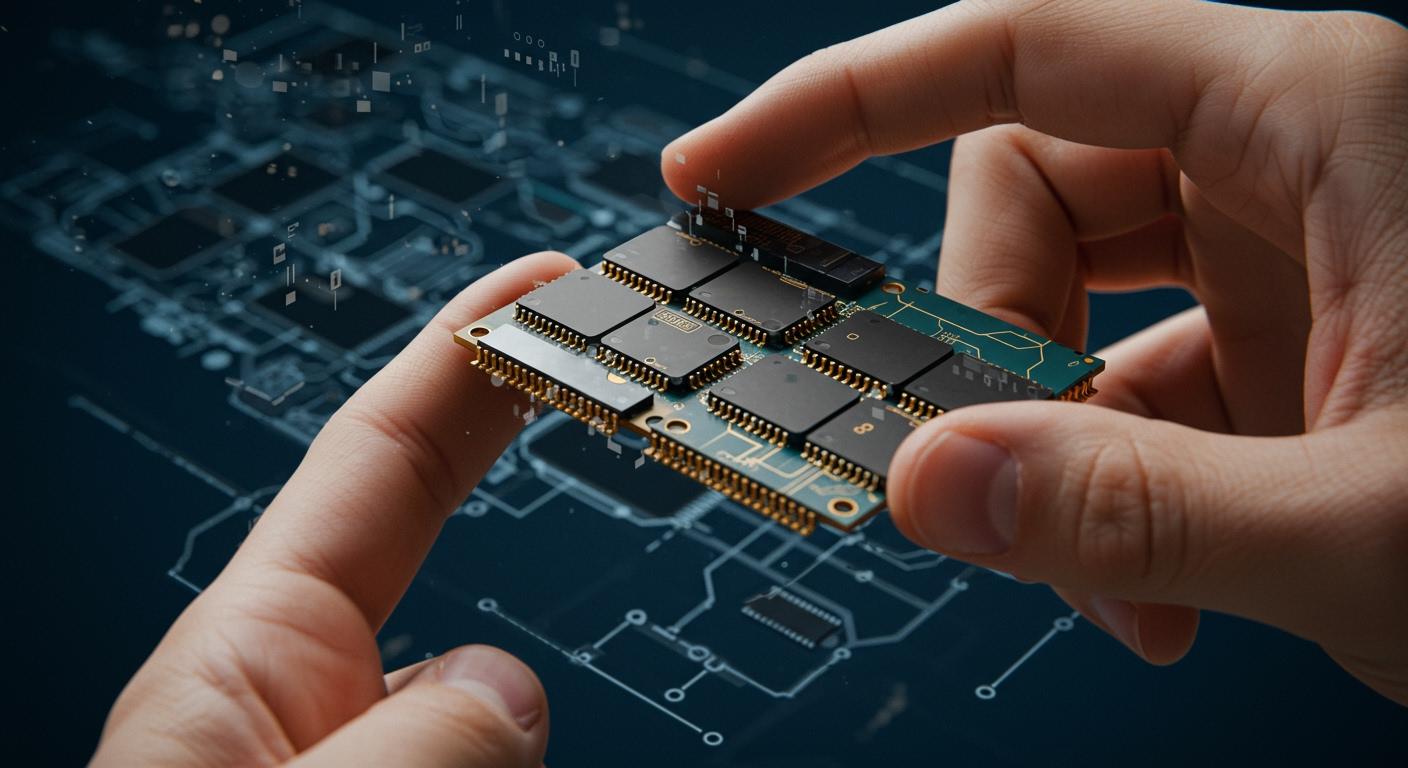
A chiplet is a small part of a semiconductor. It does one job inside a bigger circuit system. Traditional chips are made as one piece. Chiplets are built as separate parts. Each chiplet is made for a special task. They are put together to make stronger and better systems. Chiplet technology is important because it helps electronics work better. It also makes it easier to build bigger systems. Chiplets are becoming more popular in the market. The global chiplets market was worth $5.3 billion in 2023. It could grow to $42.8 billion by 2029.
The market might grow by 41.9% each year until 2029.
By 2035, it could be worth $1780.9 billion. This shows chiplets will be very important in the future.
Key Takeaways
Chiplets are small semiconductor parts made for certain jobs. They help make systems that are modular and flexible.
Using chiplets can lower costs a lot and boost performance. You can upgrade parts without changing the whole system.
The chiplet market is growing fast. It may reach $42.8 billion by 2029. This shows chiplets are becoming more important in technology.
Chiplet systems give design flexibility. Users can mix and match parts to fit their needs well.
Standards like UCIe help chiplets from different makers talk to each other. This makes them work together and helps new ideas grow.
Chiplet Basics
Modular Design
A chiplet is a small part made for one job. Each chiplet does something like handle data or memory. Companies make chiplets so you can put them together. This is not how regular chips work. Regular chips have everything on one piece.
Chiplet architecture uses small parts made alone, then joined together.
Monolithic chips keep all jobs on one piece, which is less flexible and harder to upgrade.
Chiplet-based systems let you pick different chiplets for what you need.
Smaller chiplets cost less because they have fewer mistakes and more good pieces.
Chiplets make it easy to grow and change systems fast, so you do not need to start over.
Chiplet systems use designs that already work. You can add old chiplets to new products. This saves money and helps companies finish faster.
Here is a table that shows why modular chiplet design is good:
Advantage | Description |
|---|---|
Design Flexibility | You can choose parts to fit your needs, so you do not need special designs. |
Cost Effectiveness | Small chiplets have fewer problems and more good pieces, so you save money. |
Performance Optimization | Chiplets can use different ways to make each part better. |
Accelerated Time-to-Market | Ready-made chiplets help you finish products faster. |
Environmental Impact | Small chiplets use less material, so making them is better for the planet. |
Integration Methods
You can put chiplets together in different ways. These ways help chiplets work as one system.
Integration Method | Description |
|---|---|
2.5D Integration | Puts chiplets next to each other on a shared base called an interposer. |
3D Integration | Stacks chiplets on top of each other for better speed and closer connection. |
The Universal Chiplet Interconnect Express (UCIe) standard lets chiplets from different makers talk to each other. UCIe helps connect chiplets made in different places and with different methods.
Many rules tell chiplets how to send data and talk to each other. These rules make sure chiplets from different companies work together in one system. This makes chiplet technology easier for everyone to use.
Chiplet Role
Functions in Electronics
Chiplets are used in many modern electronics. Each chiplet is a small part of a bigger system. Different chiplets do different jobs. Some chiplets work as CPUs and do basic tasks. Other chiplets are GPUs and handle graphics or many tasks at once. Memory chiplets help you get data quickly. I/O chiplets let your device connect to other devices.
Here is a table that explains what each chiplet type does in a semiconductor system:
Chiplet Type | Function Description |
|---|---|
CPU Chiplets | Handle general-purpose processing tasks. |
GPU Chiplets | Manage graphics and parallel computing tasks. |
Memory Chiplets | Provide high-speed memory access. |
I/O Chiplets | Manage input/output operations. |
You can pick different chiplets to make a system that fits your needs. This design lets you use the best chiplet for each job. You do not have to make a new chip to upgrade. You can just change one chiplet for another.
Tip: High-speed interconnects, like UCIe, let chiplets share data fast and use less power. This helps your device work better and saves energy.
Impact on Performance
Using chiplets gives you better speed and more choices. Each chiplet can use the newest process, so each part works its best. You can also use chiplets from different companies or with special features. This helps you make a system that is right for you.
Chiplets make it simple to upgrade or change your device. If you want more memory or faster graphics, just add or swap a chiplet. You do not need to build a whole new system. This saves both time and money.
Here are some ways chiplets help with performance and flexibility:
You can use the best process for each chiplet, so your device is faster and uses less energy.
You can upgrade one part without changing everything.
You can make custom systems for special uses, like gaming or data centers.
Chiplets also help lower the cost. Smaller chiplets mean fewer problems and more working pieces from each wafer. This makes it cheaper to build complex devices.
Note: As technology gets better, chiplets help you keep up. You can use new chiplets in old systems, so you do not fall behind.
Chiplet Benefits
Flexibility
Chiplets help you build systems that fit what you need. You can pick different chiplets for each job. This way, you do not need to make a new semiconductor every time. You just choose the chiplet that does the job best. This makes it simple to make special devices for gaming, data centers, or phones.
Makers can put chiplets together for special tasks.
You can use designs that already work, which saves money and time.
Each chiplet does one thing, so your system works better.
Tip: Chiplets let you upgrade or change your device fast by swapping one part.
Scalability
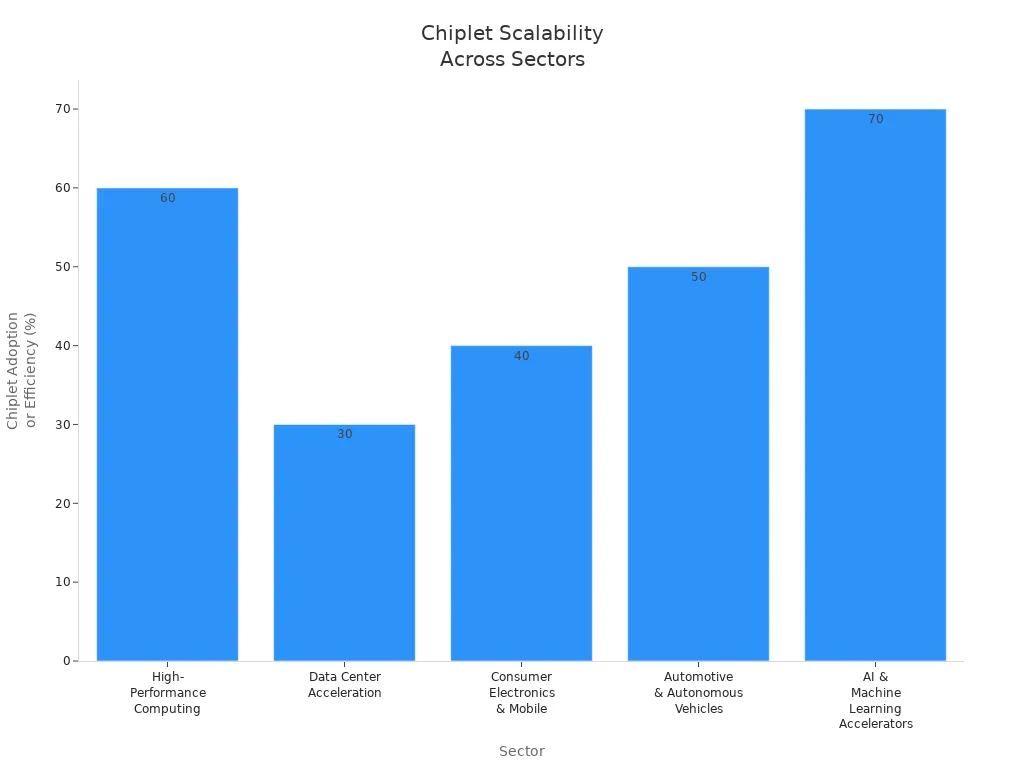
Chiplet systems let you grow your tech as you need. You can add more chiplets or switch them for better ones. You do not have to rebuild the whole system. This makes it easier to make your system bigger than with old designs.
Factor | Description |
|---|---|
Modularization | Breaks big designs into small, separate parts, so you can change and grow them easily. |
Flexibility | Lets you use and mix chiplets to meet many needs fast. |
Cost Efficiency | Mixes different chiplets to balance speed and cost. |
Chiplet scalability is used in many areas. Supercomputers use chiplets to get more power. Data centers use modular chips to work better. Phones now have AI and sensors as their own chiplets. Cars use special chips to be safer and smarter. AI hardware uses special and regular chiplets for faster learning.
Cost Efficiency
Chiplets help you save money in many ways. Small chiplets have fewer problems, so you get more good parts from each wafer. You can also buy chiplets from different places, so you can find better prices and avoid running out.
Aspect | Description |
|---|---|
Modular Design | Uses small, special chips for better results and lower costs. |
Improved Yield | Small chiplets have fewer problems, so making them costs less. |
Flexible Manufacturing | Lets you mix chiplets for different products, so you can deliver faster and keep stock better. |
Advanced Packaging | Uses new ways to connect chiplets, so systems are smaller and cheaper. |
Supply Chain Optimization | Lets you buy chiplets from many places, so you lower risk and cost. |
Note: Chiplets help you make new products faster and cheaper, so your business can do better.
Chiplet Challenges
Technical Limits
There are many technical limits with modular semiconductor systems. These limits can slow down progress. They also make design harder. One big problem is how chiplets connect. You need lots of connections for fast data sharing. But printed circuit boards can only hold about 400 connections in one square centimeter. Warping and solder bump distance make adding more connections hard. Security is another issue. Using parts from different vendors gives hackers more ways to attack. You must check each part to keep it safe. Design gets harder, too. Mixing chiplets can cause mistakes or hidden problems.
Here is a table that shows the main technical limits:
Limitation Type | Description |
|---|---|
Interconnect Density | PCB systems have trouble making lots of connections. They can only fit 400 in 1 cm² because of warping and solder bump space. |
Security Vulnerabilities | Using chiplets from different vendors makes it easier for hackers to attack. More parts mean more places to break in. |
Co-design Complexity | Putting different chiplets together makes design harder. It can cause mistakes or let bad circuits sneak in. |
Bandwidth and latency also change how well your system works. Chiplets use energy and sometimes face delays when talking to each other. Old package substrates hit a “bandwidth wall” that slows things down. Crossing chiplet boundaries adds latency. This can hurt how fast your device works. Memory-heavy jobs may get 15–40% slower.
Note: You must plan well to avoid slowdowns and security risks when using modular parts.
Manufacturing Issues
Making modular semiconductor systems brings new problems. Each chiplet can have defects, which lowers yield. Putting many chiplets together raises the chance of problems. Misalignment and heat during assembly can cause defects. Uneven heat can make some parts less reliable. Low yield rates can make production cost more.
You need new steps to join chiplets on substrates. Production takes longer and gets harder. You must use smart planning tools to keep quality high and deliver on time.
Here are some common manufacturing issues:
Yield loss in each chiplet because of defects.
Defects from misalignment and heat during assembly.
More chiplets means more chances for yield loss.
Uneven heat can hurt reliability.
Low yield can make production cost more.
New steps needed to join chiplets on substrates.
Longer production times and harder scheduling.
Need smart planning tools to keep quality and delivery good.
You might wonder how yield rates compare. The table below shows the difference between monolithic and modular designs:
Design Approach | Production Cost | Yield |
|---|---|---|
Monolithic Design | Higher | Lower |
Chiplet-Based Design | Lower | Higher |
Tip: Modular designs can lower costs and improve yield. But you must handle more steps and risks during production.
Chiplet vs. Traditional Chips
Key Differences
When you look at soc and traditional chips, you notice big changes in how they are built and used. Soc means “system on a chip.” It puts all the parts together on one big piece of silicon. This makes everything close together and easy to test. Socs work fast and use less power. But, making socs costs more money. They are also hard to change or upgrade.
Chiplet-based systems use many small pieces. You connect these pieces with special packaging. This way, you can use parts from different companies. You can upgrade just one part if you want. You do not have to change the whole system. Smaller pieces also have fewer problems, so you save money.
Here is a table that shows the main differences:
Feature | SoC Architecture | Chiplet Architecture |
|---|---|---|
Performance | High due to tight integration | Slightly lower due to interconnect overhead |
Power Efficiency | Optimized for low power | May have higher power use due to interconnects |
Manufacturing Cost | High due to large monolithic die | Lower due to modular small dies |
Scalability | Limited by die size and complexity | Highly scalable with modular upgrades |
Customization | Fixed, harder to modify | Flexible, mix-and-match for customization |
Testing Complexity | Easier, all on one die | More complex, multiple pieces |
Pros and Cons
It is important to know what is good and bad about each type before you pick one. Socs give you strong speed and are easy to test. They are good when you want everything on one chip. But, they cost more and are hard to upgrade.
Chiplet-based systems are more flexible and cost less. You can use parts from many companies and only upgrade what you need. Smaller pieces mean you get more working chips. But, it can be hard to connect all the pieces and keep them cool.
Here is a table that lists the pros and cons:
Feature/Advantage | SoC | Chiplet-Based System |
|---|---|---|
Performance | High | Overcomes some limits, but may have overhead |
Cost | Higher due to large die | Lower due to modular design |
Flexibility | Less flexible, fixed design | Highly flexible, easy to customize |
Scalability | Limited | Easy to scale and upgrade |
Design Approach | Monolithic, needs full redesign | Modular, allows upgrades |
Assembly Process | Single large die | Interconnected smaller dies |
Customization | Limited to one vendor | Mix and match from many vendors |
Note: Chiplet-based systems can be tricky to connect and keep cool. You need to plan for these problems to get the best results.
You can see how using modular parts changes electronics. Companies use smaller, special parts to make systems that can change easily. This way helps save money and makes devices work better. Big companies spend a lot of money to improve these systems.
“This change is not just about new tech. It also helps start a new time of big ideas in many fields.”
Future Trend | Impact |
|---|---|
Modular Architectures | Designs that are easy to change and grow |
Cost Reduction | Cheaper to make and more good parts |
Performance & Efficiency | Devices that are faster and use less energy |
As these trends keep growing, new computers will get stronger and easier to change.
FAQ
What is the main advantage of using chiplets?
You can mix and match chiplets to build custom systems. This gives you more flexibility and helps you upgrade or fix devices faster. You also save money because you use only the parts you need.
Can you use chiplets from different companies together?
Yes, you can use chiplets from different companies. Standards like UCIe help chiplets talk to each other. This lets you pick the best chiplets for your project.
Do chiplets make devices faster?
Chiplets can make your device faster. You can use the newest chiplets for each job. This helps your system work better and use less energy.
Are chiplet-based systems harder to design?
You may find chiplet-based systems harder to design. You need to connect many small parts. This takes careful planning and testing.
Will chiplets replace traditional chips?
Chiplets will not replace all traditional chips soon. You will see more devices use chiplets for flexibility and cost savings. Some simple devices may still use regular chips.