A programmable logic controller (PLC) is a strong computer. It helps you control machines in factories. You use a PLC to read signals from sensors. Then it sends instructions to equipment. This makes sure everything works well.
It keeps instructions for tasks like logic, counting, timing, and sequencing.
You can think of the PLC as the “brain” of automation. It always tries to make things work better and safer.
How PLCs Boost Efficiency | What This Means for You |
|---|---|
Real-time data collection | Less downtime and faster repairs |
Predictive maintenance | Fewer unexpected machine failures |
AI-driven optimization | Better process control and lower costs |
PLC Overview
What Is a PLC
A PLC helps control machines and processes in factories. It is a tough computer made for hard jobs. You can find PLCs inside control panels. They are also near conveyor belts and robotic arms. These devices help keep production lines moving.
A PLC controls equipment by reading signals from sensors and switches. It follows programmed instructions to make choices. Then it sends commands to motors, valves, and other devices. PLCs help machines run safely and smoothly.
Here are the main jobs of a PLC in factories:
Input Processing: Sensors and switches connect to the PLC. The PLC gets signals from these devices.
Decision-Making: The PLC uses logic you program to choose what to do.
Output Control: It sends signals to motors and other equipment to do tasks.
PLCs are used in many industries because they are reliable and simple to program. They use ladder logic, which looks like electrical diagrams. This makes it easy to set up and change how machines work.
PLC in Automation
Factories and plants use PLCs for automation. Automation means machines do work with little help from people. PLCs act as the brains for this process. They control things from simple lights to big assembly lines.
In the last ten years, more industries have started using PLCs. You see them in food, car, and electronics factories. Companies want to work faster and better, so they use PLCs to automate more jobs. This trend keeps growing as digital technology gets better.
Industry | Notable PLC Brands |
|---|---|
Automation | Siemens, Allen-Bradley, Schneider Electric |
Manufacturing | Siemens, Allen-Bradley, Schneider Electric |
Energy | Siemens, Allen-Bradley, Schneider Electric |
Automotive | Siemens, Allen-Bradley, Schneider Electric |
PLCs are important for automating hard processes. You find them in aerospace, food factories, energy plants, and data centers. For example, in food factories, PLCs control temperature and packaging. In energy plants, they manage turbines and watch the environment. People trust PLCs to keep these systems safe and working well.
Tip: Using PLCs helps you control and watch machines better. You also have less downtime and your work is more reliable.
PLCs are not the same as PACs or DCS. PACs have more features and more power. PLCs are made for simple, strong control using ladder logic. You pick PLCs when you need a tough and easy way to automate.
PLC Operation
Inputs and Outputs
You use your senses to learn about your world. A PLC does something similar in automation. It uses inputs and outputs to talk to machines. Inputs tell the PLC what is going on. Outputs let the PLC make things happen.
Common input and output devices you might see in an industrial setting include:
Indicator lights show if a system is working.
Alarms help you watch tank liquid levels.
Actuators change electrical signals into movement.
Solenoid valves control how gases or liquids move.
Start and stop push buttons begin or end jobs.
Proximity sensors find objects without touching them.
If you press a button, the PLC gets that signal. If a sensor finds a part, the PLC knows right away. The controller uses its program to choose what to do next. It might turn on a motor or open a valve. It could light up an indicator too. This all happens very fast, in just milliseconds. You get quick and correct actions. This helps machines work well.
Processing Logic
A PLC does more than just read signals. It follows instructions called logic. This logic tells the PLC how to act in each case. You can think of it as rules for process control.
Here is how a PLC works with logic in real time:
Input processing: The PLC checks sensors and switches to see what is happening.
Logic execution: The PLC uses its program to pick what to do.
Output control: The PLC sends signals to motors and valves to make things happen.
You get help from these quick choices. The PLC can find problems and fix them fast. For example, if a sensor says a tank is full, the PLC closes a valve right away. This keeps your process safe and working well.
Note: Modern automation systems need fast and reliable PLC logic. Factories lose up to $50 billion each year from downtime. Equipment failures can cause over 800 hours of lost work. In car factories, every minute stopped can cost $22,000. Using a PLC helps you avoid these problems. It keeps machines running and cuts downtime.
You can make your PLC system last longer by taking care of it. Check it often, clean it, and update it. Look at wiring, clean connections, update firmware, and back up programs. These steps help your automation system work for many years.
A real example shows how strong modern PLC systems are. Pfizer’s plant in Freiburg, Germany, used Siemens technology to improve automation. This change cut energy use by 40% in its control system. You can see how a good PLC setup saves energy and helps work better.
PLC Components

When you open a PLC, you see many parts. Each part has its own job. These jobs help the PLC run machines and keep things working well. Here is a simple look at the parts:
Component | Function |
|---|---|
CPU | Runs the program, makes decisions, and controls all actions |
I/O Modules | Connects to sensors and devices, sending and receiving signals |
Power Supply | Gives the right voltage and power to all PLC parts |
Communication | Lets the PLC talk to other devices and systems |
CPU
The CPU is like the brain of the PLC. It reads your program and checks the inputs. Then it decides what to do next. This CPU is made for hard jobs. It works in places with dust or heat. It also works where there is a lot of noise. The CPU is fast, so machines answer quickly. It keeps your process safe and working well.
I/O Modules
I/O means Input and Output. These modules help the PLC connect to the real world. Input modules get signals from sensors, like switches. Output modules send signals to motors or lights. There are different types of I/O modules:
Discrete I/O: Handles simple on and off signals, like push buttons.
Analog I/O: Reads changing values, like temperature or pressure.
Network I/O: Connects the PLC to other devices using a network.
With the right I/O modules, you can control many things in your system.
Power Supply
A PLC needs steady power to work right. Most PLCs use 24V DC, 120V AC, or 240V AC. If the power is not steady, the system could stop or break. A good power supply keeps the PLC running and protects your machines.
Tip: Always check your power supply for drops or spikes. This helps stop problems in your automation system.
Communication
Communication modules help the PLC share data with other devices. You might use Modbus, PROFIBUS, or Ethernet. These let the PLC send and get information from sensors or computers. Good communication is important for modern automation. It helps you connect many machines or watch your system from far away.
PLC Programming
Programming a plc lets you control machines and processes. You use special languages to tell the plc what to do. This section explains how you can program a plc. It also shows why your choices matter for automation.
Programming Languages
There are different languages for plc systems. The IEC 61131-3 standard lists the main ones. Here are some you might use:
Ladder Diagram (LD)
Sequential Function Charts (SFC)
Function Block Diagram (FBD)
Structured Text (ST)
Instruction List (IL)
Ladder diagrams look like electrical circuits. You use them for simple logic. Many engineers like ladder diagrams. They are easy to read and change. Function block diagrams use blocks to show signals. Structured text is like writing computer code. Each language gives you ways to control your plc. You can improve automation with these choices.
Tip: Try ladder diagrams if you are new to plc programming. You can learn the basics fast and see results quickly.
Programming Methods
You can program a plc with pictures or text. Most people like pictures because they are easy to use. Ladder diagrams are the most popular. About 85% of users pick them. Function block programming is next, with 51% saying it is important. Fewer people use instruction list or structured text. Less than 13% choose these options.
Pictures help you see how your plc controls machines. You drag and drop symbols to make your program. Text methods use code, which is harder to learn. In North America, fewer people use the IEC 61131-3 standard. But text methods are still used for some jobs.
Method | Popularity | Best For |
|---|---|---|
Ladder Diagram | Very High | Beginners, electricians |
Function Block | High | Complex logic |
Structured Text | Low | Advanced users |
Instruction List | Low | Legacy systems |
Picking the right method helps modern manufacturing automation. A good program lets your plc run machines safely and fast. You make automation better and help your system work well.
PLC Applications
Industrial Automation
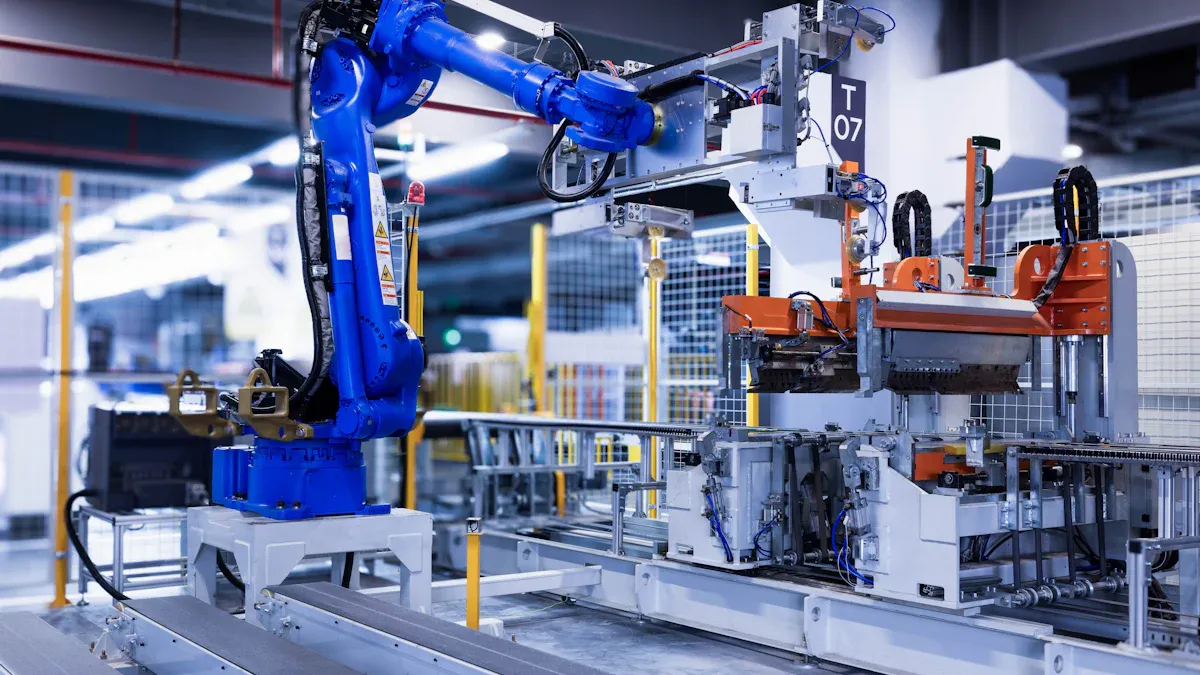
You can find industrial automation in many factories today. When you use a PLC, machines can make choices and act quickly. This helps control robots, conveyor belts, and packaging lines. PLC technology keeps everything working well in these systems. These systems can do hard jobs and work in tough places.
Here are ways PLC systems help you work safer and faster in factories:
Emergency shutdowns stop machines fast if there is a problem.
Safety interlocks only let machines run when it is safe.
Predictive maintenance tells you if a machine might break soon, so you can fix it before it stops.
These features help your team stay safe and keep machines working longer. Factories trust PLC to make automation reliable.
Manufacturing
In manufacturing, PLC controls each step of making things. You can run assembly lines, test products, and pack items. PLC lets you watch sensors and control machines very well. This means you make more things with fewer mistakes.
The PLC market is growing as more factories use automation. Look at the table below to see how different regions spend on these systems:
Region | Market Size 2021 (Million USD) | Market Size 2025 (Million USD) | Growth Rate (%) | Projected Size 2033 (Million USD) | CAGR (%) |
|---|---|---|---|---|---|
North America | 2849.54 | 3638.36 | 78.32 | 6156.73 | 6.796 |
Europe | 2293.29 | 2954.56 | 77.62 | 5096.78 | 7.053 |
Asia Pacific | 3522.89 | 4683.43 | 75.22 | 8592.36 | 7.881 |
South America | 458.659 | 774.12 | 59.25 | 1375.68 | 7.452 |
Middle East | 400.107 | 516.08 | 77.53 | 789.324 | 5.455 |

You also see new things happening in industrial control systems. Smart meters, electric car charging, and green energy projects all use PLC to work better. Governments and companies try to make these systems safer and smarter. By using PLC in smart cities and country areas, you help build the future.
Everyday Uses
You may not see it, but PLC technology is used outside factories too. Industrial control systems help you every day. Here are some places you might find them:
Escalators and elevators in malls and airports
Automatic water pumps in buildings
Doors that open and close by themselves
Remote checks for air conditioners and fans
Washing machines in your house
You count on these systems to make life easier and safer. PLC helps watch, control, and protect equipment around you.
Tip: Learning about PLC and industrial control systems can help you find many jobs in automation and technology.
You can see how a plc changes automation today. It lets you control machines right away and helps stop errors. You can get more work done with quick data and better steps. There are jobs for technicians, engineers, and people who fix things in many fields like cars and food. If you want to know more, you can take free online classes or learn one programming type. 📚
Fast control and quick actions
More work done and less waiting
Many job choices in factories
Free lessons and help online for new learners
FAQ
What are control systems in automation?
Control systems help you run machines and processes. They make sure things work smoothly. In factories, control systems let you watch equipment. You can change settings and make things safer. Many industries use control systems, like food and cars.
How do PLCs fit into control systems?
PLCs are a big part of control systems. You program a PLC to check sensors and control machines. Using PLCs in control systems gives you quick answers. It also makes your machines more reliable. This helps stop mistakes and keeps work going.
Why are control systems important for safety?
Control systems keep people and equipment safe. You can add alarms, emergency stops, and safety checks. These features help stop accidents before they happen. Good control systems let you find problems and fix them fast.
Where do you see control systems outside factories?
Control systems are used in many places. Elevators, traffic lights, and water pumps use them. Your home heating and cooling also use control systems. These systems help save energy and keep things working well.
Can you learn to work with control systems?
Yes! You can learn about control systems online or with kits. Many schools teach control systems in technology classes. If you like solving problems, you can get a job working with control systems in many areas.
Tip: Look for free online resources to try building control systems. You can use simple kits to learn how control systems work.