You use hardware accelerators to handle huge amounts of data. They help run complex ai models very fast. These devices make ai and machine learning jobs easier and stronger. In the last few years, there are many new types of ai hardware. Companies now make special platforms for different ai jobs:
Microsoft is making an ai chip for its HoloLens headset.
Google uses a Tensor Processing Unit for ai in the cloud.
Amazon is making an ai chip for Alexa.
Apple makes an ai processor for Siri and FaceID.
Tesla builds an ai processor for self-driving cars.
As ai software gets smarter, hardware also changes to keep up.
Key Takeaways
Hardware accelerators make AI tasks faster. They help you handle lots of data quickly.
There are different accelerators like GPUs and ASICs. Each one is made for certain AI jobs. Pick the one that fits your needs.
Hardware accelerators can use less energy and cost less money. This makes your AI projects work better.
Parallel computation splits big tasks into smaller ones. These small jobs run at the same time to boost AI performance.
In the future, AI hardware will have special chips and edge computing. These will make things even faster and more efficient.
Hardware Accelerators in AI
Speed and Efficiency
You need fast tools to work with lots of data in AI. Hardware accelerators help you process data much faster. These devices are quicker than normal CPUs. You can use them to make machine learning and AI jobs go faster.
Some main types of ai accelerators are:
Graphics Processing Units (GPUs)
Tensor Processing Units (TPUs)
Central Processing Units (CPUs)
Field-Programmable Gate Arrays (FPGAs)
GPUs are special because they have many small cores. You can use them to do lots of math at once. This is great for ai jobs like image recognition or language tasks. Custom ASICs are made for certain jobs. They give you strong performance and save energy. These accelerators help you train models faster and use less power.
Tip: If you use hardware accelerators, you can finish training your ai models in hours, not days.
Benchmarks show how fast these accelerators are. For example, GPUs can reach about 15,700 GFLOPS. TPUs can do up to 275,000 INT8 operations each second. Tools like the MLPerf Training benchmark let you compare how well different ai accelerators work. You can see which one is best for your ai jobs.
Enabling Deep Learning
Deep learning models can have billions of parameters. You need strong ai accelerators to train these models. Hardware accelerators like FPGAs, GPUs, and ASICs make this possible. They help you use less memory and work faster. This means you can train bigger models without memory problems.
Here is how different accelerators help with deep learning:
Accelerator | How It Helps |
|---|---|
GPUs | They use many processors for complex neural networks. You can train deep learning models faster because of this. |
ASICs | They are made for special ai jobs. You get faster training and use less power. |
FPGAs | You can change their design for your needs. You can make them more efficient and handle big models. |
You also get high-bandwidth memory systems. These systems stop data from getting stuck and keep your ai models running well. When you use more than one GPU, you can train even bigger models. Technologies like InfiniBand and NVLink help you move data fast between devices. This makes your ai jobs bigger and more efficient.
You can use data locality-aware methods to get data faster.
You can lower the amount of communication during training.
You can make arithmetic units better for more speed.
With these tools, you can train deep learning models for advanced ai jobs like speech recognition, self-driving cars, and medical diagnosis. Hardware accelerators help you get better accuracy and speed in ai.
Types of AI Accelerators
You can pick from many ai accelerators. Each one is made for a special job. Some work better for certain ai tasks. The main types are GPUs, NPUs, FPGAs, and ASICs. These tools help you do machine learning faster and better.
Hardware Accelerator | Key Features | Advantages | Limitations |
|---|---|---|---|
GPUs | They use many cores to work together. | Great for math jobs and fast data work. | Not as good for some jobs as ASICs. |
NPUs | Built for neural networks. | Very good for deep learning and saves energy. | Not as flexible as FPGAs. |
FPGAs | You can change how they work. | You can make them fit special jobs and get quick results. | Harder to set up and program. |
ASICs | Made for one job only. | Very fast and uses little power for that job. | You cannot use them for other jobs. |
GPUs
GPUs are used a lot for ai jobs. They can do many things at the same time. This helps you handle lots of data fast. GPUs are great for deep learning and finding answers quickly. You can train models faster and do things like image recognition. GPUs also help with math that is used in machine learning.
GPUs work on many data pieces at once.
You get faster training and more power for ai.
NPUs
NPUs are made for neural networks. You see them in many ai products. NPUs are fast and save energy for deep learning. They are good for things that need quick answers, like self-driving cars or robots. NPUs help with sensor data, speech, and pictures.
NPUs make ai systems work better.
They help with quick answers and media jobs.
FPGAs
FPGAs let you change how they work for your needs. You can set them up for new jobs after you buy them. FPGAs are good for jobs that need quick results and high power. You can use them for special ai jobs where you want control.
FPGAs let you design hardware for your ai.
You can change them for new jobs as you need.
ASICs
ASICs are made for one kind of ai job. They give you top speed and save energy. ASICs are best for jobs that do not change, like voice or data center work. They are fast and use little power, but you cannot use them for other things.
ASICs are made for special ai jobs.
You get quick answers and save energy.
Tip: When you choose an ai accelerator, think about your ai jobs and how much you need to change things. Each type is good for different jobs.
AI Workload Optimization
Training vs Inference
There are two main steps in ai. The first is training. Training needs a lot of computer power. You do many math problems again and again. Strong ai accelerators help with these hard jobs. The second step is inference. Inference means ai looks at new data and makes choices. This step does not need as much hardware. You can use one accelerator or even a CPU.
Note: Making inference faster can save a lot of money. Many ai tools, like fraud checks and suggestions, need quick and smart inference.
The hardware you pick depends on your job. Here are some examples:
Scenario | Training hardware | Inference hardware |
|---|---|---|
Sales forecasting engine | CPU | CPU |
Image classification model | GPU | CPU or GPU if needed |
How you do inference can change. It depends on how big your model is, where you use it, and how fast you want answers. You might need to set things up, tune them, put them in place, work with big models, or use them at the edge. Making a good inference system often needs experts. It is not just about new hardware.
Parallel Computation Techniques
You can make ai work better by using parallel computation. This means you split big jobs into small ones. You run these small jobs at the same time. Ai accelerators use different ways to do this:
Parallel processing splits jobs across many CPUs or GPUs. This makes ai work faster and better.
Data parallelism breaks your data into pieces. Each accelerator works on one piece. You put all the answers together.
Model parallelism splits the ai model. Different accelerators work on different parts at once.
These ways help ai apps work faster. For example, GPUs and NPUs use parallel processing to help deep learning and save energy. You get better results and can work with bigger ai jobs without slowing down.
Comparing Accelerators

Performance and Efficiency
You want your ai projects to run fast and use less energy. When you compare different hardware, you look at how quickly they finish tasks and how much power they use. Some accelerators can train ai models much faster than others. For example, the latest benchmark results show that the NVIDIA B300 can finish training in just 9.59 minutes. The AMD Instinct MI355X is up to 2.8 times faster than older models. You can see how these devices stack up in the table below.
GPU Model | Training Time (minutes) | Performance Gain |
|---|---|---|
AMD Instinct MI355X | 10.18 | Up to 2.8X faster |
NVIDIA B200 | 9.85 | N/A |
NVIDIA B300 | 9.59 | N/A |
AMD Instinct MI300X | 28 | N/A |
AMD Instinct MI325X | ~20 | N/A |
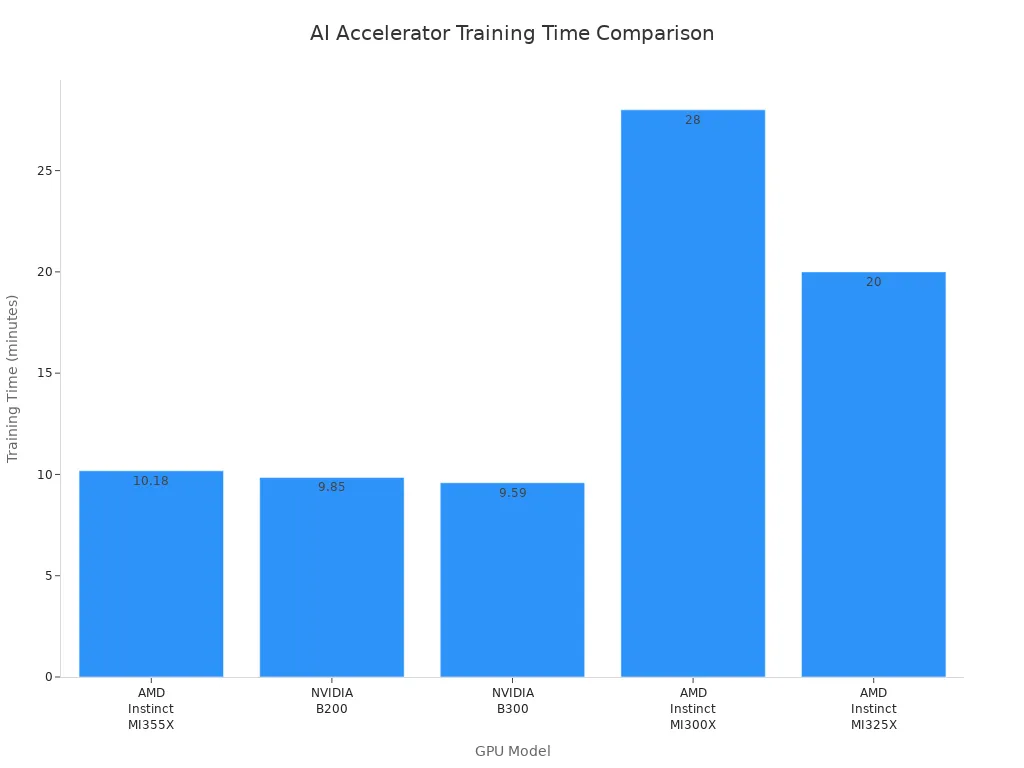
You can use these numbers to pick the best AI hardware for your needs. Faster training means you can try more ideas and get results sooner. High performance also helps you save energy and money. When you choose the right hardware, you boost both speed and efficiency.
Deployment Scenarios
You can use ai in many places, like on the cloud or at the edge. Each place has its own benefits and limits. If you run ai at the edge, you cut out network delays. You also keep your data private and lower costs. For example, edge ai can remove 50 to 200 milliseconds of network wait time. It also cuts data costs by up to 80%. In the cloud, you may face higher delays and more data use.
Here is a table to help you compare edge and cloud ai:
Aspect | Edge AI Benefits | Cloud AI Limitations |
|---|---|---|
Latency | Eliminates 50-200ms network round-trip latency | High latency due to data transmission |
Data Privacy | Processes sensitive data locally | Requires data transmission to external servers |
Bandwidth Optimization | Reduces bandwidth by processing data locally | High bandwidth usage for data transmission |
Cost Reduction | 60-80% reduction in data transmission costs | Higher operational costs due to bandwidth |
You should think about where you want your ai to run. If you need quick answers and privacy, edge ai works best. If you need lots of power for big jobs, cloud ai may be better. The right choice depends on your project and goals.
Challenges and Trends
Integration Issues
When you use hardware accelerators in ai, you can face problems. You must make sure your hardware and software work well together. If they do not match, your ai models may run slow. You also need to watch how much energy and memory you use. This is very important with big ai models. Sometimes, you have to change your setup for new ai methods. The table below lists some common problems:
Challenge | Description |
|---|---|
Getting the best speed by matching hardware and software. | |
Resource Efficiency | Using less energy and memory for big ai models. |
Adaptability | Making sure your system can change for new ai ideas. |
You can use new software to help with these problems. For example, SNAX lets you connect different accelerators easily. It gives you a simple layer, so you can focus on your ai work. SNAX-MLIR helps you use memory and data better. This makes your ai system work faster.
Tip: Tools like SNAX let you add new accelerators and change your setup as your ai grows.
Future of AI Hardware
Big changes are coming for ai hardware. Companies now make special ai chips for certain jobs. These chips help your ai run faster and use less energy. You will also see more systems that use different processors together, like GPUs, FPGAs, and ASICs. This is called heterogeneous computing. It helps you get the best results for each ai job.
Here are some trends for the future:
Custom ai chips like NPUs and TPUs are used more.
Edge computing lets you process data close to where you get it. This lowers delays and keeps your data private.
Neuromorphic computing uses brain-like designs to save energy and make ai better.
Quantum computing may solve very hard problems, but it still has many problems to fix.
Experts think the ai hardware market will grow a lot. In 2024, the market is $16.55 billion. By 2029, it could be $52.76 billion. This means it grows about 26% each year.
Note: As ai hardware gets better, you will have more ways to make your ai projects faster and stronger.
You get lots of good things from hardware accelerators in ai. These tools help you work faster. They let you make choices right away. You also save money when you use them. Look at the table below for a quick look:
Benefit | Description |
|---|---|
Enhanced Performance | Makes ai faster and works better |
Energy Efficiency | Uses less power for ai jobs |
Scalability | Can grow as your ai gets bigger |
Pick the best accelerator for your ai job. New chip designs and ways to save energy will change how ai works in the future.
FAQ
What is a hardware accelerator in AI?
A hardware accelerator is a special chip or device. You use it to make AI tasks faster. It helps your computer handle big data and complex models without slowing down.
Why do you need different types of AI accelerators?
You need different accelerators because each AI job is unique. Some work best for training, others for quick answers. You pick the right one to get the best speed and save energy.
Can you use hardware accelerators at home?
Yes, you can use some accelerators at home. Many laptops and desktops have GPUs. These help you run AI programs for learning, games, or small projects.
How do hardware accelerators save energy?
Hardware accelerators finish AI tasks quickly. They use less power than regular CPUs. This helps you save energy and lower your electricity bill.
What is the future of AI hardware?
You will see more custom chips for AI. These will make your devices smarter and faster. New designs like neuromorphic and quantum chips will change how you use AI.