An FPGA, or Field-Programmable Gate Array, is a chip you can reprogram. It lets you create and use custom digital circuits. Unlike regular chips, it can change to do different jobs. This makes it very useful in modern technology.
FPGAs are important in areas like phones, cars, and AI. Their value is shown by how much the market is growing:
The FPGA market made $6.5 billion in 2022. It might grow to $13.5 billion by 2032.
The market is growing at a yearly rate of 7.8%.
Around 34% of users like FPGAs for lowering costs, showing they save money.
These facts show why FPGAs are so important in today’s tech world.
Key Takeaways
FPGAs are special chips you can reprogram for many uses. They are great for creating custom digital circuits.
The FPGA market is growing fast and may reach $13.5 billion by 2032. This shows they are becoming more important in technology.
FPGAs have key features like quick response, saving energy, and doing many tasks at once. These help in AI and real-time data work.
To program an FPGA, you use languages like VHDL or Verilog. You follow steps to make sure it works correctly.
FPGAs are useful in many fields like electronics, cars, and space. Their flexibility and performance make them valuable.
What is an FPGA?

Definition and Core Concept
An FPGA, or field-programmable gate array, is a chip you can reprogram. Unlike fixed chips like CPUs or GPUs, it lets you design custom hardware. This makes it great for creating circuits that fit specific tasks.
An FPGA has three main parts: configurable logic blocks (CLBs), interconnects, and input/output (IO) blocks. CLBs handle data and logic tasks. Interconnects link different parts of the chip. IO blocks connect the FPGA to other devices. These parts work together to make a flexible and programmable system.
Component Type | What It Does |
|---|---|
Configurable Logic Blocks (CLB) | Basic unit with tools for data and logic tasks. |
Interconnects | Links that connect different parts of the chip. |
Input/Output (IO) Blocks | Connects the FPGA to outside devices. |
Digital Signal Processing (DSP) | Helps with tasks like filtering or multiplying. |
Types of FPGAs | Includes SRAM-based, flash-based, and anti-fuse types. |
Key Features of FPGAs
FPGAs are special because of their unique features. These features make them useful in many industries. Here are some key features:
Flexibility: You can reprogram an FPGA for different tasks.
Rapid prototyping: Test and improve designs quickly with an FPGA.
Parallelism: Do many tasks at the same time for better performance.
Customization: Build hardware that fits your exact needs.
Reconfigurability: Update or change the FPGA even after it’s in use.
Lower NRE costs: FPGAs cost less than ASICs for development.
These features make FPGAs popular in areas like electronics and aerospace.
Why FPGAs Are Reconfigurable
The ability to reprogram an FPGA makes it stand out. You can change how it works without replacing the chip. For example, partial reconfiguration lets you update parts of the chip while it’s running. This is helpful for devices that need constant updates.
Over time, FPGA technology has improved a lot. Modern FPGAs are faster and use less energy. Big companies are using FPGAs more now. For example, Intel bought Altera in 2015, and Amazon launched FPGA-based F1 instances in 2017. These moves show how important reconfigurable chips are becoming.
FPGAs are not just programmable; they can adapt. This adaptability keeps them useful as technology changes quickly.
How Does an FPGA Work?
Parts of an FPGA
An FPGA has several main parts that work together. These parts let you design circuits for specific tasks. Here’s a simple explanation of the key components:
Configurable Logic Blocks (CLBs): These are the main building parts of an FPGA. Each CLB has slices with look-up tables (LUTs) and flip-flops (FFs). LUTs handle logic tasks, and FFs store data.
A CLB can have either one SLICEM and one SLICEL or two SLICELs. Each slice has four LUTs and eight FFs. This setup helps create almost any logic function.
Digital Signal Processing (DSP) Slices: These parts handle tasks like filtering and multiplying. They are great for signal processing jobs.
Block Random Access Memory (BRAM): These memory blocks store data temporarily. They can be adjusted for different sizes and uses.
Transceivers: These parts send and receive high-speed data.
Input/Output (IO) Blocks: These blocks connect the FPGA to other devices. They allow data to move in and out of the chip.
Each part is important for making the FPGA a flexible and powerful device.
Why Programmable Logic Matters
Programmable logic is what makes an FPGA special. It lets you set up the chip for specific tasks by changing its internal logic. LUTs are used to create logic functions, and routing connects the parts. This makes FPGAs useful for many things, from simple tasks to complex systems.
Tests like the PREP suite check how well programmable logic works. These tests measure speed and capacity to help pick the right FPGA. For example:
The Average Benchmark Capacity (ABC) shows how many circuits fit in the chip.
The Average Benchmark Speed (ABS) measures how fast the chip works.
This flexibility means FPGAs can handle both easy and hard designs well.
How to Set Up an FPGA
Setting up an FPGA means programming it to do certain tasks. You can do this by writing code in languages like VHDL or Verilog. The setup process usually includes these steps:
Design Entry: Write a design using code or a diagram.
Synthesis: Turn the design into a netlist, which shows logic and connections.
Place and Route: Match the netlist to the FPGA parts and connect them.
Programming: Load the design onto the FPGA to make it work.
Some FPGAs allow partial updates while running. This is helpful for devices that need regular changes.
For example, Cisco explains how to manage FPGA resources in industrial tools. It talks about features like the FPGA Profile, which turns software functions on or off. This helps save resources and improve performance.
FPGA vs. Other Technologies
FPGA vs. ASIC
FPGAs and ASICs are different in how they work. FPGAs can be reprogrammed, even after being used. ASICs are fixed and made for one job only. This makes ASICs faster and use less power for specific tasks, but they can’t change.
Feature | FPGA | ASIC |
|---|---|---|
Flexibility | Can be reprogrammed for new tasks. | Fixed; cannot be changed. |
Development Cost | Costs less to start; no special tools needed. | Costs more due to custom design. |
Performance | Slower for certain tasks. | Built for top speed in one job. |
Time to Market | Quicker to test and use. | Takes longer to develop. |
Use an FPGA if you need flexibility or are testing ideas. ASICs are better for making many chips with high speed and low power needs.
FPGA vs. CPU
FPGAs and CPUs handle tasks differently. CPUs are good at doing one thing at a time. FPGAs can do many things at once, making them great for special tasks like AI or signal processing.
Feature | FPGA | CPU |
|---|---|---|
Processing Type | Good at doing many tasks at once. | Best for doing one task at a time. |
Configurability | Can be changed to fit many uses. | Fixed design for general tasks. |
Energy Efficiency | Uses less power for specific jobs. | Manages power well but not as good for many tasks at once. |
Ideal Use Cases | AI, real-time data, and special computing tasks. | Everyday computing and running programs. |
For example, FPGAs can be up to 77 times faster than CPUs in AI tasks. They also save more energy, making them great for jobs needing speed and low power.
When to Choose an FPGA
Pick an FPGA if your project needs flexibility or fast processing. FPGAs work well for AI, real-time data, and edge computing. They can be better than GPUs when quick responses are needed.
Factor | Importance | FPGA Score |
|---|---|---|
Cost | High | 4 |
Speed | Medium | 5 |
Complexity | Medium | 4 |
Power Consumption | High | 3 |
Future-proofing | Medium | 5 |
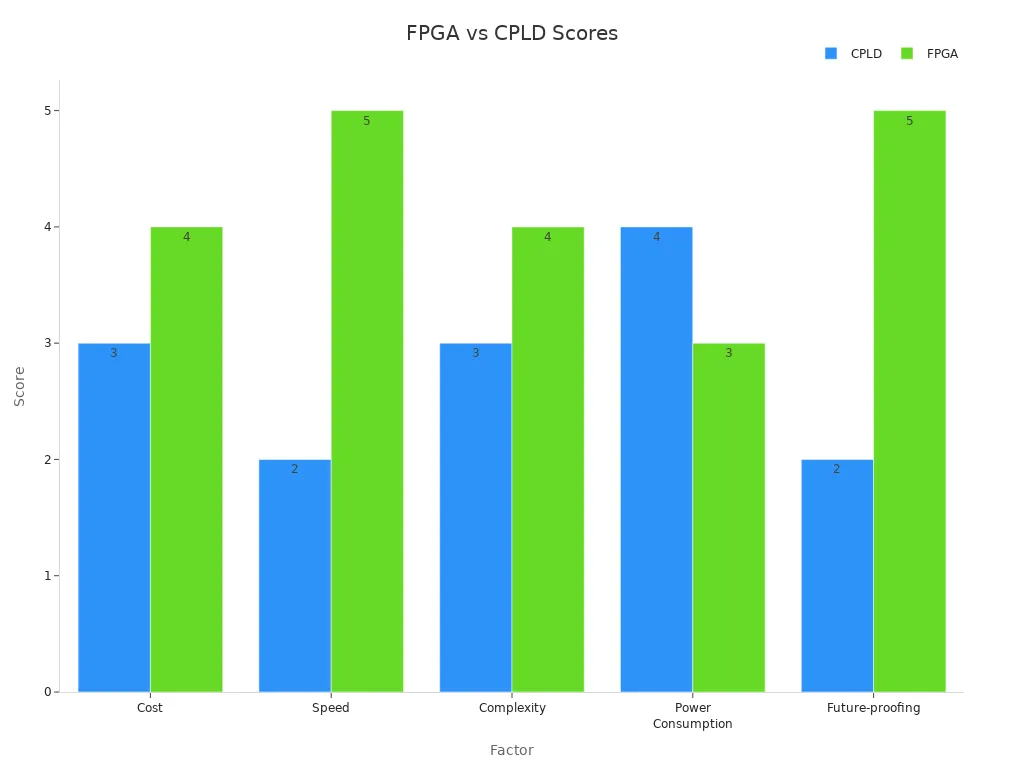
FPGAs are great for AI tasks because they can be customized. They often beat GPUs in edge computing. If you need low delay, high speed, or frequent updates, FPGAs are a smart choice.
Applications of FPGAs
Consumer Electronics
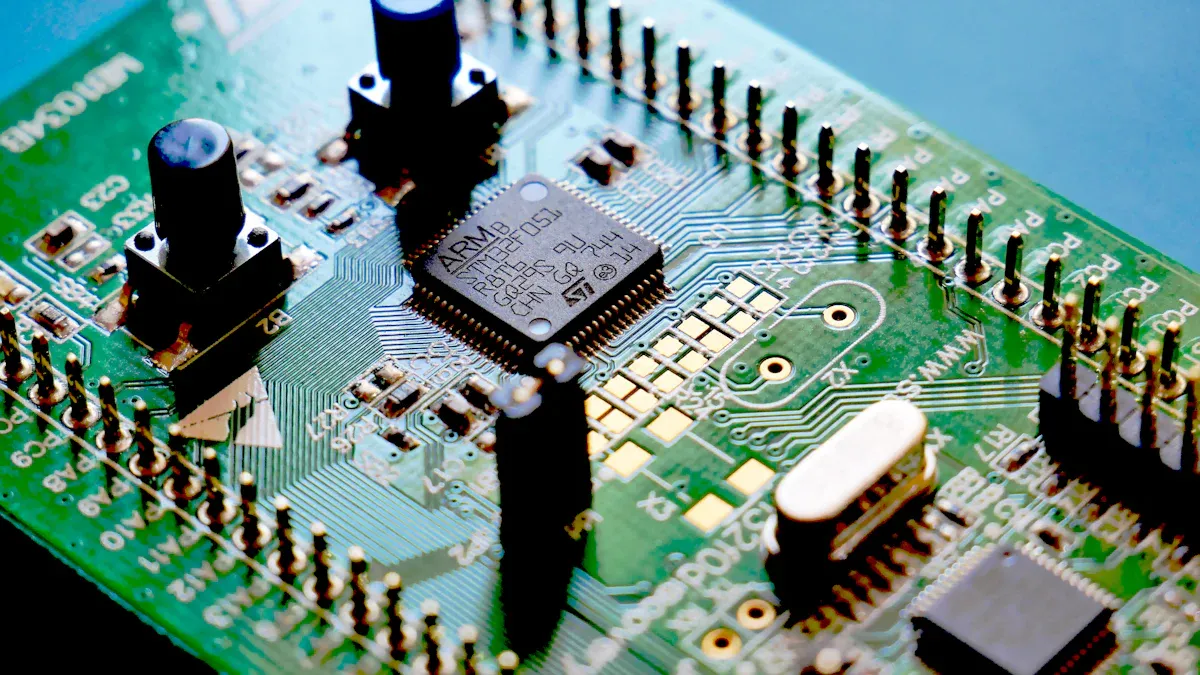
FPGAs are important in today’s electronics. They make devices like smart home systems, wearables, and cameras work better. For example, in video processing, FPGAs help with HDR and 4K/8K resolution. This makes videos look clearer and more colorful. In smart home gadgets, FPGAs process data quickly, making them faster and smarter. Cameras also benefit as FPGAs reduce noise and improve picture quality.
Application Area | What FPGAs Do |
|---|---|
Video Processing | Speed up tasks like HDR and 4K/8K video output. |
Smart Home Devices | Process data fast to improve how devices work. |
Consumer Cameras | Make pictures clearer by reducing noise and enhancing details. |
These uses show how FPGAs make electronics more flexible and efficient.
Data Centers and AI
FPGAs are great for tough jobs in data centers, like AI training and sorting data. They are fast and handle tasks with little delay. For example, Microsoft Azure uses FPGAs in Project Catapult to improve Bing search results. AWS also uses FPGA-based f1 instances to speed up data tasks in Redshift AQUA. These examples show how FPGAs boost cloud computing and AI performance.
Workload Type | FPGA Strengths | GPU Strengths | Notes |
|---|---|---|---|
AI Workloads | Faster for some tasks | Depends on size | FPGAs are better for smaller tasks. |
CSV Parsing | 8GB/sec speed inside | N/A | Big improvement in Apache Spark tasks. |
Data Filtering | Prepares data for Redshift | N/A | FPGAs filter and group data well. |

Automotive and Aerospace
FPGAs are key in cars and planes because they are reliable and flexible. In cars, they help with self-driving by quickly processing sensor data. They also control car systems like lights and windows. In planes, FPGAs are used in safety systems. Their ability to change makes them dependable for a long time.
Title | Focus Area |
|---|---|
SRAM-Based FPGA Systems for Safety-Critical Applications: A Survey on Design Standards and Proposed Methodologies | How SRAM-based FPGAs are used in safe designs for cars and planes. |
Generating hardware descriptions from automotive function models for an FPGA-based body controller: A case study | How FPGAs are used in car system designs. |
Field programmable gate arrays in space | How FPGAs perform well in space systems. |
These industries depend on FPGAs to stay safe and meet new tech needs.
Industry-Specific Use Cases
FPGAs are useful for solving tough problems in many industries. They are flexible and can be reprogrammed, making them great for special tasks. Here are some real-world examples.
Aerospace and Defense
In aerospace, FPGAs are reliable and save energy. For example, a strong AIS radio was made using FPGAs to meet strict aerospace needs. This design worked well and used less power. Also, spacecraft radios called SDRs use FPGAs to handle space challenges. These radios ensure good communication, even with limited resources.
Emergency Services
FPGAs help in search and rescue missions. One example is improving beacon decoding software to communicate better with authorities. Using FPGAs made the system faster and more reliable. This helps teams respond quickly during emergencies.
Industry-Specific Case Studies
The table below shows how FPGAs solve problems in different fields:
Case Study Title | Goal | Problems | Solution |
|---|---|---|---|
AIS Radio Design | Create a strong AIS radio | Meet strict aerospace needs | FPGA design for reliability and low power use |
Search and Rescue Software | Improve beacon decoding software | Better communication with authorities | Used FPGAs to boost software performance |
SDR for Spacecraft Communication | Build a radio for spacecraft communication | Limited resources for SDR development | FPGA-based solution for tough space conditions |
These examples show how FPGAs meet specific industry needs. In aerospace, rescue missions, or space, FPGAs offer flexibility and strong performance. They solve hard problems and create smart solutions.
Advantages and Challenges of FPGAs
Benefits of FPGAs
FPGAs have special benefits that make them useful in many fields. They are flexible, so you can set them up for specific tasks. This makes them great for things like AI and signal processing. Unlike fixed chips, FPGAs can change to meet new needs, giving you more control.
Here are some main benefits of FPGAs:
Energy efficiency: FPGAs use less power than regular processors. This makes them good for mobile and small devices.
Low latency: They work fast with little delay, which is important for real-time tasks.
High throughput: FPGAs process large amounts of data quickly, helping with tasks like speeding up neural networks.
Event-based vision: FPGAs work well in low light, reduce motion blur, and save bandwidth by cutting out extra data.
Metric | What It Means |
|---|---|
Throughput | How much data is handled in a certain time. |
Latency | How long it takes to process one piece of data. |
Power Efficiency | How much work is done for each watt of power used. |
These features make FPGAs a strong choice for solving hard problems effectively.
Challenges and Limitations
Even though FPGAs are flexible, they have some challenges. Programming them is hard and needs special skills. They also have fewer tools compared to GPUs, which can make them harder to use.
Some common challenges include:
Complex designs: Big circuits can cause timing problems.
Routing delays: Signals may take longer to travel through the chip.
Resource congestion: Using too many resources can slow things down.
Tool limitations: Design tools may not always work perfectly.
Challenge | What Happens |
|---|---|
High Clock Frequencies | Faster clocks make timing harder to manage. |
Clock Domain Crossings | Different clock areas can cause timing problems. |
High Fanout Nets | Signals going to many places can slow down routing. |
These issues show why careful planning and knowledge are needed when using FPGAs.
Addressing FPGA Challenges
You can solve FPGA problems by using smart methods and better tools. For example, secure boot systems make sure only safe software runs on the FPGA. Separating hardware tasks can also protect sensitive data, especially in telecom systems.
Here are some ways to fix common problems:
Real-time monitoring: Use AI tools to check performance and find issues.
Bitstream encryption: Protect your designs and follow safety rules.
Dynamic optimization: Change FPGA settings as needed to improve performance.
These methods work well in industries like cars and telecom. For example, Fidus used encryption to make car FPGAs safer. Custom FPGA designs with strong security have also protected 5G networks from hackers.
By using these solutions, you can get the most out of FPGAs while avoiding their problems.
How Are FPGAs Programmed?
Programming an FPGA means setting it up for specific tasks. You use special languages, tools, and steps to design custom hardware that fits your project.
FPGA Programming Languages
To program an FPGA, you need hardware description languages (HDLs). These languages tell the FPGA what to do. The most common ones are Verilog, System Verilog, and VHDL. Each has its own style and purpose.
Language | What It Does | Year Introduced |
|---|---|---|
Verilog | Works like C; used for digital hardware design. | 1995 (IEEE 1364) |
System Verilog | An improved version of Verilog with better testing features. | N/A |
VHDL | A different language with similar uses as Verilog. | N/A |
Some programmers also use Python-based tools. These tools make FPGA programming easier for beginners by simplifying the process.
Development Tools and Frameworks
You need special software to design, test, and program FPGAs. Popular tools include Xilinx Vivado and Intel Quartus Prime. These programs help you check your designs before putting them on the FPGA.
Tool Type | Examples | Benefits |
|---|---|---|
Testing Tools | Cocotb, Verilator, GHDL, UVVM, VUnit | Make testing easier and more accurate. |
Coding Tools | Sigasi Studio, Visual Studio Code, Eclipse IDE | Help you write and organize code better. |
Automation Tools | Jenkins, GitLab CI/CD, CircleCI | Automate tasks and find problems early. |
High-Level Design Tools | Chisel, SpinalHDL, Clash | Allow simpler and creative designs. |
These tools make FPGA programming faster and easier to manage.
Steps in FPGA Programming
Programming an FPGA follows a series of steps. Each step ensures your design works properly. Here’s how it’s done:
Plan your design.
Pick a language like Verilog or VHDL.
Write your code.
Turn the code into a netlist.
Match the design to FPGA parts.
Load the program onto the FPGA.
Test and fix any issues.
Write down what you did.
Share the final program.
You’ll also do tasks like mapping and routing your design. Tools like timing analysis and bitstream generation help make sure the FPGA works well. By following these steps, you can turn ideas into working hardware.
FPGAs are special chips you can reprogram to make custom circuits. They are flexible and can do many tasks at once. This makes them useful in cars, planes, and gadgets like smart devices. FPGAs are great for handling real-time data, AI, and 5G networks.
More people want FPGAs because of new tech like AI and machine learning. The COVID-19 pandemic made this demand grow faster. As 5G and high-speed devices improve, FPGAs will become even more important for future technology.
Parameter | Description |
|---|---|
Market drivers and restraints | Factors that affect how the FPGA market grows. |
Study objectives | Detailed look at market trends, capacity, and competition. |
FPGAs are not just for now; they are shaping the future of technology.
FAQ
How are FPGAs different from regular processors?
FPGAs let you create custom hardware. CPUs and GPUs have fixed designs. You can reprogram FPGAs for specific tasks. This makes them great for AI, signal processing, or real-time data.
Can you use an FPGA for another project?
Yes, you can reprogram an FPGA for new tasks. This makes it cheaper for testing ideas or changing needs. Unlike ASICs, FPGAs don’t need new hardware for every project.
Do you need special knowledge to program an FPGA?
Yes, programming FPGAs needs skills in hardware languages like Verilog or VHDL. You also need to know digital logic and use special tools. Beginners can try Python-based tools for easier tasks.
Are FPGAs good for small devices?
Yes, FPGAs work well in small gadgets. They use less power and are efficient. They are perfect for mobile devices, wearables, and IoT gadgets.
How do FPGAs help with AI?
FPGAs handle data at the same time, making them faster for AI. You can adjust them for specific algorithms. This improves speed and saves energy compared to regular processors.