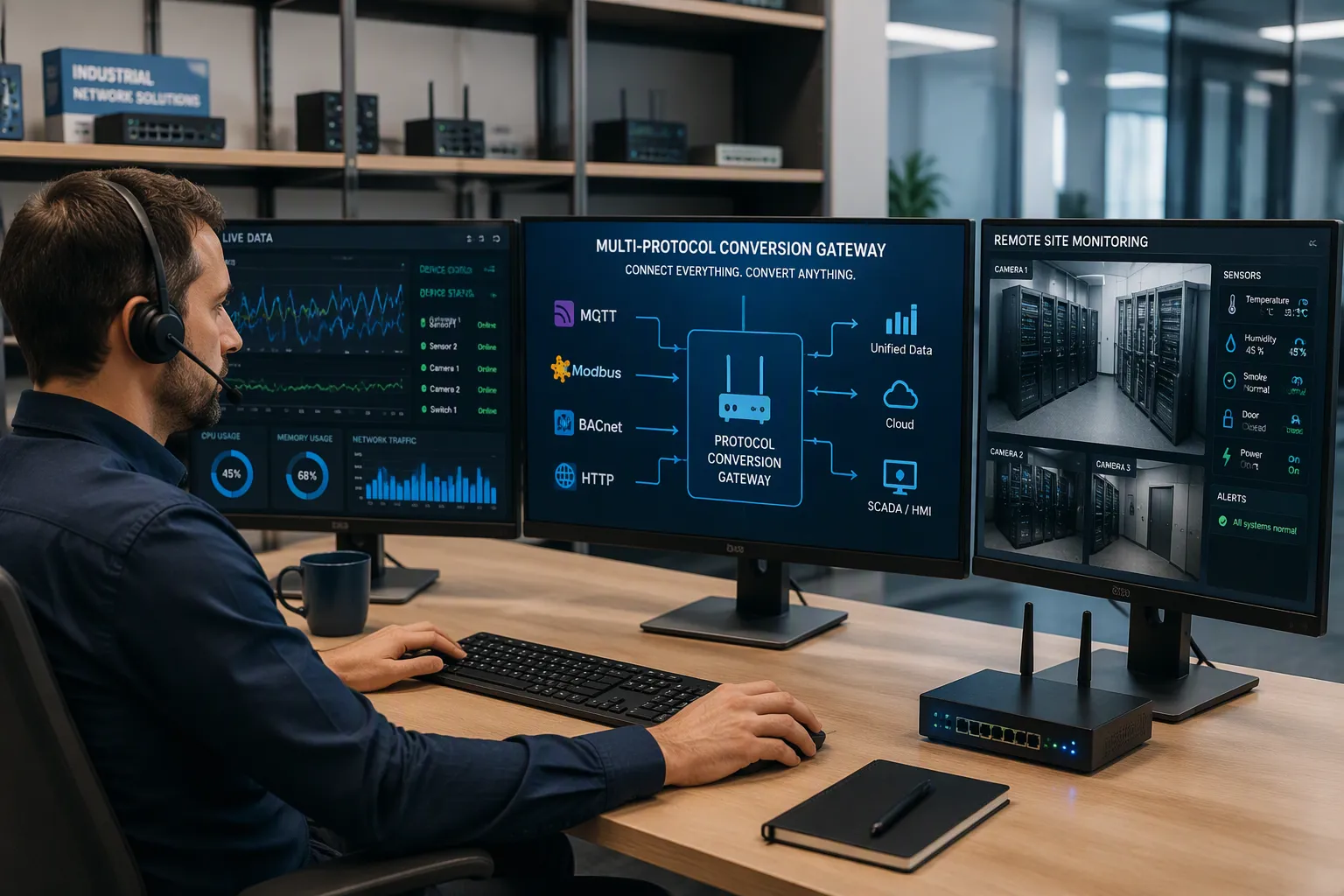
Multi-protocol conversion and remote monitoring work as one system: converters translate data between incompatible device languages, and monitoring platforms collect, display, and alert on that data from anywhere. Together they solve two stubborn problems. Mixed-protocol equipment often cannot share information, and operators cannot watch distant assets without constant site visits. Interoperability gaps leave data trapped inside individual machines. Oversight gaps leave failures undetected until they cause outages.
When you pair the two capabilities, every device feeds one unified view, regardless of its native protocol. You gain continuous visibility across your whole estate. That combination pays off quickly. McKinsey research shows predictive maintenance cuts machine downtime by 30–50% and extends equipment life by 20–40%.
Key Takeaways
Protocol converters translate data between different device languages. Remote monitoring collects and displays that data from anywhere. Together they give you one unified view of all your equipment.
You can keep your existing legacy equipment. Gateways translate old data formats so old devices work with modern platforms. This saves money and avoids costly replacements.
Real-time alerts and dashboards let you respond to problems fast. You see equipment health continuously and act before failures cause downtime.
Start with an asset and protocol audit. List each device, its language, and its priority. This scopes your project and prevents overbuilding.
Security is critical. Use encryption, role-based access, and network segmentation to protect your data and comply with standards.
What Is Multi-Protocol Conversion?
Protocols and the Conversion Problem
A protocol converter is a universal data protocol bridging device. It converts one communication protocol into another. Think of it as a translator that sits between machines speaking different languages.
Communication protocol conversion is arguably the most challenging aspect of any automation project. Corso Systems notes that integrating legacy and modern hardware from different vendors significantly increases complexity. Teams often need third-party bridge devices to close the gap.
You face three common paths, and each carries a cost.
Challenge | Description |
|---|---|
Centralized PLC modules | Devices connect directly to a PLC with added Modbus modules; this creates costly wiring challenges, expensive extra modules, and requires experienced programmers with extensive protocol knowledge. |
Upgrading devices | Installing communication cards to speak PROFINET/PROFIBUS directly is costly at scale and limited by the number of PROFIBUS slave IDs a PLC can accept. |
Adding small PLCs | Inserting small PLCs between a processing PLC and legacy devices demands highly skilled programming engineers for coding and troubleshooting. |
Software tools add licensing costs and rely on PC hardware. That hardware is less rugged than industrial equipment and exposed to Windows update risks. Hardware-specific solutions are generally preferred.
How Protocol Gateways Bridge Devices
A gateway handles the actual work of protocol conversion. Consider a pumping station. Its PLCs output Modbus RTU data. The gateway converts that data into TCP/IP messages and uploads them to the cloud through 4G/5G networks. Your operators then read live pump status from a dashboard.
Engineers also build dedicated hardware. One example is a Multi-Protocol Conversion Unit (MPCU) implemented on an FPGA. Its testing design includes a 7-segment display driver, which shows conversion results during validation.
Commercial products scale this idea further. The CPC Gateway supports about 100 protocols across multiple ports. That level of multiprotocol support lets one box serve an entire mixed-vendor site. A well-designed communication protocol conversion system also relies on standardized conversion protocols, so each device pair follows a repeatable mapping. This approach retires legacy protocols one connection at a time. A mature protocol conversion system grows with your asset base. You add ports, not parallel networks. Each protocol conversion you deploy removes one island of stranded data. Over time, the communication protocol conversion system becomes the backbone of your site. Good protocol conversion design also keeps latency low. The communication protocol conversion layer stays transparent to your applications.
What Is Remote Monitoring?
Remote monitoring is the practice of watching assets from a distance. You collect data at the equipment, send it over a network, and review it on a screen far from the site. A telemetry system does this work around the clock. It turns scattered readings into one continuous picture of asset health.
Core Components of a Monitoring System
Every remote monitoring systems deployment rests on a few building blocks. Sensors and IoT devices capture raw asset-level data: temperature, pressure, vibration, energy consumption, and flow rates. Without adequate sensor coverage on critical equipment, the system has nothing meaningful to work with.
The control layer of PLCs and HMIs sits between physical assets and the software platform. It gives you visibility into production processes and integrates with existing control hardware rather than replacing it. Communications and data acquisition then move data reliably to analysis systems through standardized protocols such as OPC UA. That standardization enables portfolio-wide aggregation and prevents data silos. Advanced analytics and trending process the incoming stream, detect anomalies, and supply historical context. Governance and access controls decide who can see or change what, and they log every action.
From Data Collection to Alerts
The path from a sensor reading to a useful alert follows a short loop. Device data is collected, transmitted securely with low latency, analyzed by the platform, and turned into actionable insights. Those insights then drive real-world outcomes. In cold-chain logistics, sensors transmit out-of-range temperature data in real time. If a cooling unit begins to fail, an immediate alert lets the driver act before goods spoil.
Several trigger mechanisms decide when that alert fires. Threshold-based rules fire when a value crosses a predefined limit. Trend rate rules watch the rate of change instead of a static limit. Model-driven severity scores from machine-learning models trained on labeled fault data reduce false positives compared with rule-based limits. Results reach teams through dashboards, mobile apps, and automated alerts, and the full cycle from sensor reading to alert delivery completes in seconds to minutes. Strong remote alarm management keeps that flow clean. Alarm monitoring equipment filters noise so real equipment issues surface clearly. Network monitoring systems and telemetry communication data handling complete the chain, and monitoring dashboards, trend tools, and mobile access keep supervisors informed.
How the Two Technologies Integrate
The Combined Data Pipeline
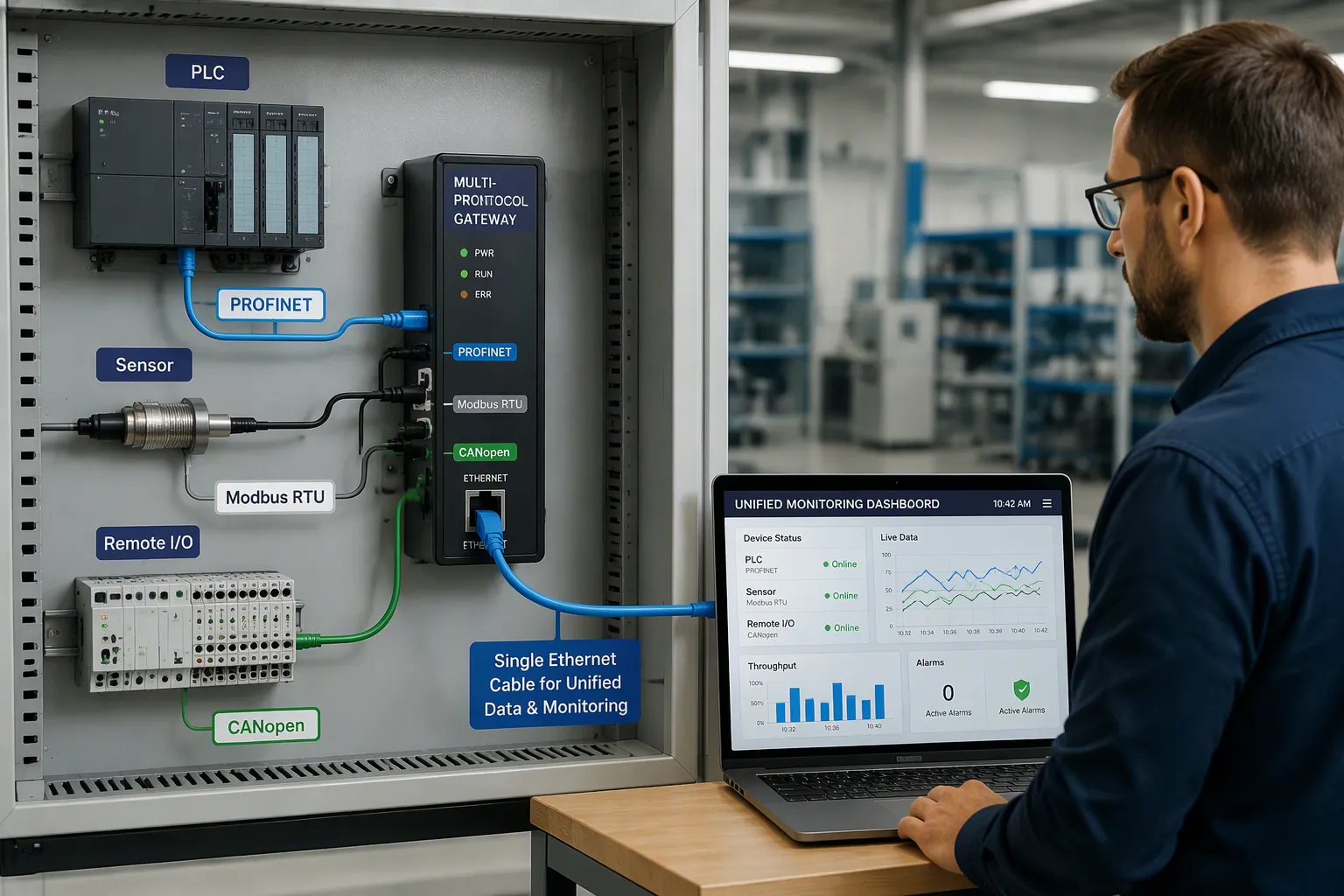
Conversion and monitoring meet in one pipeline. Field devices speak their native languages. A gateway translates each stream, and the platform presents a single view. Multi-protocol remote I/O systems show the pattern in practice: one network cable aggregates data from field devices that use different protocols. You run one cable, not one network per vendor.
Architects treat protocol mediation as a necessity, not an add-on. Three drivers explain why.
Protocol mediation is an architectural necessity for integrating multi-protocol environments with remote monitoring systems, driven by three key considerations:
Platform consolidation — Unifying network management on a single multi-protocol master is more reliable and cost-effective than running parallel, disconnected monitoring systems; a single integrated multi-protocol master should accept many different protocols.
Legacy equipment after mergers — Protocol mediation is the most efficient means of integrating incompatible network management systems and providing uniform visibility and service across the merged enterprise.
Loss of vendor support — Protocol mediation extends the operational life of legacy equipment without limiting network growth, allowing legacy devices to work with new masters and RTUs instead of being replaced.
A sound design covers six layers.
Architectural Consideration | How It Supports the Combined System |
|---|---|
Multi-protocol support | Interoperates with Modbus, BACnet, SNMP, MQTT, OPC UA and other industrial protocols from multiple vendors, avoiding costly replacement while enabling protocol translation. |
Legacy + intelligent asset connectivity | Connects communicating and non-communicating assets via sensors and protocol translation to remove blind spots. |
Scalable architecture | Modular hardware and cloud software scale from a few sites to thousands without redesign. |
Dual-path connectivity + edge buffering | Local buffering prevents telemetry loss during outages; dual-path links restore communication automatically. |
Role-based access + secure remote configuration | Stakeholders get tailored views, with remote configuration controlled. |
Ruggedized field hardware | Gateways, sensors, and controllers survive harsh industrial conditions. |
Field results confirm the pattern. A water utility with 200 pumping stations, 80% of them remote, converts Modbus RTU PLC data to TCP/IP and uploads it over 4G/5G for monitoring, SMS alarms, and reverse control. An 800-km gas pipeline converts Modbus to TCP/IP at valve chambers and runs SNMPv3 management for pressure and flow visibility. The CPC Gateway PLUS unifies Allen Bradley, GE, Siemens, Cummins gensets, and Schneider PLCs into one network. The Monico mCore SDR bundles conversion, edge processing, and connectivity in one device.
How Multi-Protocol Conversion Enables Oversight
Oversight depends on translation. Gateways translate between legacy serial protocols, proprietary fieldbuses, and modern industrial Ethernet standards. Translation enables unified supervision of mixed-vendor environments. Aggregation adds continuous visibility and alarm management. Secure connectivity bridges legacy and modern networks over cellular, satellite, or VPN links. Remote diagnostics and firmware updates cut field visits. Integrated buffering preserves information during outages.
Secure remote access devices show the payoff. The iO Gateway leverages existing monitoring capabilities for power and cooling assets. Video systems follow the same logic. Protocol conversion systems convert video device protocols based on categorized labels or identifiers by type and protocol.
Edge intelligence completes the picture. Gateways filter data, detect abnormal conditions, and compute metrics before transmitting to cloud platforms. You respond near the source and keep centralized oversight.
Key Benefits for Operations
Interoperability and Cost Savings
Interoperability pays for itself in avoided replacement. You keep working legacy devices and connect them to modern platforms instead of ripping them out. A multiprotocol master station accepts many device languages on one backbone. That design removes parallel networks and the duplicate hardware they demand. Systems integration costs fall when one gateway serves an entire mixed-vendor site.
Seamless interoperability also cuts engineering hours. Your team maps each protocol once, then reuses that mapping across sites. Spare parts shrink to a single gateway family. Training focuses on one toolset. You gain interoperability across your estate without a fleet of vendor-specific boxes. An integrated network monitoring platform turns those savings into a repeatable standard you can roll out site by site.
Real-Time Visibility and Response
Live data changes how fast you act. Real-time monitoring lets teams achieve faster response times and improve decision-making. Continuous visibility into equipment health supports better-informed operational choices. Cloud-transmitted operational data enables peak-level service response time. Real-time alerts notify service teams of potential issues before they escalate, minimizing disruptions.
Impact Area | How Real-Time Remote Monitoring Delivers It |
|---|---|
Faster response times | Real-time data lets teams respond faster and decide better. |
Improved decision-making | Continuous equipment health visibility supports better operational choices. |
Reduced unplanned downtime | Cloud-transmitted data enables peak-level service response. |
Faster troubleshooting | Alerts flag potential issues before they escalate. |
Operational visibility gives teams faster access to current information. They respond more effectively to changing business conditions. Problems surface earlier, and cross-department coordination improves. Real-time insight helps you react quickly during disruptions or delays. Live status updates and alerts on movement, delays, and exceptions enable fast, informed decisions. Proactive issue resolution lets teams identify and address issues promptly, take immediate corrective actions, and mitigate disruptions by monitoring critical metrics. Sharing real-time data improves collaboration and reduces lead times. Immediate visibility into issues enables quick resolutions and minimizes service gaps. Remote alarm systems integration ties these alerts into your existing network monitoring systems, and multiple network monitoring systems feed one clear picture.
Implementing a Combined Solution
Assessing Protocols and Assets
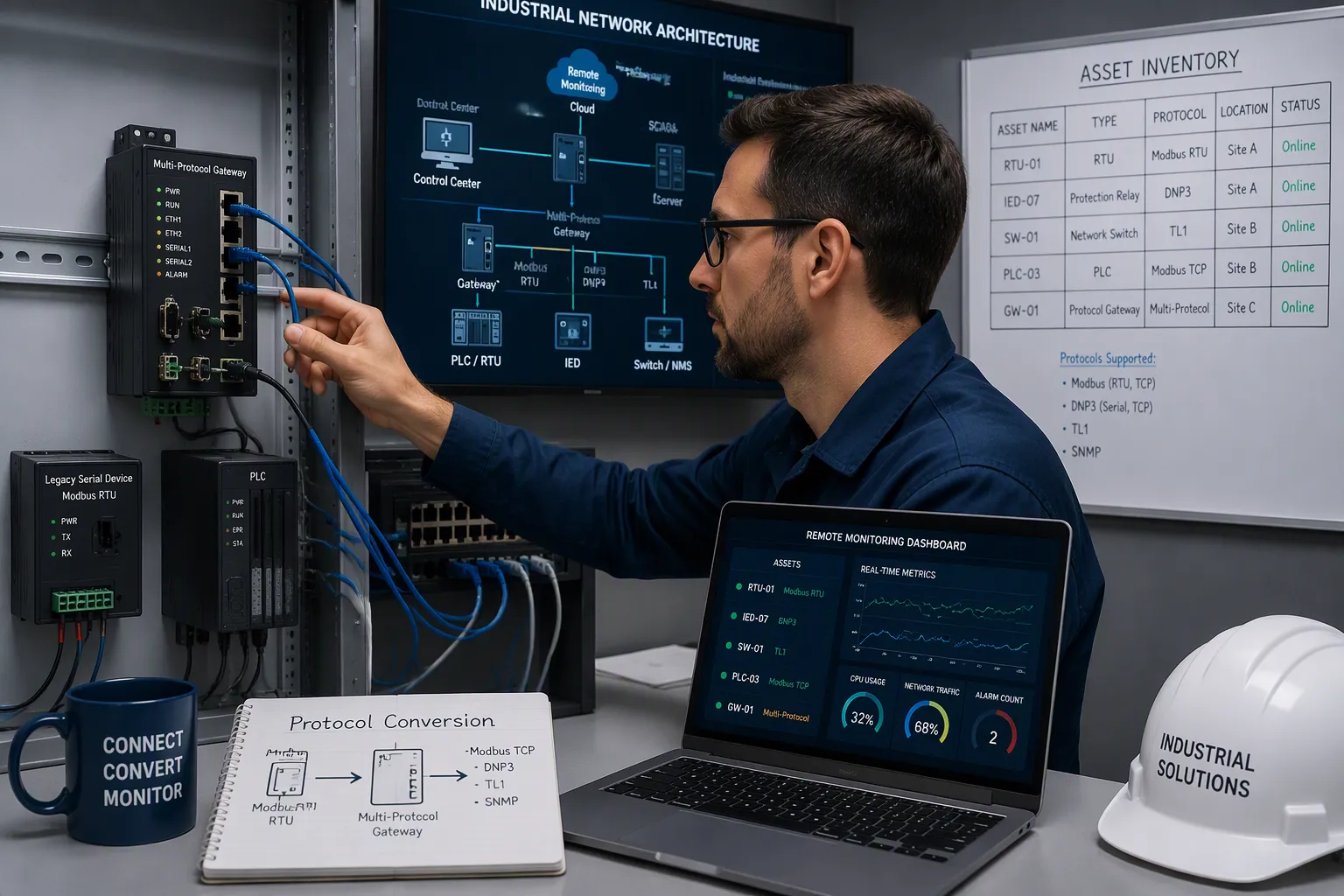
Start with an inventory. List every asset, its native protocol, and its communication path. Note which devices are legacy serial units and which speak modern industrial Ethernet. This audit tells you where protocol conversion is needed and where data already flows.
Map each asset to a business priority. Critical pumps, chillers, and power feeds deserve full monitoring coverage. Low-value devices may only need status reporting. Your asset list then drives port counts and gateway placement. A clear picture of protocols and priorities prevents overbuilding and keeps the project scoped.
Choosing Gateways and Platforms
Pick a platform with native multi-protocol support. A platform that handles only SNMP forces a rip-and-replace decision every time older equipment enters scope. A platform with native multi-protocol support lets that equipment stay put. Verify support for Modbus RTU, DNP3, TL1, and proprietary formats. Confirm the platform scales from a single site to hundreds without replacing edge hardware. Check for out-of-band cellular alert paths and edge buffering during WAN outages. Evaluate total cost of ownership, not upfront price alone.
Then score candidate gateways against hard criteria.
Criterion | What to Evaluate |
|---|---|
Industrial-grade reliability | IP67 protection, wide-temperature range (-40°C to 85°C), EMC compliance, redundancy (dual power, watchdog, auto-reconnect) |
Security performance | AES-256 encryption, role-based access control, security auditing/logging |
Scalability & flexibility | Hardware expansion (USB, PCIe), OTA software upgrades, open APIs for customization |
Debugging & operational efficiency | Real-time monitoring, remote configuration/firmware management, visualization tools |
Total cost of ownership | Low-power design, modular maintenance, vendor 24/7 support |
Certifications & standards | CE/FCC/RoHS plus industry-specific (IEC 61850, EN 50155, ATEX) |
Ecosystem compatibility | MQTT, OPC UA, database access; cloud compatibility (Alibaba, Huawei, AWS); industry protocols (IEC60870-5-104, BACnet) |
Case validation & reputation | Peer benchmark cases, third-party reports, user testimonials |
Favor gateways with dynamic multi-protocol loading. You add new protocols through software configuration, not hardware replacement. A hybrid interface design covers RS485, RS232, Ethernet, Wi-Fi, and 4G/5G in one unit. High-density acquisition lets a single gateway collect thousand-point data. Look for protocol breadth across Modbus RTU/TCP, Profinet, EtherNet/IP, and CANopen, plus IoT protocols like MQTT and OPC UA. The device should translate proprietary protocols such as Modbus RTU or DLT645 into MQTT+JSON for platform integration. A multiprotocol master station on one backbone simplifies system integration across vendors. Careful systems integration at this stage saves rework later.
Common Challenges and Solutions
Security and Data Integrity
Every open port on a converter is a door. You must lock the ones you do not use. Audit your network for remote desktop services, close unused RDP ports, and log every login attempt. Disable legacy SMBv1 and move to SMBv3 with the hardening steps in the joint #StopRansomware Guide. Segment the network so federation servers sit apart from production traffic. Restrict allowed traffic to only the systems and protocols each asset truly needs.
Identity control matters just as much. Integrate RADIUS with Active Directory or LDAP, then enforce role-based access control so read-only operators and configuration-privileged engineers see different views. Add multi-factor authentication with one-time passwords or certificates. Protect RADIUS traffic through secure tunnels or modern cryptography. Review authentication logs for unusual patterns, and revoke credentials no longer required. These controls produce audit trails that support NERC CIP, IEC 62443, and ISO/IEC 27001 compliance. Your protocol conversion design should treat security as a first-class requirement, not a later patch.
Legacy Device Constraints
Old equipment rarely speaks a modern language. Protocol gateways solve this by acting as translators. They convert outdated data formats so legacy devices and modern platforms exchange data cleanly. Gateways also normalize analog output into standardized digital formats and aggregate readings from many sensors into one data set. Fully working older equipment then stays in service, which cuts capital costs and simplifies systems integration.
Dedicated conversion modules prove the point. Engineers build modules that convert CAN bus, RS232, and RS485 protocols to each other, and experimental results verify their accuracy and reliability. That kind of hardware handles snmp-legacy integration without a rip-and-replace project. For unpatched assets, apply compensating controls: network isolation, firewall filtering, application allowlisting, and continuous monitoring. Edge computing adds local analytics and temporary storage during outages. Cloud-native tools then synchronize data in real time. Your communication protocol conversion layer should also feed network monitoring systems and network alarm systems, so alarm management systems and remote alarm management stay unified. Plan each protocol conversion around legacy protocols you cannot retire, and let communication protocol conversion carry that data forward.
Multi-protocol conversion translates data between incompatible device languages. Remote monitoring collects that data and turns it into dashboards and alerts you can act on.
Pair the two and the old gaps close. Interoperability stops trapping data inside single machines. Monitoring stops depending on site visits. One unified view covers every asset, whatever protocol it speaks.
Start small. Run an asset and protocol audit before you buy hardware. List each device, its native language, and its priority. That list scopes the project and prevents overbuilding.
Multi-protocol conversion and remote monitoring form one system. Converters translate, platforms watch, and you see everything from anywhere.
FAQ
What does a protocol converter actually do?
A protocol converter translates one device language into another. It sits between machines that cannot talk directly. For example, it turns Modbus RTU data from pumping station PLCs into TCP/IP messages for cloud upload. You gain one shared data stream instead of isolated devices.
Do I need to replace legacy equipment to add remote monitoring?
No. A gateway translates old data formats so legacy devices and modern platforms exchange data cleanly. You keep working equipment in service and cut capital costs. Protocol conversion extends the operational life of legacy assets without limiting network growth.
How many protocols can one gateway support?
Support varies by product. The CPC Gateway handles about 100 protocols across multiple ports. One box can serve an entire mixed-vendor site. Check that your chosen device covers your asset list before you buy.
What should I check before choosing a gateway?
Score candidates on industrial reliability, security, and scalability. Look for IP67 protection, a wide temperature range, and AES-256 encryption. Confirm support for your native protocols and cloud platforms. Favor dynamic multi-protocol loading, so you add protocols through software, not hardware swaps.
How does a multiprotocol master station simplify oversight?
A multiprotocol master station accepts many device languages on one backbone. It removes parallel networks and the duplicate hardware they demand. Your team maps each protocol once and reuses that mapping across sites. Monitoring stays unified, and protocol conversion carries every stream into one view.