When you pick between Rogers and Taconic for high-frequency pcb material, you should match the pcb material to your design and what you want it to do. Rogers usually gives more steady electrical properties for high-frequency uses. Taconic often gives a cheaper pcb material with good performance for many printed circuit board uses. The right material helps keep signals clear and makes your pcb work well. Think about how the material fits your high-frequency pcb material needs and your design before you choose.
Key Takeaways
Pick PCB materials that fit what your design needs. Try to balance how well it works and how much it costs. Rogers gives very steady electrical features and handles heat better. It works well for hard, high-frequency jobs. Taconic works well too but costs less. It is good for many wireless and 5G projects. Look at important things like dielectric constant and signal loss. Also check thermal stability and mechanical strength before you choose. Ask experts for help and test samples first. This helps you avoid mistakes and make strong, good PCBs.
Importance
Signal Integrity
When you make a printed circuit board for high-frequency use, you must care about signal integrity. Signal integrity means your high-frequency signals move through the pcb material without getting weak or messed up. If you pick the wrong high-frequency pcb material, your signals can lose power, slow down, or change shape. This can make your high-frequency performance worse and your device might not work in rf applications.
High-frequency pcb material with a low dielectric constant (Dk) and low dissipation factor (Df) helps stop signal loss.
Materials with low-profile copper help signals move better and stay clear.
High volume resistivity in the material keeps energy from leaking away, which is important for high-frequency signals.
The right thickness of the pcb material helps you control impedance, which keeps signal integrity strong.
Matching the thermal expansion of all materials in your pcb stops stress and keeps your signals steady, even when the temperature changes.
You want your high-frequency pcb material to keep signal integrity high in all fast applications. This is very important for rf applications, where even small losses can cause big problems.
Electrical & Mechanical Properties
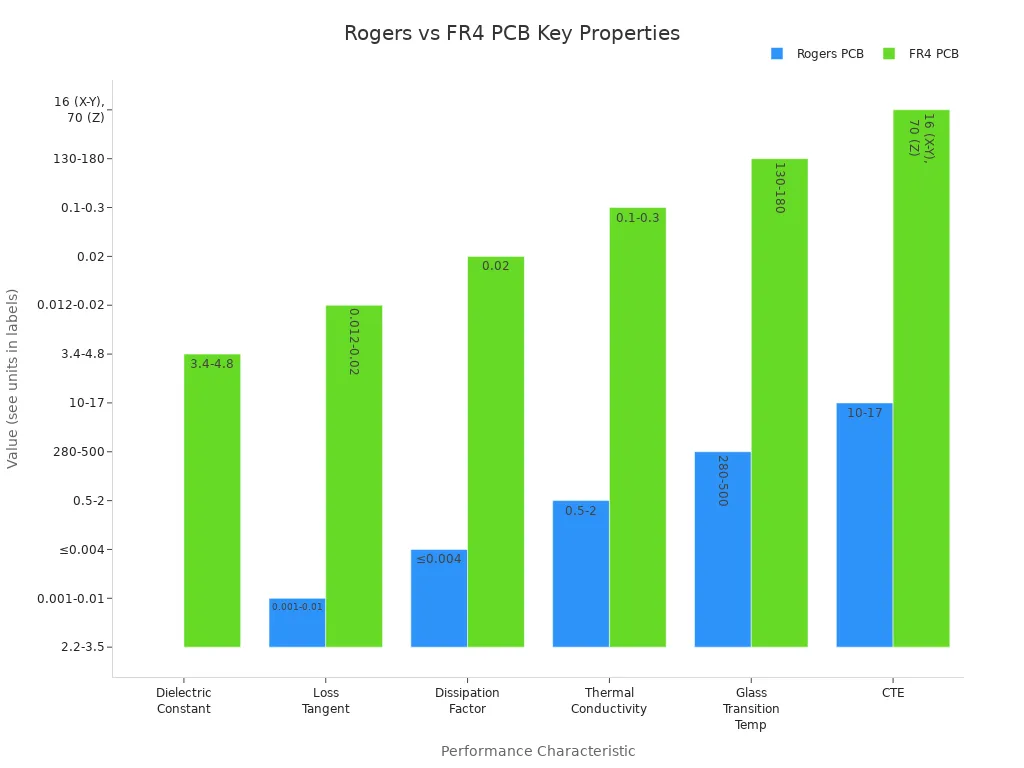
You also need to look at both electrical and mechanical properties when you pick a pcb material for high-frequency use. Electrical properties like dielectric constant and dissipation factor decide how well your pcb handles high-frequency signals. If these numbers are not right, your high-frequency performance will not be good.
Mechanical properties matter too. Your pcb material must be strong enough to handle drilling, lamination, and other steps when making the board. If the material is too weak, your pcb can crack or break during use. The balance between electrical and mechanical properties is important. Sometimes, making a material better for one property can make it worse for another. You need to find a pcb material that works for both.
In fast applications, the right material choice means your pcb will last longer and work better. Always check both sets of properties before you choose.
Key Differences
Rogers Overview
Rogers is a popular choice for high-frequency pcb material. It helps your signals stay strong and clear. Rogers has a dielectric constant (Dk) from 2.2 to 3.5. This low Dk helps keep your signals from getting weak. Rogers also has a very low dissipation factor (Df), between 0.001 and 0.01. This means you lose less signal, even at high frequencies.
Rogers pcb materials work well in tough places. They have high thermal conductivity, so they help with heat. The glass transition temperature (Tg) is high, so your board stays stable when it gets hot. Rogers does not soak up much water. This makes it good for humid or outdoor places. Rogers comes in many types, like RO4000, RO3000, RT/duroid, and TMM series. Each type works for different microwave and high-frequency needs.
Note: Rogers has strong mechanical properties. Your pcb will not bend or break easily. This helps your design last a long time.
Taconic Overview
Taconic is another good choice for high-frequency pcb material. Taconic has a low dielectric constant, so signals move fast and stay sharp. The dissipation factor is low, so you lose less energy as heat. This keeps your pcb cool and working well.
Taconic does not soak up much water. Your pcb keeps working, even if it is humid. Taconic has great peel strength. The copper stays stuck to the board, so it stays strong. Taconic works well in hot places because it has a high glass transition temperature, about 315°C. You can use Taconic for fast data and high bandwidth. This is important for new things like 5G.
Taconic is easier to make and costs less than Rogers. It is a good pick if you want good performance and need to save money.
Tip: Taconic helps lower crosstalk and signal coupling. Your circuits will have less trouble from interference.
Application Areas
You should pick the pcb material that fits your project. Rogers is best for high-frequency and high-performance designs. You see Rogers in RF, microwave, aerospace, and telecom uses. Rogers gives you the best signal and heat control when things get tough.
Taconic works well for many high-frequency uses too. You can use Taconic in wireless, cars, and 5G projects. Taconic gives good results at a lower price. If you do not need the highest stability, Taconic can help you save money.
Material Comparison Chart
Here is a chart to help you see the main differences between Rogers and Taconic. This chart shows how each pcb material works in important ways:
Property | Rogers | Taconic |
|---|---|---|
Dielectric Constant (Dk) | 2.2 – 3.5 (stable) | 2.2 – 3.0 (stable) |
Dissipation Factor (Df) | 0.001 – 0.01 (very low) | 0.001 – 0.005 (very low) |
Thermal Conductivity (W/m-K) | 0.5 – 2 (high) | 0.3 – 0.8 (good) |
Glass Transition Temp (Tg, °C) | 280 – 500 (high) | ~315 (high) |
Moisture Absorption | Very low | Very low |
Mechanical Strength | High | High |
Cost | Higher | Lower |
Fabrication Ease | Moderate | Easier |
Typical Applications | RF, microwave, aerospace, telecom | Wireless, automotive, 5G, general RF |
You can use this chart to help you choose. Rogers is best for hard jobs. Taconic is good if you want to save money and still get good results.
Remember: Always check what your project needs before you pick a pcb material. The right choice helps you get the best outcome.
Electrical Performance
Dielectric Constant (Dk)
When you look at Rogers and Taconic, check the dielectric constant first. This number shows how fast signals move in the pcb material. Rogers usually has a dielectric constant from 2.2 to 3.5. Taconic is also low, often between 2.2 and 3.0. If the Dk is lower, signals move faster. This helps your high-frequency circuits work better. Both brands keep their Dk steady, so your pcb works the same every time. This is important for microwave and other advanced projects.
Tip: If the dielectric constant stays steady, you can control impedance and keep your signals strong.
Dissipation Factor (Df)
Dissipation factor tells you how much signal is lost as it moves through the laminate. A lower Df means less energy turns into heat. This helps your pcb work better at high speeds. Here is a quick look at Rogers and Taconic for dissipation factor:
Property | Rogers RO4350B | Taconic RF-35 |
|---|---|---|
Dissipation Factor (Df) | 0.0037 | 0.0018 |
Frequency Range | Up to 40 GHz | Up to 20 GHz |
Taconic has a lower dissipation factor, so it loses less signal. This makes Taconic good for designs that need very low loss. Rogers keeps its Df steady even at higher frequencies. This helps Rogers work well in tough pcb projects.
Frequency Stability
You want your pcb to work well at many frequencies. Rogers is good because its Dk and Df stay steady up to 40 GHz. Taconic works well up to 20 GHz, but its properties can change more at higher frequencies. If you need your pcb to work best at very high frequencies, Rogers is more stable. For most high-frequency uses, Taconic still works well and loses little signal.
Here are some common electrical benchmarks you should check when you compare pcb materials:
Benchmark Parameter | Description | Relevance to Rogers and Taconic Materials |
|---|---|---|
Dielectric Constant (Dk) | Shows how well the material stores electrical energy and affects signal speed. | Rogers usually has low Dk, so signals move faster. |
Dissipation Factor (Df) | Tells how much signal is lost in the material. | Rogers usually has low Df, so less signal is lost. |
Coefficient of Thermal Expansion (CTE) | Shows how much the material grows or shrinks with temperature changes. | This is important for keeping the pcb stable when it gets hot or cold. |
Flame Retardant Grade | Shows how well the material resists fire (like 94V-0). | This keeps the pcb safe and meets rules. |
Glass Transition Temperature (TG) | The temperature where the material changes from hard to soft. | Higher TG means the pcb can handle more heat. |
Comparative Tracking Index (CTI) | The highest voltage the surface can take before leaking. | Higher CTI means the pcb is safer from electrical leaks. |
Conductive Anodic Filament (CAF) | Shows if the pcb can get shorts from voltage and water. | Lower CAF risk means the pcb is more reliable. |
Relative Thermal Index (RTI) | Shows how much heat the pcb can take for a long time. | This tells you the highest safe working temperature. |
When you compare Rogers and Taconic, always match the electrical performance to what your project needs. Both brands give you good choices for high-frequency work. Your pick depends on your frequency, how much loss you can allow, and your budget.
Thermal & Mechanical
Thermal Conductivity
You need to think about thermal conductivity when you choose a pcb material. Good thermal conductivity helps your pcb move heat away from hot spots. This keeps your circuits safe and working well. Rogers materials often have higher thermal conductivity than Taconic. If your design makes a lot of heat, you may want to use Rogers for better heat control.
Rogers pcb materials can reach up to 2 W/m-K. This means they move heat fast.
Taconic pcb materials usually range from 0.3 to 0.8 W/m-K. These numbers work for many uses, but not for the hottest designs.
Tip: High thermal conductivity helps your pcb last longer and keeps the quality high. You lower the risk of damage from heat.
You should always check the heat needs of your pcb. If your board gets hot, pick a material that can handle it. This choice helps you keep stable quality in your finished product.
Mechanical Strength
Mechanical strength matters for every pcb. You want your board to stay strong during drilling, soldering, and use. Rogers and Taconic both give you good mechanical strength, but you may see small differences.
Rogers pcb materials have high peel strength. The copper stays attached to the laminate, even after heat cycles.
Taconic pcb materials also show strong peel strength and flex well. This helps your pcb resist cracks and breaks.
A strong pcb means fewer problems during assembly. You get better quality and fewer repairs. Always look at the specs for mechanical strength before you choose. If you need a pcb for tough jobs, both Rogers and Taconic can give you what you need.
Note: Good mechanical strength and thermal performance together help you build a pcb with stable quality that lasts.
Cost & Manufacturing
Material Cost
You need to think about both price and how well the pcb works. Rogers costs more because it gives steady electrical properties and good heat control. Taconic is cheaper but still works well for many high-frequency pcb projects. If you look at the material comparison chart, Rogers is more expensive. Taconic helps you save money if you have a small budget.
To get the most for your money, you should:
Choose a pcb material that fits your needs and budget.
Think about cost and benefits for the whole life of your pcb.
Try using different materials in different parts of your board.
Use as much of each panel as you can to waste less.
Talk to suppliers early to find ways to save money.
Tip: Always look at the material comparison chart before you pick. This helps you find ways to save money and keep good quality.
Availability
You want your pcb material to be easy to find. Rogers and Taconic are sold all over the world. This makes it easy to get your pcb made fast, no matter where you live. The material comparison chart shows you can get these materials in the USA, China, Taiwan, Israel, India, and Thailand. When you can get materials quickly, you finish your pcb project on time.
Aspect | Details |
|---|---|
Materials Available | Rogers, Taconic, FR4, high temp, CEM-1, Polyimide |
Production Facilities | USA, China, Taiwan, Israel, India, Thailand |
Lead Times | 2-3 days for up to 8 layers (domestic manufacturing) |
5 days for 8-18 layer multilayers (domestic and offshore manufacturing) | |
Inventory Programs | Kan-Ban and blanket stocking programs for split deliveries |
Impact on Lead Times | Global availability and many factories mean fast turnaround |
Additional Benefits | No extra tooling costs when moving from prototype to production |
Note: The material comparison chart helps you see how getting materials from many places can make lead times shorter.
Fabrication
You want your pcb to be simple to make. Rogers pcb material works with most normal FR4 processes. This means you get more good boards and fewer problems when making many at once. Taconic pcb material needs some changes for lamination and drilling, but it is stable for special jobs. The material comparison chart shows Rogers is better for big orders. Taconic is good for small or flexible projects.
Rogers pcb material fits most factory setups, so production goes smoothly.
Taconic pcb material lets you try new ideas and save money on small runs.
Both materials make strong boards, but always check the material comparison chart for tips.
Tip: Talk to your fabricator early. This helps you pick the best pcb material and avoid mistakes that cost money.
Choosing RF PCB Material
Application Fit
When you pick a pcb material, you must match it to your project. Each rf pcb material has special features that help in different jobs. You should check some key things:
Dielectric constant: This changes how fast signals move. It also helps you control impedance. Lower numbers mean less signal loss and less distortion. This is very important for high-frequency work.
Loss tangent: This tells you how much energy turns into heat. If the loss tangent is low, your signals stay strong and clear.
Thermal properties: Good thermal conductivity moves heat away fast. A stable coefficient of thermal expansion keeps your pcb strong when it gets hot or cold.
Material stability and consistency: You want the dielectric thickness and quality to stay the same every time. This makes your design more reliable for fast jobs.
Always check these things before you pick a pcb material. If you use the wrong one, your pcb can lose signals or break in hard conditions. For example, FR-4 is not good for high-frequency jobs. It can cause more signal loss and bad performance. You should use special rf pcb material for antennas, radar, or 5G devices.
Tip: Always pick a material that fits your project. This helps your pcb work well and last longer.
Performance vs Budget
You need to think about both performance and cost when you choose. High-frequency jobs often need special materials. These can cost more than regular ones. Rogers and Taconic give you great high-frequency performance. They have low dielectric constants and low loss. But they cost more than normal materials.
Only use expensive rf pcb material if your design really needs it. If you use costly materials for easy jobs, you waste money. Always check if you need the best performance. For most fast jobs, you can find a material that fits your needs and your budget.
Make a list of what your design needs most, like speed or signal clarity.
Compare the cost of each material to what it gives you.
Do not pick materials that are too good for your job. This saves money and keeps your project simple.
Note: Smart choices help you get good performance without spending too much. This makes your pcb project work well.
Consulting Experts
You should talk to experts if your job is hard or new. Many engineers make mistakes by picking the wrong material or skipping steps. For example, using FR-4 for fast jobs can cause signal loss and bad results. Experts can help you avoid these problems.
Ask your pcb maker about the best material for your design.
Work with engineers who know about high-frequency pcb material.
Get advice on layout, trace width, spacing, and heat control.
Use prototypes to test your design before making many boards.
Callout: Talking to experts helps you avoid mistakes and reach your goals.
You should also follow good design rules. Keep solid power and ground planes. Match impedance and check your design rules. These steps, plus the right pcb material, help you build strong and fast boards for any high-frequency job.
You should always match your PCB material to your design, performance, and budget needs. To choose the best high-frequency PCB material, follow these steps:
Find your operating frequency.
Check the dielectric constant and loss tangent.
Look at thermal stability and frequency range.
Avoid FR4 for high-frequency jobs.
Use selector tools to compare options.
Request samples or talk to experts before you decide. This helps you build a reliable and strong PCB.
FAQ
What makes Rogers better for high-frequency PCBs?
You get stable electrical properties with Rogers. This helps your signals stay clear at high frequencies. Rogers also handles heat well and resists moisture. You can trust it for tough jobs like aerospace or telecom.
Is Taconic a good choice for budget projects?
Yes, you can save money with Taconic. It gives you good performance for most high-frequency uses. You still get low signal loss and strong boards. Taconic works well for wireless, automotive, and 5G projects.
Can I use FR-4 for high-frequency designs?
You should avoid FR-4 for high-frequency work. FR-4 causes more signal loss and less stable performance. Your circuits may not work as expected. Choose Rogers or Taconic for better results.
How do I pick the right PCB material for my project?
Start by listing your needs. Check your frequency, signal loss, and heat limits. Compare Rogers and Taconic using a chart. Ask your PCB maker for advice. You can also request samples to test.
Do Rogers and Taconic materials work with standard PCB processes?
Yes, you can use most standard PCB processes with both materials. Rogers fits well with common setups. Taconic may need small changes for lamination or drilling. Always talk to your fabricator before you start.