Tablets have become part of your daily life. You use a tablet to read, work, stream shows, or even draw. Maybe you wonder which tablet suits your needs best. Choosing the right tablet can feel confusing with so many options. You want clear answers, not just hype. That’s why you need an unbiased review. Here, you’ll see how each tablet pc performs, what value it offers, and how it fits different uses. You deserve honest advice.
Key Takeaways
Pick the tablet that fits what you need. Think about how fast it is, how long the battery lasts, and if it is easy to carry.
The Apple 11th-generation iPad is a great choice for most people. It works well and can do many things.
If you want to save money, the Amazon Fire HD 10 is a good pick. It has a nice screen and the battery lasts a long time.
Windows tablets like the Microsoft Surface Pro are strong and can be used as a laptop or tablet. They are good for work and school.
Look for sales like Black Friday or Back-to-School time. You can get the best prices on tablets then.
Top Tablet PCs Overview
Choosing the right tablet can feel overwhelming. You see so many brands and models. Some tablets cost less than a dinner out, while others cost as much as a laptop. Let’s break down the best options for every need and budget.
Best Overall Tablet PC
After hundreds of hours of research and testing, Apple’s 11th-generation iPad is concluded to be the best all-around tablet.
You want a tablet that does everything well. The 11th-generation ipad stands out as the best ipad for most people. It handles web browsing, streaming, drawing, and even light gaming. You get a smooth experience, fast performance, and a bright display. The battery lasts all day, so you can use it for work or play without worry. If you want a little more power, the ipad Air M3 gives you a premium design, the M3 chip, and even better battery life. Both models feel fast and reliable. You can trust them for school, work, or fun.
Best Value Tablet
You might not want to spend a lot on a tablet. Consumer reports say that if your budget is $200 or less, you should look at Amazon’s Fire tablets or Walmart’s Onn line. These tablets work well for reading, streaming, and simple games. If you want more features, tablets between $500 and $1,000 give you lots of choices. You can find professional models for over $1,000 if you need top performance. The best amazon tablet for most people is the Fire HD 10. It gives you a good screen, long battery, and a low price. You get a lot for your money.
Best Windows Tablets
You may need a tablet that runs windows. The best windows tablets give you the power of a laptop and the ease of a tablet. The Microsoft Surface Pro series leads this group. You can use it as a detachable 2-in-1. Snap on the keyboard, and you have a laptop. Take it off, and you have a tablet. The Surface Pro is a detachable that feels solid and premium.
Strengths | Description |
|---|---|
Versatility | The Surface Pro tablets offer tablet-to-laptop flexibility in one powerful device. |
Performance | They provide faster performance, being over 50% faster than previous models. |
Display Quality | The devices feature gorgeous displays with vivid colors and optional ultra-bright OLED screens. |
Battery Life | They boast all-day battery life, with up to 16 hours of video playback. |
Typing Experience | The Surface Pro offers an incredible typing experience with a premium keyboard attachment. |
You get a great display, strong battery, and a detachable keyboard. The Surface Pro is a top choice if you want a windows tablet for work or school.
Best iPad Models
You see many ipad models. Which one fits you? Here’s a quick guide:
iPad Model | Recommended For | Key Features |
|---|---|---|
iPad | Everyday tasks | Basic model, suitable for web browsing and light office tasks. |
iPad Mini | Mobility-focused users | Compact and lightweight, powerful performance despite smaller size. |
iPad Air | General office work and creativity | Robust performance, suitable for multitasking and entertainment. |
iPad Pro | Professionals and creatives | High-end model with powerful configuration, ideal for demanding tasks. |
For creative professionals: ipad Pro is the best ipad for creators and students.
For business users: ipad Pro or ipad Air.
For casual users: standard ipad or ipad Mini.
For travelers: ipad Mini.
For families: standard ipad.
The ipad Pro shines for creative work and heavy multitasking. The ipad Air is the best ipad for most people who want speed and value. The ipad Mini is perfect if you want portability. The standard ipad covers school, home, and fun.
Best Android Tablets
You may prefer android tablets. The best android tablet for most people is the Google Pixel Tablet. It runs fast, has a bright screen, and works well with Google apps. If you want the best android tablet for students and creators, look at the Samsung Galaxy Tab S9. It has a sharp display, strong battery, and a detachable 2-in-1 design. The best affordable android tablet is the Lenovo Tab M10 Plus. It gives you a good screen, long battery, and a low price. If you want the best tablet under $100, try the Amazon Fire 7. It is simple, but it works for reading and streaming.
Here are some top android tablets:
Google Pixel Tablet: best android tablet for most people.
Samsung Galaxy Tab S9: best android tablet for students and creators.
Lenovo Tab M10 Plus: best affordable android tablet.
Amazon Fire 7: best tablet under $100.
You get lots of choices with android. You can find a tablet for every budget and need.
Best for Portability
You want a tablet that fits in your bag or even your pocket. The ipad Mini is the top pick for portability. It is light, small, and powerful. You can hold it in one hand. It works well for reading, travel, and quick notes. Many android tablets also come in small sizes. The Samsung Galaxy Tab A7 Lite is a good choice if you want a small android tablet. You can carry it anywhere.
Best for Durability
You may need a tablet that can handle drops, water, or dust. Some tablets have special ratings for toughness.
Certification | Description |
|---|---|
MIL-STD-810G | |
MIL-STD-810H | Enhanced standards for drops and shocks |
IP65 | Dust tight and protected against water jets |
IP67 | Dust tight and protected against immersion in water up to 1 meter |
IP68 | Dust tight and protected against continuous immersion in water |
Glove-compatible screens | Usable with gloves for convenience in rugged environments |
If you work outside or travel a lot, look for these ratings. The Samsung Galaxy Tab Active series and some Lenovo tablets have these features. You can use them in tough places. They last longer and keep working even if you drop them.
You now have a clear view of the best tablets for 2025. You see options for every need, from the best ipad for most people to the best android tablet for students and creators. You can pick a tablet pc that fits your life, your work, and your budget.
Tablet PC Brand Reviews
Apple iPad Series
You see the ipad almost everywhere you go. People use it in schools, offices, and coffee shops. The ipad uses iPadOS, which is smooth and simple. It works fast because of Apple’s A-series or M-series chips. The app store has many apps made for the ipad. You can use the Apple Pencil and Magic Keyboard with it. Apple gives you updates for many years. Your tablet stays new for a long time. The ipad looks nice and feels light in your hands. The standard ipad is best for most people. The ipad Air and ipad Pro have more power and features. If you want a small tablet, the ipad Mini is a good choice. You can use the ipad for drawing, reading, or work. The best ipad for most people has a good price and works well.
Specification/Feature | Lenovo Tablets | |
|---|---|---|
Operating System | iPadOS | Android |
Processor/Chipset | Apple Silicon | Snapdragon/MediaTek |
App Ecosystem | Optimized App Store | Google Play Store |
Storage | Non-Expandable | Expandable (microSD) |
Accessory Integration | Seamless | Varies |
Software Updates | Long-term | Shorter |
Price Range | Higher | Wider |
Primary Use Cases | Creative, Media, Education | Entertainment, Budget, Productivity |
Hardware Design | Premium, Thin | Varies |
Samsung Galaxy Tab Series
You see Samsung tablets in many places too. The Galaxy Tab series uses Android, so you get many apps. Samsung tablets have bright screens and batteries that last long. You can use the S Pen for drawing or taking notes. The Galaxy Tab S9 is great for students and creators. It works fast and has a clear display. If you want a cheaper tablet, the Tab A7 Lite is small and easy to carry. Samsung tablets are good for streaming, reading, and light work. You can find one for any budget.
Microsoft Surface Pro and Windows Tablets
You may want a tablet that feels like a laptop. The best windows tablets are made by Microsoft. The Surface Pro gives you a strong windows experience. It has a bright OLED display and battery that lasts all day. The keyboard snaps on, so you can type fast. It uses Snapdragon chips for good speed. The Surface Pro can be a tablet or a laptop. You can use Microsoft Copilot for help with tasks. Some windows tablets have AI tools for creativity. The design is light and easy to carry. The best windows tablets are good for business, school, and creative work.
Advantages | Disadvantages |
|---|---|
Limited App Compatibility | |
Stunning OLED Display | Performance in Emulation |
Powerful Performance | Accessories Cost Extra |
Integrated AI | AI Features Unpolished |
Portability | |
Versatile Form Factor | |
Microsoft Copilot | |
Creativity Tools |
Lenovo Tablet PCs
You see Lenovo tablets in stores and online. They use Android, so you get many apps. Lenovo tablets are a good deal, especially if you want to save money. You can add more storage with a microSD card. Some models have kickstands or special speakers. They work well for reading, streaming, and light work. Lenovo tablets are good for families and people on a budget. You have many choices to pick from.
Other Notable Tablet Brands
You might want a different kind of tablet. Brands like Boox, Kobo, and Kindle make special tablets. Boox Go 10.3 has a clear E Ink screen and works fast. Kobo Elipsa 2E is good for taking notes on e-books. Kindle Scribe lets you read and write with AI tools. Amazon Fire Max 11 is nice for fun and work. Haoqing MeeBook P78 Pro is a good deal for reading and writing. Supernote A5 X helps you organize notes fast. You have many options if you want a tablet for reading, writing, or simple jobs.
Tip: Try out different tablets in stores before you buy. You can see which one feels right for you.
Key Features of Tablet PCs
Performance and Speed
You want a tablet that feels fast every time you use it. Performance matters for everything, from opening apps to playing games. The latest tablet models use powerful chips, like the Apple M5, which can reach speeds up to 4.43 GHz. You can see how top tablets compare in this chart:

Tablets with higher performance scores let you multitask, edit videos, and run demanding apps without lag. If you want the best experience, look for a tablet with a high performance score.
Display and Touchscreen Quality
A good display makes everything look better. You notice the difference when you watch movies or draw. Tablets use different screen types, like LCD, OLED, and AMOLED. OLED and AMOLED screens give you brighter colors and deeper blacks. For sharp images, check the pixel density. Tablets with over 300 pixels per inch look crisp and clear. Many top tablets now offer 120Hz refresh rates, so scrolling and gaming feel smooth.
Display Type | Characteristics |
|---|---|
LCD | Thin, light, low flicker |
OLED | High contrast, fast response |
AMOLED | Bright, vivid colors |
Tip: For the best graphics, choose a tablet with at least an 8-inch screen.
Battery Life
You don’t want your tablet to die in the middle of the day. Battery life is a big deal. Most leading tablets last at least 8 hours with normal use. Even with heavy use, you should expect at least 6.5 hours. Some tablets go even longer, so you can stream, work, or play without worrying about the battery.
Expect at least 8 hours of battery life from top tablets.
Heavy use should still give you 6.5 hours or more.
Operating System Choices
The operating system changes how you use your tablet. You might like Windows for a desktop feel, or Android for lots of apps and easy use. Each system offers different ways to interact, from touch to keyboard and stylus. Accessories can make your tablet more useful, turning it into a mini laptop or a drawing pad.
Windows gives you a desktop experience for work.
Android is simple and has many apps for fun.
Pick the system that matches your needs.
Build Quality and Design
You want a tablet that lasts. Build quality affects how long your tablet stays in good shape. Some tablets use magnesium alloys or reinforced plastic for extra strength. Look for features like MIL-STD-810H certification or IP65–IP68 ratings. These mean your tablet can handle drops, dust, and water.
Feature | Description |
|---|---|
Rugged Design | Uses strong materials for durability. |
Component Placement | Protects electronics from shocks. |
Quality Assurance | Meets tough standards for drops and weather. |
Advanced Materials | Magnesium alloys resist impacts. |
Display Protection | Gorilla Glass keeps screens safe. |
Tablets with rugged designs work well outdoors or on job sites.
Accessories and Expandability
Accessories help you get more from your tablet. You can add a keyboard, stylus, or case. Some tablets let you expand storage with a microSD card. Entry-level tablets like the iPad 11 are affordable, while high-end models like the iPad Pro cost more but offer advanced features. Many accessories cost less than $150 and can make your tablet more powerful for work or play.
Accessory Type | Description | Price Range |
|---|---|---|
Good for basic use, affordable. | $274 | |
iPad Pro | Advanced features, higher price. | $2000+ |
General Accessories | Enhance your tablet for less money. | Under $150 |
Note: Adding the right accessories can turn your tablet into a tool for school, work, or art.
Choosing Your Tablet PC
Tablet PC for Students
You want a tablet that helps you learn and take notes. Students need a device that works all day and is fast. The tablet should feel good to use. Pick one with a bright screen and stylus support. This makes writing and drawing easy. Make sure there is enough space for your files. If you want to save money, choose a tablet with good value. It should still have the important features you need.
Feature | Description |
|---|---|
Performance & Processor | Fast multitasking for switching between apps. |
Display Quality | Eye-comfort screens for long study sessions. |
Stylus Compatibility | Handwriting and sketching made easy. |
Battery Life | 8–12 hours to last a full school day. |
Storage & Expandability | Enough space for PDFs and presentations. |
Value for Money | Affordable without losing important features. |
Windows Tablet for Business
You need a tablet that can handle your busy work. A windows tablet for business is strong and safe. You can use a detachable 2-in-1 for meetings or typing. These tablets have support for work and docking. You get easy multitasking and reliability. If you want the best, try the Surface Pro, Dell Latitude 7320, or Lenovo ThinkPad X1.
Tablet Model | Key Features |
|---|---|
Dell Latitude 7320 | Enterprise reliability, docking, security. |
Lenovo ThinkPad X1 | Enterprise reliability, docking, security. |
Microsoft Surface Pro | Multitasking, battery life, premium accessories. |
Tip: Pick a detachable 2-in-1 for meetings and travel.
Tablet for Creatives
You want a tablet for drawing, design, or editing photos. Creatives need a big, clear screen and comfy tools. Make sure your tablet works with your favorite apps. Portability is important if you travel. Choose a tablet that fits your budget and works with a stylus.
A big screen helps with detailed work.
An ergonomic design keeps you comfortable.
The right software is important for creative jobs.
Tablet for Gaming
You want games to look good and run smooth. The best tablets for gaming have fast chips and high refresh rates. The M5 iPad Pro, Galaxy Tab S10+, and REDMAGIC Astra are top picks. These tablets can play hard games and stay cool. You get bright screens and strong performance.
Tablet Model | Key Hardware Features | Gaming Performance (FPS) | Price |
|---|---|---|---|
M5 iPad Pro | M5 chip, 150 GB/s memory, Adaptive Sync | 60 fps | $999 |
Galaxy Tab S10+ | 12.4-inch AMOLED, 120 Hz, Snapdragon processor | 55 fps | $819.42 |
REDMAGIC Astra | Snapdragon 8 Elite, cooling system, OLED display | N/A | $799 |
Tablet for Travel
You want a tablet that is light and lasts long. Travelers need a tablet that is easy to carry. Pick one with Wi-Fi and cellular for internet anywhere. A good camera helps you take pictures. The iPad Mini fits in your bag and works in small spaces. Add a keyboard for work on the go. The A15 Bionic chip lets you do many things and watch movies.
Feature | Description |
|---|---|
Portability | Lightweight and easy to pack. |
Battery Life | Lasts longer than most phones. |
Connectivity Options | Wi-Fi and cellular for internet everywhere. |
Stylus and Keyboard Support | Makes note-taking and work easier. |
Camera Quality | 12MP camera for photos and video calls. |
Note: A detachable 2-in-1 tablet is best for travel and flexibility.
Tablet PC Comparison Table

You want to see how the top tablets stack up. A comparison table makes it easy for you to spot the differences. You can check the price, screen size, resolution, storage, RAM, and weight. This helps you pick the tablet that fits your needs and budget.
Price | Screen Size | Resolution | Storage | RAM | Weight |
|---|---|---|---|---|---|
$47.98 | 7 inches | 1024 x 600 | 32 GB | 3 GB | unknown |
$69.99 | 10.1 inches | 1920 x 1200 | 32 GB | 3 GB | 15.29 oz |
$274.00 | 11 inches | 2360 x 1640 | 128 GB | 6 GB | 16.8 oz |
$54.99 | 7 inches | 1024 x 600 | 16 GB | 2 GB | 15.1 oz |
$104.99 | 10.1 inches | 1920 x 1200 | 32 GB | 3 GB | 23.21 oz |
$199.00 | 10.9 inches | 1920 x 1200 | 128 GB | 8 GB | 16.93 oz |
Tip: If you want a bigger screen and more storage, you may need to spend a little more. Lighter tablets are easier to carry, but sometimes they have less power.
You might wonder how price and performance compare for premium tablets. Here’s a quick look at some top models:
Tablet Model | Price Range | Performance Highlights |
|---|---|---|
> $1,000 | Fast processor, sharp display, long software support (up to 7 years) | |
Galaxy Tab S10 Ultra | > $1,000 | Great for work, strong performance, 7 years of updates |
Lenovo Tab Extreme | $600–$900 | Good for media, bright OLED screen, expandable storage, older chip than flagships |
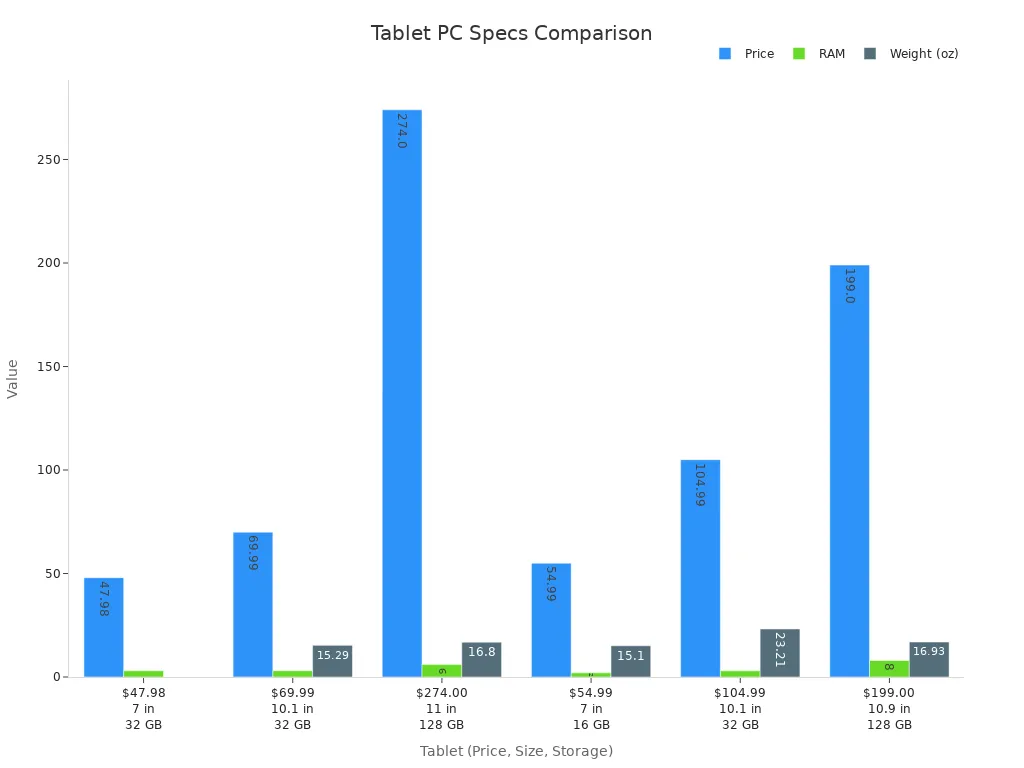
You can see from the chart that tablets with more RAM and bigger screens usually cost more. If you want top speed and the best display, you will pay a premium. If you just need a tablet for reading or streaming, you can save money and still get good features.
Note: Always check the specs before you buy. You want a tablet that matches your daily needs, not just the lowest price.
Buying Tips for Tablet PCs
Best Time to Buy
You want to save money when you buy a tablet. Timing matters. Some times of the year offer better deals than others. Here are the best times to shop for a tablet PC:
Black Friday and Cyber Monday: These big sales in late November bring some of the lowest prices on electronics.
Back-to-School Season: Late summer is perfect for student deals. Stores offer discounts on tablets and laptops.
New Model Launches: When new tablets come out, older models often drop in price.
Amazon Prime Day: This event in July gives you major savings on many electronics.
End-of-Year Clearance: Late December and early January are great for finding clearance deals on last year’s models.
Tip: If you can wait, shop during these events to get the best value for your money.
Where to Buy Safely
You want to buy your tablet from a place you trust. Safe shopping protects your money and your device. Here are some tips:
Buy from official brand stores or well-known retailers like Best Buy, Amazon, or Walmart.
Check for secure payment options. Look for “https” in the website address.
Read reviews from other buyers before you decide.
Avoid deals that seem too good to be true. Scams often use fake discounts.
Ask about return policies. A good store lets you return or exchange your tablet if needed.
Note: Shopping in person lets you try the tablet before you buy. Online stores often have more choices and better deals.
Warranty and Support
You want your tablet to last. Good warranty and support make a big difference. Most major brands offer helpful options:
Warranty Coverage: Many tablets, like Microsoft Surface devices, come with at least a one-year warranty. This covers mechanical problems and technical support.
Protection Plans: You can buy extra coverage for accidental drops or spills.
Advanced Exchange: Some brands send you a replacement before you return a broken device. This keeps you working without long waits.
SSD Retention: Certain brands let you keep your storage drive during repairs. This protects your personal data.
If you use your tablet for work or school, consider an extended warranty or protection plan. It gives you peace of mind and keeps your device safe.
You’ve seen how different tablet PCs stack up for work, play, and travel. The best tablet for you depends on your needs and budget. Want speed? Go for a top model. Need value? Pick a budget-friendly option. Always check features before you buy.
Compare specs and prices.
Test devices in person if you can.
Look for deals during sales events.
Tip: Bookmark this blog! New tablets come out often, so check back for fresh reviews and updates.
FAQ
What’s the difference between a tablet and a laptop?
A tablet is lighter and easier to carry. You use touch to control it. A laptop has a keyboard and more power. You pick a tablet for reading, drawing, or travel. You choose a laptop for heavy work.
Can I use a tablet for school or work?
Yes! You can take notes, join video calls, and use apps for homework or office tasks. Many tablets support keyboards and styluses. You get a device that fits your busy day.
How long does a tablet battery last?
Most tablets last 8 to 12 hours on one charge. You watch movies, play games, or read without plugging in. Some tablets last longer if you lower the screen brightness.
Do tablets get software updates?
You get updates for most tablets. Apple iPads often get updates for many years. Android tablets get updates for a few years. Updates keep your tablet safe and add new features.
Can I play games on a tablet?
Absolutely! You play games from app stores. Some tablets run simple games, while others handle big, 3D games. Look for a tablet with a fast chip and bright screen for the best gaming experience.