You want the best GPS antennas for your device in 2026. You need a GPS solution that gives you a strong signal. It should keep your connection reliable. The right embedded GPS antenna is important for tracking and navigation. It also matters for IoT projects. When you pick a GPS antenna, you should check some technical things:
Criteria | Description |
|---|---|
Frequency Compatibility | Make sure your GPS antenna works with the right GPS band for your device. |
Size and Form Factor | Pick a GPS antenna that fits your design. It should not lose performance. |
Range and Signal Strength | Choose an antenna that keeps a strong GPS signal. It should work even in tough conditions. |
Environmental Durability | Select a GPS antenna that can handle moisture and temperature changes. |
You will get expert picks and helpful advice. This will help you choose and use the best GPS antennas for your needs.
Key Takeaways
Pick a GPS antenna that works with your device’s frequency band for the best results.
Think about the antenna’s size and shape so it fits your PCB design and keeps good signal.
Choose antennas with high gain to make the signal stronger, especially in tough places.
Try out your antenna in real situations to check how well it works before you finish making it.
Keep up with new trends like smaller antennas and multi-GNSS support to make your device better.
Best GPS Antennas for PCB Integration
Top Embedded GPS Antenna Picks
You want good gps antennas for your pcb projects. Engineers suggest a few models for 2026. These antennas help you get strong gps signals. They also help you track things well. There are choices for many devices and budgets.
Antenna Model | Ideal Use | Operating Frequency Lower Band | Operating Frequency Upper Band | Operating Temperature | Dimensions (mm) | |
|---|---|---|---|---|---|---|
CR-G5 | High-accuracy networking | 1230±70 MHz | 1565±50 MHz | 43 dB | -50°C to +85°C | 380 x 155.5 (without dome) |
PN-A5 | High-accuracy networking | 1230±70 MHz | 1565±50 MHz | 43 dB | -50°C to +85°C | 380 x 262 (without dome) |
PG-F1 | Surveying and construction | 1230±70 MHz | 1565±50 MHz | 35 dB | -50°C to +85°C | 141.6 x 67.3 x 141.6 |
G5-A1 | Budget-sensitive base receivers | 1230±70 MHz | N/A | N/A | N/A | N/A |
You can also pick popular embedded gps antennas like TE Puck, Taoglas dual band, and quadrifilar antennas. These work with many pcb designs. They give you strong signal quality.
Tip: Always check the antenna’s frequency range and gain before you pick one for your pcb. This helps you match the antenna to your gps receiver.
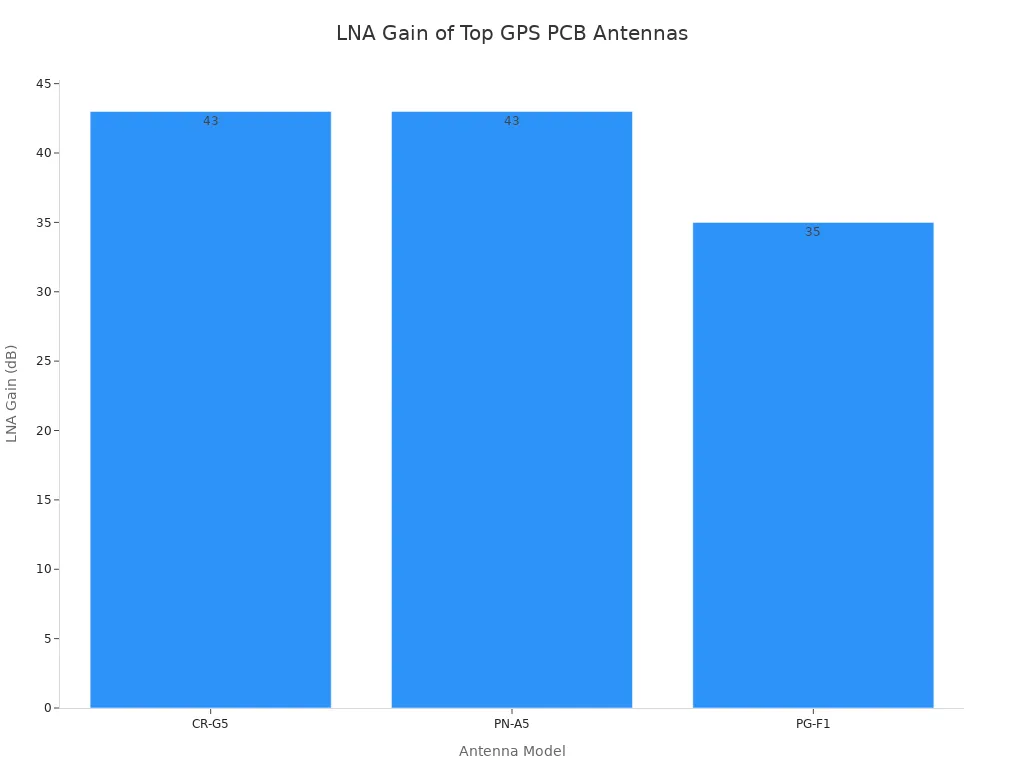
The chart shows that CR-G5 and PN-A5 antennas have high LNA gain. This means you get better signal strength and accuracy.
Why These GPS Antennas Stand Out
You want embedded gps antennas that give you a steady gps signal. You also want them to be easy to use in your device. The best gps antennas for pcb use have features that help your device work well.
Antenna Type | Typical Gain (dBi) | Characteristics |
|---|---|---|
Patch Antennas | 2 to 5 | Compact, good performance, requires clear sky view for optimal reception. |
Helical Antennas | N/A | Robust against interference, performs well in varied orientations. |
Chip Antennas | 0 to 2 | Extremely small, integrated onto pcb, limited range due to lower gain. |
Patch antennas are good for navigation and car devices. PCB trace antennas are great for custom designs and saving money. Active antennas have amplifiers for weak signals. Flexible antennas fit wearables and small gadgets. GPS + Cellular combo antennas are useful for IoT and smart trackers.
Frequency range: Make sure your antenna matches the gps bands your device needs.
Gain: Higher gain gives you stronger signals and better coverage.
Mounting options: Pick antennas that are easy to solder or connect.
Sensitivity: Choose antennas that work well in tough environments.
Signal quality: Good antennas improve gps accuracy and reliability.
Compatibility: Match the antenna to your gps receiver and connector.
Budget: Balance cost and performance for your project.
The best gps antennas for pcb integration give you high gain, strong signal, and easy mounting. These antennas help you get a steady gps signal in many places. You can use them in devices for navigation, surveying, IoT, and more.
Note: You should always test the antenna in your pcb layout. This helps you check signal strength and performance before final production.
Market Trends in Embedded GPS Antennas
Miniaturization and Performance Advances
GPS antenna technology changes a lot each year. Now, antennas are much smaller. You can put them on almost any pcb, even tiny devices. These small antennas give you better gps signals and weigh less. This helps you use gps in drones, wearables, and other small products.
Small gps antennas now give strong signals and good accuracy.
New shapes help stop signal problems in crowded places.
Choke-ring designs block unwanted signals from behind the antenna. This is great for small drones and robots.
Tiny gps antennas meet industry rules. They work well even in hard conditions.
These new features make gps work better in your pcb projects. You do not need to worry about losing signal when your device moves or faces noise.
Multi-GNSS and IoT Integration
You want your gps antenna to do more than just track. Now, antennas can use signals from many satellites, not just gps. This gives you faster and more accurate results.
Feature | Description |
|---|---|
Design and Performance | Dual-band stacked patch works well in a small size. It helps you get better location accuracy. |
Form Factor | Small design (35 x 35 x 4mm) fits in tight spaces. |
Gain and Polarization | Passive peak gain is 2.61 dBi. It works for many GNSS systems. |
Applications | Good for asset tracking, smart farming, industry, and self-driving cars. |
Technological Advancement | Uses special electro-ceramics for strong performance and easy use. |
There are also new ideas for gps antennas in IoT. AI helps make antennas smaller and better at blocking noise. Some gps antennas now work with 5G, so you get better connections and location. New materials like graphene make antennas smaller and tougher. GNSS updates let your antenna use new signals, so your pcb stays modern.
Tip: When you pick a gps antenna for your pcb, choose one that works with multi-GNSS and IoT. This helps your device keep a strong signal and work well anywhere.
GPS Antenna Profiles and Use Cases
TE Puck PCB Mount Antenna – Features & Applications
You can use the TE Puck antenna for many gps projects. This antenna is small and has a strong patch design. It gives you a steady gps signal in tiny devices. The TE Puck antenna fits asset trackers, handheld navigation tools, and smart sensors. You can use it outside because it handles bad weather and temperature changes.
The patch style keeps your gps signal stable when your device moves. You can put this antenna right on your pcb. This saves space and makes building easier. If you want good performance in a small size, the TE Puck antenna is a strong choice for your gps project.
Tip: Test the antenna in your final pcb layout. This helps you check signal strength and avoid problems during production.
Taoglas Dual Band Antenna – GPS & GLONASS
You can pick the Taoglas dual band antenna for gps and GLONASS. This antenna uses a patch design and works on two bands. Your device gets better accuracy by using more satellites. The Taoglas antenna is good for smart farming, fleet tracking, and industry monitoring.
You can mount this antenna on your pcb without needing much space. The patch design gives you strong gps signal in busy places. You can trust this antenna for devices that need fast and accurate location updates. The dual band feature helps your device keep a gps signal even when buildings or trees block the sky.
Dual band support gives you better gps performance.
The patch antenna design saves space on your pcb.
You can use this antenna in many fields, like farming and logistics.
Quadrifilar Antenna – Dynamic Environments
You can use a quadrifilar antenna when your device faces changing environments. This antenna is light and easy to carry. You can rely on it in disaster areas or places with unstable conditions. The quadrifilar antenna keeps working even when things change fast.
The antenna stays stable when conditions shift.
You do not need extra power for the antenna to adjust its pattern.
The bi-stable design lets the antenna return to normal after being disturbed.
You get reliable gps signal for emergency communication.
The antenna supports special modes for rescue or field operations.
You can trust the quadrifilar antenna for drones, emergency beacons, and mobile command units. It gives you steady gps signal and strong performance when you need it most.
Active vs Passive GPS Antennas
You need to pick between active and passive antennas for your pcb. Each type has strengths and fits different gps projects. You can compare them in the table below:
Feature | Active GPS Antenna | Passive GPS Antenna |
|---|---|---|
Signal Gain | Has LNA, gives higher sensitivity | No boost, needs good placement |
Integration Complexity | More complex, needs extra parts | Simple, no power needed |
Cost | Usually costs more due to LNA and circuits | Costs less, simple design |
Performance in Environments | Works better in tough places | Depends on placement and design |
Active antennas have a built-in amplifier. You get a stronger gps signal, which helps in weak coverage areas. Passive antennas do not boost the signal. You need to place them carefully on your pcb for best results. You can use active antennas in cars, drones, or devices that move through cities. Passive antennas work well in small trackers or wearables where space and cost matter.
Note: Match the antenna type to your device’s needs. Test both options to see which gives you the best gps performance in real life.
Real-world use cases help you choose your antenna. Portable trackers need small antennas that fit inside the pcb. Careful layout and testing help you avoid gps signal problems. Always test your device in different places to make sure the antenna works well.
Selecting the Best GPS Antenna

Key Criteria: Gain, Efficiency, Polarization
When you choose a gps antenna for your pcb, you need to look at several important factors. These factors help you get the best gps signal and strong performance. The table below explains what you should check:
Criterion | Description |
|---|---|
Gain | Measures how well the antenna turns RF power into a signal in one direction. Higher gain means better signal strength. Measured in dBi. |
Gain Pattern | Shows how the antenna spreads its gain. For gps, you want a broad and even pattern. |
Polarization | Most gps antennas use Right-Hand Circular Polarization (RHCP). This helps the antenna receive gps signals better. |
Axial Ratio | Tells you how close the polarization is to a perfect circle. Lower values mean better signal and less interference. |
Noise Figure | Shows how much noise the antenna adds. Lower numbers (1.5 dB or less) keep your gps signal clean. |
Phase Center Stability | Checks if the antenna’s center stays the same at different angles. This is important for high-precision gps. |
You should always compare these criteria when you look at different antennas. This helps you pick the one that fits your pcb integration and gps needs.
Matching Antenna Specs to Device Needs
You want your gps antenna to work well in your device. You need to match the antenna specs to your device’s requirements. Here are some tips to help you get the best gps performance:
Place the antenna so it points toward the sky. This gives you the strongest gps signal.
Put the antenna in a corner of your pcb. Keep it away from other parts to avoid signal problems.
Leave a space of 5-10mm between the antenna and any ground or metal on your pcb. This stops detuning and keeps your signal strong.
Do not use metal around the antenna. Metal can block or weaken your gps signal.
Use a tuning kit if you need to adjust the antenna for your device’s environment.
You should always test your antenna in your final pcb integration. This helps you see how the antenna works in real life. You can then make changes to improve gps signal and overall performance. By following these steps, you make sure your device gets the best gps results.
PCB Integration Tips for GPS Signal Optimization
Layout and Placement Best Practices
You want your gps antenna to work well on your pcb. The way you place and connect it is important. Good layout helps your gps signal stay strong. Always look at the manufacturer datasheet before you begin. The table below shows some best ways to set up your gps antenna:
Best Practice | Description |
|---|---|
Minimize the number of vias | Using fewer vias helps your gps signal move better and lowers mistakes. |
Implement shorter leads | Short leads keep the signal clean and help stop interference. |
Avoid crosstalk | Keep signal lines apart and use ground planes to stop signals from mixing. |
Add decoupling capacitance | Put capacitors near power pins to block noise from reaching your antenna. |
Keep loop area small | Small loop areas help stop interference in your gps antenna circuit. |
Maintain accurate impedance matching | Match the impedance to stop signal reflections and keep your gps signal strong. |
Tip: Put your gps antenna far from noisy parts on your pcb. This helps you avoid interference and keeps your signal clear.
Avoiding Common Integration Pitfalls
You can have problems if you do not follow good design steps. Many engineers make the same mistakes when adding a gps antenna to a pcb. The table below lists common mistakes and how they hurt your gps signal:
Explanation | |
|---|---|
50 Ohm Impedance | If you do not keep 50 ohm impedance, your gps signal can bounce back and get weaker. |
Ground Plane Issues | A weak or broken ground plane under the antenna makes it less efficient and changes the signal path. |
Inductance from Vias | Too many vias add unwanted inductance and lower your gps signal quality. |
Proximity to Digital Traces | Putting the antenna near digital traces adds noise and weakens your gps signal. |
Impedance Matching | Use pi-networks or L-networks to fine-tune impedance and help signal transfer. |
Thermal Stability | Use strong pcb materials to stop heat from changing your antenna’s tuning. |
Layering for RF Routing | Use special layers for RF signals and solid ground planes to cut down on interference. |
You should always test your gps antenna after you finish your pcb design. Try these steps:
Check the gps signal strength and accuracy with testing tools.
Run tests in hot, cold, and wet places to see if your pcb and antenna still work.
Watch for hidden sources of interference and test your device over time to make sure it stays reliable.
Note: Careful layout and testing help you get the best gps signal and keep your device working well in real life.
Expert Advice and Final Recommendations
Summary of Key Points
You want your gps project to work well. Experts say you should think about the antenna early. This helps you stop problems before they start. Always pick an antenna that fits your device’s needs. Here are some things to remember:
If you plan early, your gps signal will be better.
Choosing active or passive antennas changes your pcb and how it works.
A ground plane at least 70 x 70 mm helps patch antennas work better.
Cable length is important. Long cables may need an active antenna to keep the signal strong.
Active antennas can block noise from nearby cellular antennas.
When you pick a gps antenna, follow these expert steps:
Think about where your device will be used. Cities need strong antennas.
Check the size and shape. Small devices need small antennas. Cars and trucks can use bigger ones.
Look at how strong the signal is. If your device is in weak areas, use an active or high-gain antenna.
Watch how much power the antenna uses. Battery devices need antennas that save energy.
Balance price and performance. Better antennas cost more but can give better results.
Tip: Always test your gps antenna in your finished pcb. This makes sure you get the best results.
Additional Resources for Engineers
You can learn more about gps antennas from trusted sources. The table below shows different antenna types, what they do, and where you might use them:
Antenna Type | Description | Applications |
|---|---|---|
Patch Antenna | Small, high gain, good signal pattern. | General GPS uses |
Helical Antenna | Good for circular polarization, works well at low angles. | Places needing low angle signals |
Ceramic GPS Antenna | Made from ceramic, strong, easy to put on PCBs. | Surface mount technology |
Active Antenna | Makes the signal stronger for better results. | Many GPS uses |
Dipole Antenna | Simple, works for basic GPS needs. | Basic GPS uses |
Quadrifilar Helix | Gives circular polarization, good for moving devices. | Mobile GPS devices |
Microstrip Antenna | Thin, fits in small designs. | Small GPS devices |
Choke Ring Antenna | Cuts down on signal errors, makes gps more accurate. | High-precision uses |
Note: Manufacturer datasheets and notes have more details for your pcb design.
You can pick from many gps antennas for your projects. Experts say you should look at signal quality, gain, and frequency range. These things help you get the best results. Picking the right antenna and putting it in your device the right way makes your gps signal and device work better.
Read the datasheets and try antennas in real life.
Make sure the antenna is facing the right way and in a good spot for the best gps accuracy.
You can ask manufacturers for samples or help.
Performance Factor | Why It Matters for GPS Quality |
|---|---|
Gain | Makes the signal stronger and better |
Frequency Range | Makes sure your gps works right |
Share your stories or questions below to help everyone get better gps solutions.
FAQ
What makes patch antennas popular for GPS PCB designs?
Patch antennas are common in GPS PCB designs. They give strong signals and work well on small boards. Many engineers like them because they are easy to add and give steady results.
How do active GPS antennas improve sensitivity?
Active GPS antennas have amplifiers inside. These amplifiers make weak signals stronger. This helps your device find GPS signals in hard places. Active antennas are good when there is a lot of interference or you need good tracking.
Why is high sensitivity important in GPS antenna selection?
High sensitivity helps your device find weak GPS signals. This is important for tracking in cities or inside buildings. When you pick a GPS antenna, always look for high sensitivity. This makes sure your device works everywhere.
What trends shape the GPS antenna market in 2026?
GPS antennas are getting smaller and more sensitive. Companies now make antennas that work with more bands and use better materials. These changes help you get faster and more accurate locations in new devices.
How can you test the sensitivity of your GPS antenna?
You can use a GPS signal simulator or do field tests. Put your device in different places and see how well it gets signals. This helps you make sure your antenna works for your needs.