
You get multi-protocol coexistence on a shared board by using protocol-aware RF layout, antenna isolation, careful power and thermal budgeting, and Matter/Thread-ready architecture. This guide covers Wi-Fi, BLE, Zigbee, Thread/Matter, and IEEE 802.15.4. Expect design rules and manufacturing trade-offs, not marketing copy.
A smart home gateway or mesh wifi node packs radios onto a PCB. Your mesh router, wifi system, and front end share limited space. Wi-Fi, wifi, and Wi-Fi/BLE radios compete for Wi-Fi antenna volume. Wi-Fi harmonics, Wi-Fi duty cycle, and Wi-Fi channel overlap cut wifi throughput and wifi range. Your Wi-Fi gateway, Wi-Fi module, and Wi-Fi backhaul need isolation. You move from module placement through EMC pre-compliance to FCC/CE certification.
Puntos Clave
Put the antennas at the edge of the board and keep them spaced apart to lower interference.
Plan para aislamiento de antena early, because most small products get only 15–20 dB.
Turn on all the radios and test them. This helps you find problems before the official EMC test.
Follow a step-by-step process: check, divide, position, test, and launch.
Pick wired backhaul for mesh systems so the network does not slow down.
The Coexistence Challenge on a Shared Board
Contention in the 2.4 GHz Band
Wi-Fi, BLE, Zigbee, and IEEE 802.15.4 all share the 2.4 GHz band. On a gateway board, these radios sit centimeters apart. They compete for the same spectrum and the same antenna volume. A mesh wifi node makes this worse. Each node adds another radio set to a crowded enclosure.
The board itself creates coupling paths. A Wi-Fi harmonic can land inside a Zigbee channel. A BLE burst can raise the noise floor under a Wi-Fi frame. IEEE 802.15.4 uses narrow channels and low transmit power. It suffers first when a Wi-Fi radio transmits nearby. Your wifi system must plan channel use across every radio, not just the Wi-Fi link.
Symptoms Engineers See in the Lab
You will see desense before you see a clean failure. Receiver sensitivity drops when a neighboring radio keys up. Packet loss rises on the Zigbee or Thread link. Wi-Fi throughput degrades in bursts that match the duty cycle of the other radio.
These symptoms are measurable. Run a sensitivity sweep with each radio transmitting in turn. Log packet error rate per channel. Compare wifi range with all radios idle and with all radios active. A mesh router in a multi-radio hub often shows the widest gap between these two states.
Note: A link that passes at idle can still fail under full radio load. Always test coexistence with every radio active.
Smart Home Gateway and Hub PCB Architecture
Multi-Radio Module Placement
Where you put parts decides how much isolation you get before you pay for shielding. Start with the antenna, not the module. Put each antenna at the board edge, and let the antenna area stick out past the carrier board when the mechanical design allows it. Keep at least a quarter wavelength of the lowest operating frequency between antennas when space permits. Turn antennas so they sit at right angles to each other. A cellular patch set at right angles to a BLE inverted-F antenna gives much better isolation than parallel antennas at the same distance.
Follow these placement rules on every multi-radio board:
Add metal shields, ground planes, or EMI shielding layers between chips to block radiation and crosstalk.
Keep RF traces short, straight, and on one layer with controlled impedance and solid ground underneath.
Route high-speed digital and noisy DC/DC switch nodes away from antenna feeds and LNA inputs. Cross at right angles when you cannot avoid them.
Use continuous ground planes, multiple ground connections, and local decoupling capacitors to steady each supply domain.
Pick low-loss dielectrics and high-frequency laminates where the stackup budget allows.
A 50-ohm RF trace with impedance discontinuities lowers SNR and adds to desensitization. Treat antenna placement and RF layout as one simulation pass, not two.
Keep-Out Zones and Grounding
Write the antenna keep-out in the mechanical drawing, the PCB notes, and the assembly review. Later mechanical revisions love to fill reserved space with metal brackets, screw bosses, or decorative rings. A keep-out that lives only in a layout file will not survive the next enclosure change.
Aspecto de diseño | Práctica recomendada | Fallo común |
|---|---|---|
Ubicación de la antena | Board edge, per module guide | Antenna under metal or near a screw |
Alimentación de RF | Short controlled 50-ohm trace | Trace width copied from another stackup |
Referencia de tierra | Stable plane under the feed | Split ground or LED return paths |
Red coincidente | Keep the footprint even if DNI | No matching option after prototype |
Fuente de alimentación | Local decoupling, isolated from LED driver noise | Driver ripple resets the MCU |
Cubierta | Validate in the real housing | Open-board range fine, fixture range poor |
Grounding strategy matters as much as spacing. Add stitching vias around RF traces, filters, and front-end modules to keep return currents in check. Save clean ground and supply domains for sensitive receivers, and think about low-noise linear regulators there. Spread heat sources and add thermal vias under power devices. Local heating detunes matching networks, and a detuned match quietly eats your link margin.
Manufacturing trade-offs show up here. Extra layers buy you a solid reference plane and cleaner routing. Shields add cost and assembly steps. Board area for spacing competes with enclosure size. Decide these early, because a mesh wifi node and a compact hub pull in opposite directions.
Antenna Isolation and RF Front-End Design
Isolation Budgets and Spacing Rules
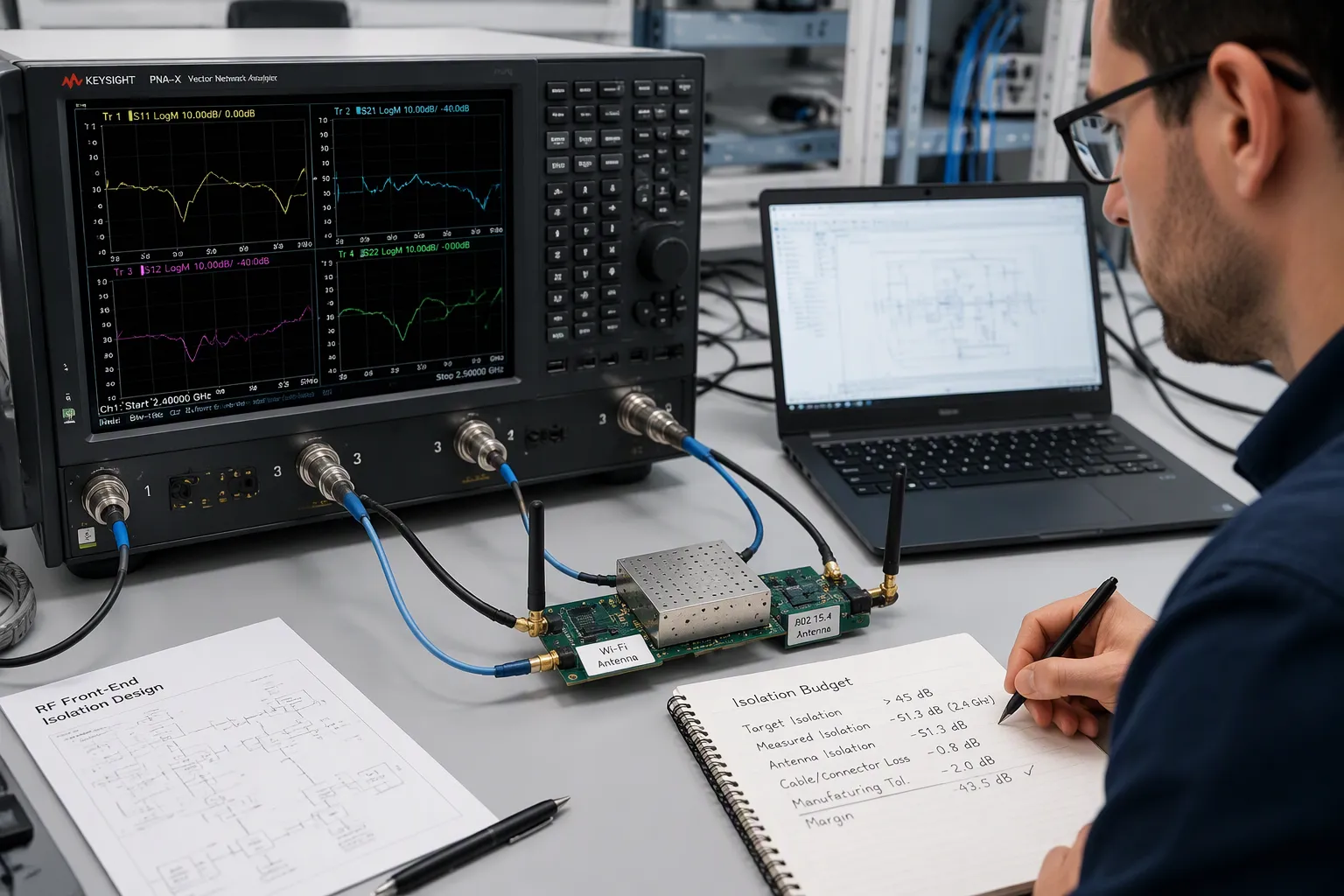
Isolation is a number you plan for, not something you hope will work out. Begin with how sensitive the receiver is and how much power the transmitter sends out. The difference between these two sets your goal.
Estado del producto | Required Antenna Isolation |
|---|---|
+20 dBm Wi-Fi TX at 100% duty cycle, receiving -92 dBm Bluetooth | 50 dB |
+20 dBm Wi-Fi TX at 100% duty cycle, receiving -80 dBm 802.15.4 | 45 dB |
Typical small-product isolation (contextual note) | 15–20 dB (generally insufficient) |
Most small products only get about 15–20 dB of isolation between antennas. That is much less than the 45 dB an 802.15.4 receiver needs when a full-duty wi-fi transmitter is nearby. You should plan for this shortfall from the start, not be shocked at EMC testing.
Spacing rules help you meet part of the goal. Keep the wi-fi antenna as far from the 802.15.4 antenna as the enclosure lets you. Turn them so they cross at different angles. Put a grounded fence or shield can between the transmitter and the receiver. Each step adds a few dB. But none of them alone can close a 30 dB gap. Use a vector network analyzer to measure the result before you lock in the stackup.
Filtering and Front-End Trade-Offs
Filters protect the receiver, but they also weaken your signal. Every stage you add puts insertion loss before the LNA. That loss directly reduces sensitivity. A wi-fi front end and an 802.15.4 front end need different filter shapes. The wi-fi passband is wide. The 802.15.4 passband is narrow. You should model the whole cascade before you start layout.
Mecanismo de diseño | Effect on insertion loss | Effect on out-of-band rejection |
|---|---|---|
Conventional waveguide filters as frequency-selective elements | Low in-band insertion loss | Effective out-of-band rejection without complex filter synthesis |
Filtering folded into the waveguide-to-microstrip transition | Reduces cascade insertion loss; avoids an extra stage | Maintains suppression of harmonics, image, and spurious signals |
Added UIRC resonators in the extended substrate | Negligible added loss and size | Extra transmission zero in the stopband |
Co-designed broadband diplexer plus filtering transition | Lower loss, no extra filtering stages | Suppresses harmonic, image, and spurious signals |
The filtering waveguide-to-microstrip transition achieves a typical insertion loss of 1.5 dB while providing more than 50 dB out-of-band suppression at 99.5 GHz — strong rejection can coexist with low insertion loss when filtering is integrated into the structure rather than added as a separate stage.
Those numbers come from millimeter-wave front ends, not smart home boards. But the same idea still applies. If you build filtering into a structure you already have, you keep loss low. If you add a separate filter, you pay for it twice. That trade-off makes integration the better choice when board space is tight.
For a mesh wifi node, plan the front end before you choose parts. A mesh router with a shared antenna and no front-end filter will desense under load. A wifi system with a diplexer and a clean match keeps its margin. Check every wi-fi band edge against the filter skirt. Make sure the wi-fi channel plan stays away from the 802.15.4 channels you depend on. Then measure isolation again with all radios transmitting.
Your wifi link budget starts here. Run the wifi sensitivity sweep with the interfering radio on. A mesh wifi node and a mesh router both need this check. Watch wifi throughput and wifi range under full load. The wi-fi module and the wi-fi radio must hold their margin together. Save the result for your EMC file.
Power Budget and Thermal Limits
Rail Design for Multi-Radio Loads
A multi-radio board pulls current in short bursts, not in a steady stream. A wi-fi radio can jump from idle to full transmit in microseconds. Your regulator sees that jump as a sudden load change. Size each rail for the worst-case total of all radios transmitting at once, then add extra room for the DC/DC ripple.
Keep the supply domains apart. Give the wi-fi module and the 802.15.4 radio their own low-noise regulators. Share a rail only when the loads are quiet and the decoupling is close by. A shared rail lets switching noise from one radio leak into another radio’s receiver, and that noise shows up as desense in your sensitivity sweep.
Watch the duty cycle when you plan power. A mesh wifi node rarely runs every radio at full power for long. Use the real operating profile, not the datasheet peak, to size the regulator and the copper. Then check that the peak case still passes thermal limits.
Thermal Spreading Near PA and Radio Modules
Heat near a power amplifier throws off the matching network and shortens component life. Spread that heat before it reaches the sensitive parts. Use these techniques on the board:
Use thicker copper and add large copper areas to spread the heat.
Put thermal vias under exposed thermal pads.
Plan the heat spreading path away from the antenna and the LNA.
Touch the metal chassis or add a heat spreader where the enclosure allows.
Check the operating duty cycle and test conditions before you derate parts.
Top-side cooling changes the trade-off. In one module design, about 95% of the heat goes straight to the heatsink, and the RF shield itself works as the heatsink. That approach keeps thermal management separate from RF design and removes thermal interfaces. Bottom-side cooling pushes heat through the PCB and several interfaces instead. Pick the path early, because it shapes your stackup, your shield, and your mesh router enclosure.
Mesh Wi-Fi and Backhaul in the Smart Home
Mesh Wi-Fi System Topologies for Gateways
A mesh wifi system spreads coverage across several nodes. Each node carries its own radio set, and that changes your gateway PCB. A mesh router with two Ethernet ports needs a different PHY and switch layout than a mesh router with four. Count the ports first. Then pick the PHY and size the power rail for every port that can run at once.
Wired backhaul reshapes the board. A mesh system with Ethernet backhaul needs more PHY channels, more magnetics, and more board area. A mesh system with wireless backhaul trades those parts for a second wi-fi radio. Both choices affect your mesh network design. You should decide the topology before you lock the stackup.
A mesh wifi system with a dedicated backhaul radio keeps client traffic separate from node traffic. That separation helps whole-home coverage in a mesh wifi deployment. A shared-radio mesh router saves cost but splits airtime. Avoid mixing the two approaches on one board without a clear channel plan.
Choosing Mesh Wi-Fi Routers and the Best Mesh Router Trade-Offs
Buyers compare mesh wi-fi routers on coverage claims. You should compare them on board-level facts. A best mesh router overall for one home may carry a weak PHY for another. Check the port count, the backhaul type, and the radio count before you trust a best mesh router label.
ISP-provided gateways can bottleneck many smart home devices. A single Wi-Fi radio serves every client, and the home network slows under load. A mesh wi-fi system with wired backhaul avoids that choke point in multi-AP, multi-floor deployments. You should recommend wired backhaul for any home with several access points.
Mesh wifi vs wifi extenders is a real design question. Extenders repeat a signal and halve throughput. A mesh system routes traffic through a planned mesh network instead. Mesh wifi vs traditional routers follows the same logic. A wi-fi 7 mesh system adds wider channels, and that raises the RF and thermal budget on every node.
Compare the best mesh wi-fi routers and the best mesh wi-fi system overall on these points. A best mesh router for a small flat may fail in homes with dead zones. Reliable coverage comes from node count and backhaul, not from a spec sheet. The best mesh wi-fi routers for a home wifi system earn that label through reduced dead zones and steady wifi coverage. Treat every mesh wifi vs wifi extenders claim as a topology question, not a slogan.
Tip: Sketch the backhaul plan before you choose the PHY. Port count and backhaul type drive the rest of the mesh wifi design.
EMC Pre-Compliance and Certification
Pre-Compliance Test Planning
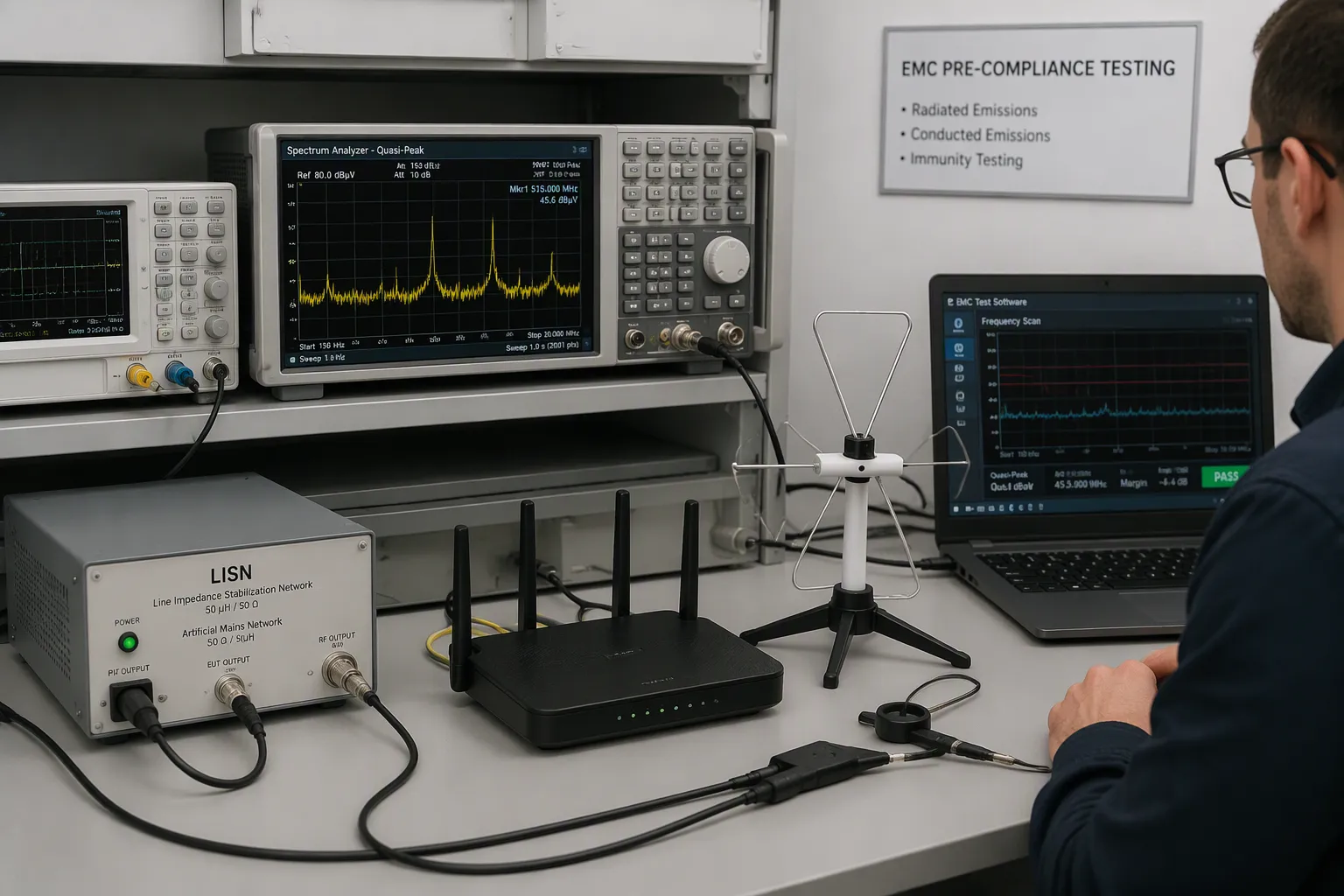
Hazlo tu mismo pre-compliance tests on your bench before you book an accredited lab. Test with all radios running at the same time. A wi-fi burst and a mesh wifi backhaul frame can hit the same frequency. A real-time analyzer tells the two sources apart.
Categoría de prueba | Equipo requerido |
|---|---|
Radiated emissions pre-compliance | Spectrum analyzer with quasi-peak detector; preamplifier (optional); antenna with non-metallic stand; EMC near-field probes (optional, for diagnostics); EMC testing software |
Conducted emissions pre-compliance | Line impedance stabilization network (LISN); power limiter; spectrum analyzer with quasi-peak detector; EMC testing software |
Debugging/analysis support | Oscilloscope with frequency and time correlation; real-time spectrum analyzer (captures transient/intermittent signals, distinguishes multiple sources at same frequency) |
Fix wi-fi harmonics and wi-fi front end filtering at this stage. Write down the wi-fi channel plan, the wi-fi band edges, and the wi-fi throughput under load. A lab re-test costs much more than a bench sweep.
FCC and CE Certification Paths
The two markets ask for different proof. Plan both paths early. A design or firmware change means you must retest on each one.
Aspecto | FCC Parte 15 (EE. UU.) | CE EMC/RED (EU) |
|---|---|---|
Base regulatoria | Part 15 governs unlicensed RF transmissions for devices emitting RF energy | Radio Equipment Directive (RED) plus EMC Directive, sometimes Low Voltage Directive; connected devices may also need cybersecurity/interoperability standards |
Ruta de cumplimiento | Must use a certified lab and may require official equipment authorization | Self-declaration of compliance; manufacturer is responsible for meeting all applicable directives and retaining a technical file |
Enfoque de las pruebas | Radiated emissions, conducted emissions, spurious emissions, peak output power | RF and EMC testing from an accredited lab, plus safety evaluation if power-related |
Documentación/etiquetado | Full technical documentation and FCC ID labeling | Full technical documentation and CE mark on packaging and device |
Cambios de diseño | Retesting required if design or firmware is modified | Retesting required if design or firmware is modified |
FCC Part 15 gives you three authorization routes. Certification covers most intentional radiators and higher-risk devices. Declaration of Conformity covers certain unintentional radiators. Verification means self-testing with no FCC filing. A device with an intentional transmitter almost always needs Certification. That route means testing at an FCC-recognized accredited laboratory and sending a test report to a Telecommunications Certification Body (TCB).
Your wifi system, mesh router, and mesh wifi node each carry transmitters. Treat each one as an intentional radiator. Check the wi-fi module gain, the wi-fi antenna pattern, and the wi-fi radio duty cycle against the filed report. Compare wifi range and wifi coverage with the declared values. A mesh router with wired backhaul still needs this check. Keep the technical file up to date, and label the product before it ships.
DFM Constraints for Multi-Protocol Boards
Manufacturability and Assembly Limits
Your multi-protocol board has tiny, closely spaced parts next to RF sections. The limits of the board maker decide whether the design builds without problems. A standard 6/6 mil trace width and spacing rule stops over-etching (opens) and bridging (shorts). Treat it as your baseline DFM constraint.
Escenario de diseño | Ancho mínimo de trazo | Espaciado mínimo | Notas |
|---|---|---|---|
Capas exteriores estándar | 6 mils recommended (3 mils pushes etching limits) | 4-mil gaps risky due to ±1 mil etch tolerance | Fabricators commonly cite 6/6 mil trace/space as standard |
HDI with fine-pitch components (e.g., 0.4 mm BGA) | 3 milésimas de pulgada | 4 milésimas de pulgada | Requires advanced photolithography; staggered microvias offset 0.1 mm improve yield ~10% |
High-speed (e.g., 5 Gbps, 50-ohm) | 0.005 in (~5 mils) on 0.008 in dielectric | 0.01 in to adjacent traces | Differential pairs matched within 5 mils (USB 3.0, PCIe) |
High-voltage (e.g., 300V) | - | 0.06 plg | Prevents dielectric breakdown |
Check these limits before you release the stackup: minimum via and drill sizes, annular ring requirements, copper-to-edge clearance, solder mask expansion, paste mask definitions, and registration tolerances between layers. Misalignment hurts fine-pitch placement and dense routing. Check the wi-fi module footprint against the paste mask early. A shifted wi-fi shield can short a pad during reflow.
Compromisos entre costo y rendimiento
Shielding choices drive layer count and cost on a multi-radio board. Stripline routing keeps fields between planes and cuts radiation, but it needs precise etching and more layers. Microstrip radiates more, yet it makes access and heat dissipation simpler. Hybrid stack-ups put RF laminates on critical layers and standard FR-4 elsewhere to control cost.
More layers improve signal integrity through dedicated ground and power planes. They also raise material, labor, and assembly cost, add vias, and increase the chance of defects. Blind and buried vias cost more because of sequential lamination and complex drilling. Weigh each added layer against the isolation you actually need. A mesh wifi node with tight enclosure space may justify the extra layers. A mesh router with room to spread antennas may not. Budget the wi-fi front end yield loss before you commit. Every wi-fi filter stage you add costs assembly time and rework risk. Run a first-article build and measure wi-fi sensitivity across the panel. Track yield per wi-fi radio variant, then adjust the wifi system stackup before volume. Your wifi link margin and your wifi coverage targets should survive the cheapest stackup that meets them.
A Step-by-Step Board Design Workflow
Assess, Partition, and Place
Comenzar con una planning pass that is driven by analysis. Before you draw even one net, look at IP selection, hardware and software splitting, system-level power, and interconnect sizing. Then compare aggregation with disaggregation. Split the radios so chip-to-chip traffic works best, and model latency and throughput for each interface choice.
Use modeling tools to try out front-end “what if?” ideas. Map workloads onto the system to see how much activity each processing element and each communication path carries. This step stops you from getting stuck with a poor partition. Look at scalability options and tune the whole system for performance, power, area, physical limits, and cost.
Placement comes after the partition. Put each antenna at the board edge, then place the mesh router radios around them. A mesh system with a dedicated backhaul radio needs its own quiet corner. Keep the mesh wifi front end away from the DC/DC switch nodes. Repeat the loop: study thermal behavior, then revise the architecture and physical plan until thermal limits and performance targets both hold. Keep tracking power and thermal KPIs through RTL, synthesis, and place and route.
Validate, Pre-Comply, and Release
Validate with samples that match production. Hand-soldered prototypes with a different stackup or shield can act differently, and labs may reject units that are not representative. Then run pre-compliance EMC testing before the formal lab visit. About half of consumer electronics fail formal EMC on the first try. A basic bench with a spectrum analyzer, LISN, and near-field probes drops that first-pass failure rate below 10 percent and avoids a costly re-test cycle.
Paso de validación | Detalle clave |
|---|---|
Pre-compliance EMC | Bench test before the formal lab |
Muestras representativas | Match the production stackup and shield |
TCB package | Reports, photos, label art, manual, schematics |
Authorization path | Classify intentional versus unintentional radiator |
Integración de módulos | Check KDB 996369 for antenna and co-location changes |
exposición a RF | Run SAR or MPE analysis where needed |
Plan for multi-radio test time. A wi-fi, Bluetooth, and Zigbee certification can take two to three weeks. Book the lab four to six weeks ahead during peak seasons. Get the full TCB package ready early, because incomplete submissions cause delay rounds. Check the wi-fi module grant against your antenna and co-location plan. Make sure the mesh wifi system, mesh wi-fi system, and mesh wi-fi routers variants each carry correct labels. Check the home network gateway, the mesh network node, and every mesh system SKU before release.
An accredited test laboratory for Bluetooth SIG, Thread, Zigbee and Matter offers pre-compliance testing to detect and resolve potential design flaws early, reducing design costs and accelerating market launch.
Working with several radios on one board takes careful planning, not just picking the right parts. You must balance wi-fi layout, wi-fi isolation, wi-fi power, wi-fi heat limits, and wi-fi building rules as one system. Your smart home gateway shows this every day.
The answer from the introduction is still true. Smart wi-fi layout, antenna isolation, and early wi-fi EMC planning help a board pass certification. Treat wi-fi design as one loop, not five separate jobs.
Use the step-by-step wi-fi workflow as your checklist. A mesh wifi node, a mesh router, and a wifi hub all follow it. Wifi margin gets better when you plan early. Mesh wifi with wired backhaul helps cover the whole home. Careful teams get reliable coverage. Start with the workflow, and your next board will pass.
Preguntas Frecuentes
How much antenna isolation do you need between a Wi-Fi radio and an 802.15.4 radio?
Plan for about 45 dB when a +20 dBm Wi-Fi transmitter runs at full duty cycle next to an 802.15.4 receiver at -80 dBm. Most small products only reach 15–20 dB. Add spacing, orientation, and a grounded fence, then measure with a vector network analyzer.
Can you pass EMC testing with every radio transmitting at once?
You should test with all radios active, not one at a time. A link that passes at idle can still fail under full radio load. Run a bench sweep with a spectrum analyzer and LISN first. That step drops first-pass failure below 10 percent.
Does wired backhaul change the gateway PCB design?
Yes. Wired backhaul needs more PHY channels, more magnetics, and more board area. Wireless backhaul trades those parts for a second radio. Decide the topology before you lock the stackup, because port count and backhaul type drive the rest of the design.
Which DFM limits should you check before releasing a multi-radio stackup?
Start with 6/6 mil trace width and spacing as your baseline. Then confirm minimum drill sizes, annular rings, copper-to-edge clearance, and solder mask expansion. Check the module footprint against the paste mask early. A shifted shield can short a pad during reflow.