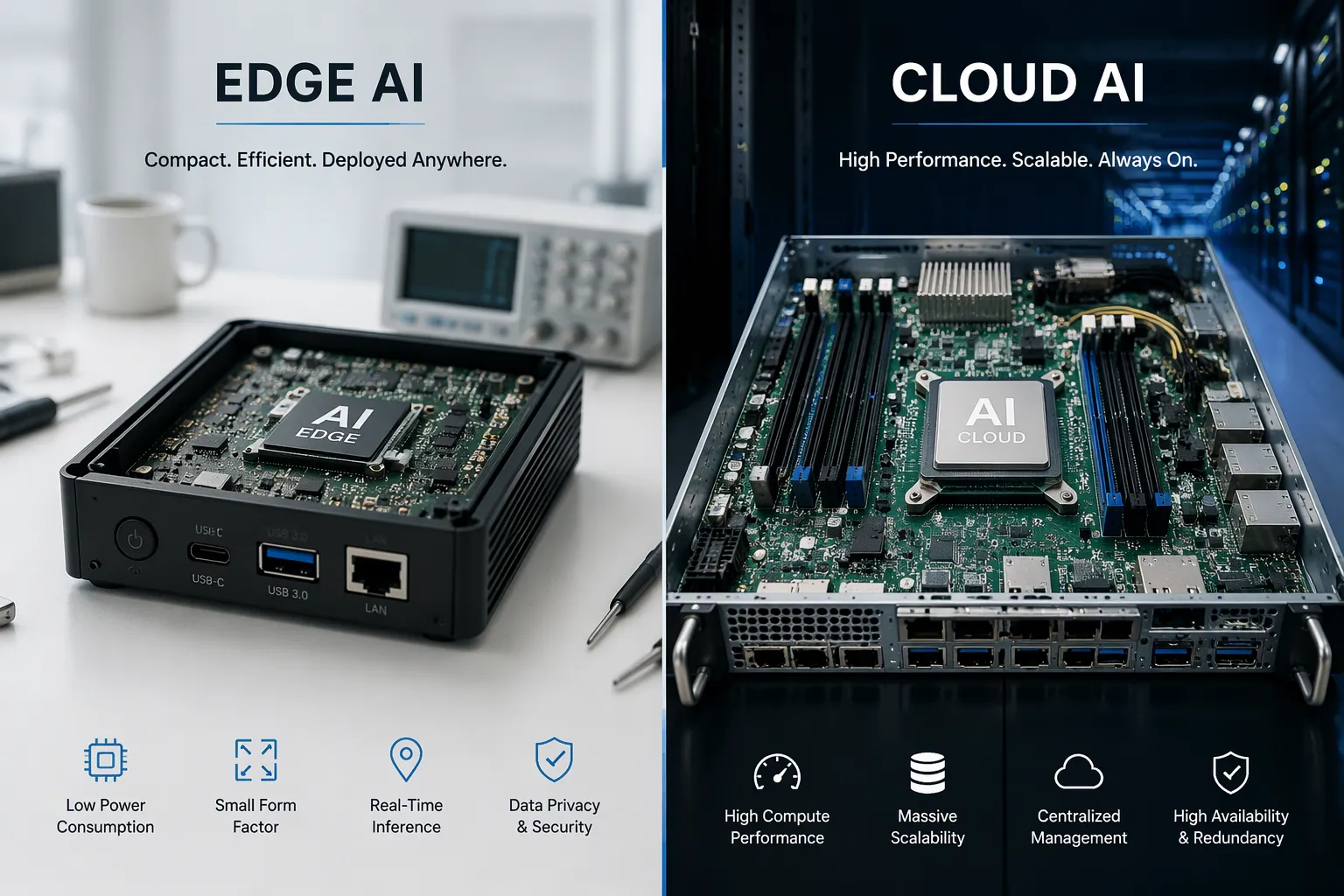
You face one early decision that reshapes the whole board: does inference run on the device or in a data center? Edge AI hardware must deliver intelligence inside strict power, thermal, and memory limits. Cloud AI hardware assumes abundant power and cooling instead. That contrast drives every downstream trade-offs in your pcb design, from processing and memory choices to power delivery and BOM cost. Edge computing rewards integration and efficiency; cloud computing rewards bandwidth and robust power. Many teams land on a hybrid split. Align your pcb decisions with the right deployment model early, and you keep your options open.
Ringkasan Utama
Decide early where AI runs: on the device or in the cloud. This choice shapes your whole PCB design.
Edge AI needs low power and small memory. Cloud AI needs high bandwidth and strong cooling.
Match your processor and memory to the AI model size. Quantization shrinks the model and saves board space.
Design power delivery for bursts, not just average use. Use wide copper and solid planes to keep voltage stable.
Plan thermal paths carefully. Edge devices often use passive cooling; cloud boards use active cooling.
Consider total cost: edge pays upfront for hardware; cloud pays ongoing for data and compute.
Run simulations for power and thermal before you finalize the PCB. This avoids costly redesigns.
Revisit your edge vs cloud decision when models grow or latency needs change. A hybrid split often works best.
AI Workload Placement: Edge vs Cloud
Edge AI Defined
Edge AI runs inference on local devices near the data source. You place the ai model directly on the sensor node, camera, or controller. This arrangement delivers low latency because the data never leaves the board. It also enables offline operation when the network drops. An edge computing device must hold the model in local memory and execute it within a tight power budget. That constraint shapes your component selection from day one.
Running AI on-device changes the design priority. You now care about memory footprint, quiescent current, and thermal headroom more than raw throughput. A factory robot or a wearable monitor cannot wait for a round trip to a server. Local inference keeps the control loop responsive and predictable.
Cloud AI Defined
Cloud AI offloads compute and storage to remote data centers. You send raw or preprocessed data over a network link. The data center holds large models, vast memory pools, and petabyte-scale storage. Centralized training also happens here, where engineers retrain models on aggregated data from many devices.
This model fits asynchronous work well. Batch analytics, long-term trend analysis, and heavy model training do not need millisecond responses. Cloud computing also spares your edge hardware from carrying a large processor and cooling system. The trade-off moves to bandwidth, transport encryption, and network availability.
Arsitektur Hibrid
Many modern intelligent systems combine both approaches. Time-sensitive inference stays at the edge. Aggregated data or hard cases travel to the cloud for retraining and long-term analytics. A smart camera might flag a defect locally in real time, then upload uncertain frames for human review and model improvement.
Comparing edge computing vs. cloud computing rarely produces a single winner. Each option fits a different job. Edge computing suits collision avoidance, robotics, and medical monitoring. Cloud computing suits reporting, fleet-wide learning, and non-critical tasks. When you evaluate edge computing against a centralized model, ask where the latency, privacy, and cost pressures actually sit. A hybrid split often serves best, and it keeps your pcb options open as requirements evolve.
Hardware Design for Edge Computing vs. Cloud Computing
Compute and Memory Profiles
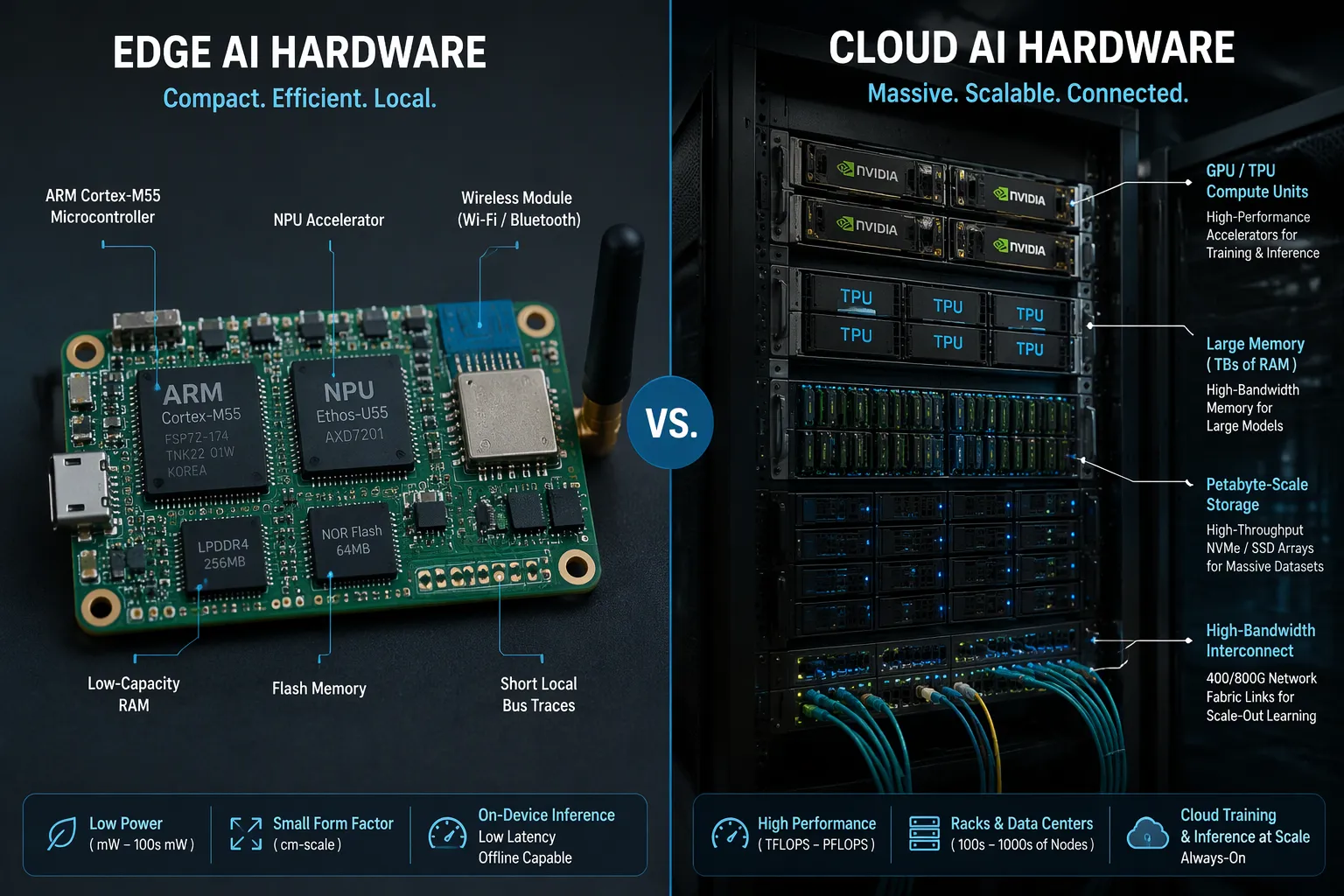
Your first chip selection decision sets the ceiling for everything that follows. Edge AI hardware spans a wide range. An ARM Cortex-M55-class MCU handles keyword spotting and simple vibration analysis. An embedded SoM or SBC runs richer vision workloads. A dedicated NPU or AI accelerator boosts throughput per watt when your model outgrows a general core. You are not restricted to specialized silicon, though. CPUs and GPUs remain acceptable edge choices for many workloads, and they often shorten your software path. Match the part to the model, not the marketing label.
Memory tells the sharper story. A quantized TinyML model typically needs roughly 256 KB to 2 MB of RAM and 100 KB to 1 MB of flash. Those figures drive package choice, fanout density, and layer count on the pcb. Cloud AI hardware sits at the opposite extreme. High-density GPUs and TPUs draw on vast memory pools, petabyte-scale storage, and high-bandwidth interconnects. The table below summarizes the contrast.
Atribut | Tepi AI | AI awan |
|---|---|---|
menghitung | MCU, SoM/SBC, NPU, CPU, or GPU | Data-center GPU, TPU, server clusters |
RAM | Roughly 256 KB–2 MB (TinyML, quantized) | Vast memory pools |
Storage | Roughly 100 KB–1 MB flash (quantized) | Skala petabyte |
Interkoneksi | Local buses, wireless links | High-bandwidth, low-loss fabrics |
Latency and Real-Time Control
Latency separates these two models more than any other factor. Edge AI avoids the network round-trip time and server queueing delay entirely. The inference result appears in the same control loop that reads the sensor. Collision avoidance, robotics, and medical monitoring all depend on this determinism. A missed deadline in those systems is a safety event, not a slow page load.
Cloud AI suits asynchronous or non-critical tasks. Batch analytics, overnight retraining, and fleet-wide reporting tolerate network jitter without consequence. When comparing edge computing vs. cloud computing for a control application, measure your worst-case response requirement first. If the number sits in the low milliseconds, keep inference local. If the task can wait seconds or minutes, the cloud fits well.
Model Size and Quantization
Quantization is the main lever for fitting an AI model onto constrained edge AI hardware. Converting weights to INT8 trades a small amount of accuracy for a smaller footprint and faster execution. The payoff compounds across the board. A smaller model needs less flash, which allows a smaller package, which eases routing and lowers cost. Fewer memory accesses also cut energy per inference, and that matters when your power budget is measured in milliwatts.
Cloud AI supports large, high-precision, unquantized or frontier models. Accuracy headroom is rarely the binding constraint there. The binding constraints are power delivery and cooling instead. This is the central trade-off in hardware design for edge computing vs. cloud computing: the edge buys efficiency with precision, and the cloud buys precision with power.
Plan your quantization step before you freeze the schematic. The memory figure you commit to determines your package, your layer stack, and your pcb design margins. Teams that quantize late often discover their chosen MCU lacks the flash for the final model. That discovery forces a respin, and a respin costs far more than an early simulation run. Treat the model size as a hardware requirement, not a software afterthought. Your edge AI hardware selection should start from that number and work outward to the rest of the ai hardware on the board.
Edge AI Hardware Constraints on the PCB
Power Budgets and Battery Limits
A strict power budget reshapes your regulator choices before you place a single component. Edge AI hardware often runs from a coin cell or a small lithium pack, so every milliwatt counts. You need low-quiescent-current regulators that waste almost nothing in sleep mode. Power gating lets you shut down unused blocks between inferences, and that duty-cycled behavior defines your average draw rather than your peak. Battery-powered edge AI products live or die on this average.
Those current levels then translate into copper decisions. Thin traces add resistance, and resistance turns into voltage drop and heat. Wider copper, solid ground planes, and adequate via current capacity keep the rail stable under transient loads. Ask why this matters: a brief inference burst pulls a current spike, and a weak plane lets the rail sag. The processor may brown out mid-inference. Size your copper for the transient, not just the average.
Memory-Constrained Layout Choices
Tight RAM and flash budgets ripple straight into your desain PCB. When your model must fit in roughly 256 KB to 2 MB of RAM and 100 KB to 1 MB of flash after quantization, you often choose a package-on-package part to stack memory above the processor. That choice consumes vertical space and demands careful keep-out planning. Fine-pitch BGA fanout then sets your minimum trace width and spacing, and those rules push your layer count upward.
Each added layer raises cost and complicates impedance control. You feel this pressure most on a compact edge computing device, where board area is scarce. Decide the memory package early, because it locks your stackup. A late change here forces a full pcb redesign.
Konektivitas dan Operasi Offline
Keeping data local delivers two wins at once. On-device AI reduces exposure during transit, because sensitive readings never cross a network. It also enables offline operation when connectivity fails. A remote sensor or a handheld diagnostic tool keeps working without a link. That independence is a core reason teams choose edge computing for field deployments.
Cloud AI carries a different burden. It depends on network availability, and it demands strong transport and storage encryption plus tight access controls. Your edge AI hardware sidesteps much of that exposure by design. Weigh both paths against your privacy needs and your site conditions. The right ai hardware choice follows from where your data must live. Every ai decision about connectivity shapes your antenna placement, your shielding, and your thermal margins on the board.
Power Delivery Trade-Offs
Edge Power Delivery
An edge device often runs from a battery, a harvested source, or a limited industrial rail. That reality sets your first constraint. The power budget is small, and every block must justify its draw. You meet this with power gating: shut down the sensor front end, the radio, and the accelerator between inference cycles. The average current then falls well below the peak, and your battery life follows the average.
Energy harvesting adds a harder problem. A solar or vibration source delivers intermittent current, so your regulator must start up at very low input and hold output through brownout gaps. Choose a regulator with low quiescent current and a clean startup profile. Place it close to the storage element, and keep the harvest path short. These engineering trade-offs decide whether the product survives a cloudy day.
Cloud Power Delivery
A data-center accelerator draws current in large, fast steps. The load can jump from idle to full compute in microseconds. Your power delivery network must hold voltage through that step, or the device throttles. Designers meet this with multi-phase VRMs that share current across phases and respond quickly. Low PDN impedance across the relevant frequency band keeps the rail stable.
Decoupling carries the high-frequency share of that job. You place capacitors in a tight loop from the die through the package to the board. Distance adds inductance, and inductance turns a fast load step into a voltage droop. Cloud computing hardware tolerates a large thermal and power envelope, so you spend area and copper freely to protect the rail.
PDN and Layout Implications
Translate these needs into layout with three decisions. First, place each regulator near its load. A long trace between regulator and processor adds resistance and inductance, and both hurt transient response. Second, choose your plane strategy for current density. A solid power plane lowers impedance and spreads heat, which helps your thermal margins. Third, size vias for the transient current, not the average. A burst of inference current through undersized vias raises resistance and local heating.
Run a PDN simulation before you freeze the pcb design. Check impedance across your load-step frequencies, and confirm the rail holds under worst-case bursts. For edge ai hardware, add a check on sleep-mode leakage. For cloud boards, verify phase balance and decoupling placement. Good ai hardware starts with a power tree you can defend. Sound pcb decisions here protect every ai workload on the board, and careful ai planning early saves a costly respin later.
Thermal Design for Edge and Cloud AI
Passive Cooling at the Edge
Edge devices usually live in sealed, fanless enclosures. You cannot rely on a fan, so heat must travel from the die to the case and then to ambient air. Passive heat spreading becomes your main tool. A metal housing, a thermal pad, or a spreader plate moves heat away from the processor. Thermal coupling between adjacent components also matters. A hot regulator can warm a nearby sensor and shift its readings. Space those parts apart, or place a thermal barrier between them.
Rugged thermal envelopes add another constraint. An outdoor or industrial edge computing node must survive wide ambient swings without active control. Design for the worst-case ambient, not the lab bench. Keep the processor’s junction temperature margin generous, and derate components that sit near heat sources. This conservative approach protects reliability across the product’s life.
Active Cooling in the Cloud
Cloud AI boards carry high-heat-flux devices. A data-center accelerator concentrates a large heat load into a small die area, and passive spreading cannot keep up. Liquid cooling or forced-air cooling removes that heat. Thermal interface materials bridge the gap between die, lid, and heatsink. Board-level heat paths, such as copper planes tied to the chassis, carry heat away from dense regions.
The cloud computing model tolerates this complexity because power and space are abundant. You spend area on heatsinks and budget airflow across the rack. The design goal shifts from survival to sustained throughput. A cooler device runs at higher clocks, so thermal design directly protects performance.
Thermal-Aware PCB Layout
Anda tata letak PCB decides how well heat escapes. Copper pouring under and around hot components spreads heat laterally and lowers local temperature. Thermal vias carry heat from a top-layer pad down to inner or bottom copper, where a larger area can dissipate it. Place these vias close to the heat source, because distance adds resistance to the heat path.
Component spacing gives you another lever. Group parts that tolerate heat, and isolate temperature-sensitive ones like crystals or sensors. Material selection matters for high-temperature operation. A higher glass transition temperature keeps the laminate stable when the board runs hot. Run thermal simulation before you freeze the pcb design, and check the result against your chosen envelope. Good thermal design here protects every ai workload, and it keeps your ai hardware inside its rated limits. Treat the power and thermal system as one problem, not two. Careful thermal planning early saves a costly respin later.
PCB Trade-Offs: BOM and Design Workflow
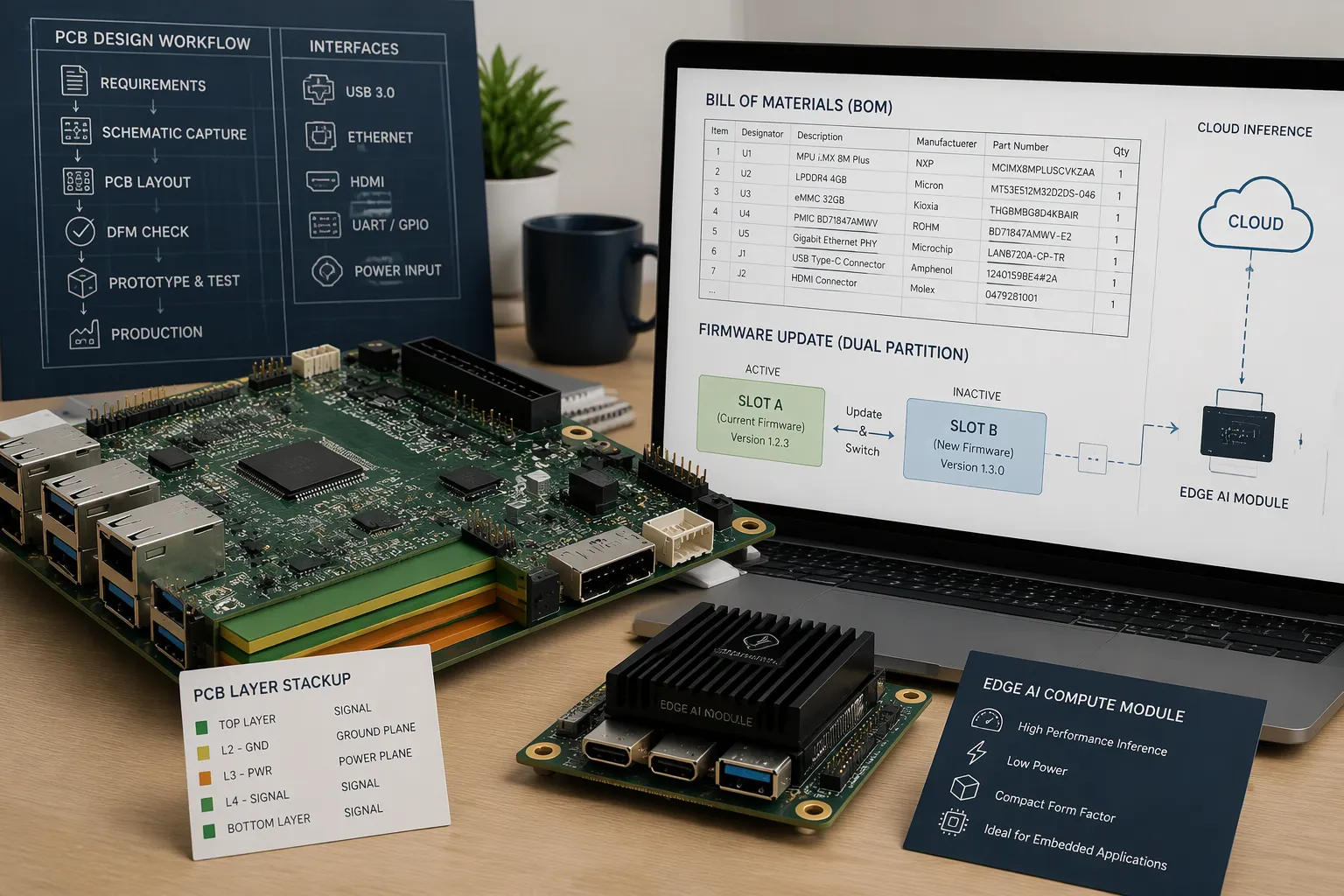
Perbandingan Struktur Biaya
Cost lands in different places depending on where inference runs. Edge AI hardware shifts spending upfront into the device BOM and ongoing fleet maintenance. You pay for the processor, memory, and thermal hardware on every unit you ship. You also fund field service, replacement, and firmware support across the product life. Those recurring bandwidth and cloud usage fees shrink, though, because data stays local.
Cloud AI reverses the pattern. You minimize upfront edge hardware cost and keep the endpoint simple. Recurring compute, storage, and data-transfer expenses then accumulate month after month. Model the total cost of ownership across your expected fleet size and service life. A small fleet with heavy analytics often favors the cloud. A large fleet with steady local workloads often favors the edge.
Scalability and OTA Updates
Cloud computing scales virtual compute elastically. You add capacity in software, and model updates push centrally to every endpoint at once. Edge scaling works differently. Growth requires physical hardware deployment, and every update becomes a firmware or OTA rollout across devices you may not control directly. Plan your update path before you commit to an edge computing device.
OTA capability depends on memory headroom and bootloader design. Reserve flash for two firmware images, so a failed update can roll back. Size your flash budget with that reserve in mind. Building edge computing devices with modular design tools eases this burden, because you can swap compute modules without a full board respin. Treat update infrastructure as a hardware requirement, not a software detail.
Early Decisions That Cascade
Several choices lock in your later options, and you make them before layout freeze. The layer stackup sets your routing capacity and impedance control. The connector strategy fixes your board-to-board and board-to-cable interfaces. Design-for-test planning determines your probe access and test coverage. Change any of these late, and you trigger a respin.
Make the processing-location decision first. That single call drives your chip, thermal and power decisions, and it ripples into stackup, BOM, and layout. Weigh these engineering trade-offs against your latency target, power source, and cost ceiling. Document the reasoning, so your team can revisit it when requirements shift. Sound pcb design starts with this decision, and disciplined pcb design keeps every downstream trade-off visible. The right ai model placement protects your schedule, and it keeps your ai hardware choices coherent. Every ai workload deserves that early clarity, and your ai roadmap will thank you.
Practical Steps for PCB Designers
Daftar Periksa Pra-Desain
You make the processing-location call before any layout work begins. Answer five questions first, and write the answers down. Where does inference run? What is your worst-case latency target, such as sub-50 ms control versus batch analytics? What power source feeds the board? What unit cost and memory ceiling apply? Do you need offline operation or strict data privacy? Each answer narrows your chip selection, thermal design and power budgeting envelope.
Inference location: on-device, cloud, or hybrid split
Latency target: real-time control versus asynchronous analytics
Power source: battery, harvested source, or fixed rail
Unit cost and memory limits: RAM and flash ceilings
Offline and privacy needs: local-only data versus network transport
Treat the memory figure as a hard requirement. A quantized model may need roughly 256 KB to 2 MB of RAM and 100 KB to 1 MB of flash. That number sets your package, your fanout, and your layer count. Resolve the chip-versus-thermal-versus-power trade-off on paper now, because layout cannot fix a wrong architecture.
Simulasi dan Validasi
Run thermal and PDN simulation before layout freeze. Check junction temperatures against your chosen thermal envelope, and confirm the rail holds under worst-case inference bursts. Validate sleep-mode leakage on an edge computing device, and verify phase balance on a cloud board. Simulation costs hours; a respin costs weeks.
Compare results against the envelope you defined in the checklist. A thermal margin that looks thin in simulation will look worse in a sealed enclosure. Fix the power tree or the copper strategy while changes remain cheap.
Revisiting the Architecture Decision
Three triggers should reopen the edge-versus-cloud question. Model growth is the first: a model that outgrows your flash budget forces a hardware change. Shifting latency needs are the second: a task that once tolerated seconds may now demand milliseconds. Cost targets are the third: fleet size and service life can flip the total-cost math.
When a trigger fires, evaluate a hybrid edge-cloud split before you redesign the board. Keep time-sensitive inference local and send aggregated data to the cloud. Teams building edge computing devices with modular design tools can swap compute modules and preserve the rest of the pcb. Document each decision, so your team can trace why the ai workload sits where it does. Sound pcb design keeps that reasoning visible, and it protects your schedule when requirements move.
Edge AI pushes you toward integration, low power, and passive thermal strategies. Cloud AI pushes you toward high-speed routing, robust power delivery, and aggressive cooling. Neither path wins everywhere. Your latency, bandwidth, power, privacy, and cost requirements decide the fit, and a hybrid split often serves best. Remember that the processing-location call cascades into stackup, BOM, and layout choices, so make it before layout freeze. Share your application, latency target, power source, and memory limits with us. We will recommend the right ai hardware class or a hybrid edge-cloud split for your pcb design.
FAQ (Pertanyaan Umum)
How do I know whether my application needs edge or cloud inference?
Start with your worst-case latency target. A control loop that must respond in milliseconds belongs on-device, because a network round trip adds delay you cannot remove. Batch analytics and overnight reporting tolerate seconds or minutes, so the cloud fits well. Write the number down before you choose a processor.
What memory should I budget for a TinyML model?
Plan for roughly 256 KB to 2 MB of RAM and 100 KB to 1 MB of flash after quantization. Treat that figure as a hardware requirement. It sets your package choice, your fanout density, and your layer count. Quantize the model early, because a late change forces a respin.
Why does quantization matter for my board, not just my software?
Converting weights to INT8 shrinks the model and speeds execution. A smaller model needs less flash, which allows a smaller package and simpler routing. Fewer memory accesses also cut energy per inference. That saving matters when your power budget is measured in milliwatts.
Can I run ai workloads on a standard CPU or GPU instead of an NPU?
Yes. CPUs and GPUs remain acceptable edge choices for many workloads, and they often shorten your software path. A dedicated NPU or accelerator boosts throughput per watt when your model outgrows a general core. Match the part to the model, not the marketing label.
How do I keep an edge device cool without a fan?
Spread heat from the die to the enclosure with a thermal pad or spreader plate. Pour copper under hot components and add thermal vias close to the heat source. Space temperature-sensitive parts away from regulators. Design for the worst-case ambient, not the lab bench.
When should I reconsider a hybrid edge-cloud split?
Reopen the question when your model outgrows its flash budget, when a task that once tolerated seconds now needs milliseconds, or when fleet size flips the total-cost math. Keep time-sensitive inference local and send aggregated data to the cloud. Document the reasoning so your team can trace it.
What should I simulate before I freeze the pcb design?
Run thermal and PDN simulation first. Check junction temperatures against your chosen thermal envelope, and confirm each rail holds under worst-case inference bursts. Verify sleep-mode leakage on battery-powered boards. Simulation costs hours; a respin costs weeks. Fix the power tree while changes remain cheap.
Does keeping data on-device really reduce my security burden?
It reduces exposure during transit, because sensitive readings never cross a network. Offline operation also keeps the device working when connectivity fails. You still need protection at rest and a disciplined update path. Weigh both options against your privacy needs and site conditions.